SmartSDR v4.1.5 | SmartSDR v4.1.5 Release Notes
SmartSDR v3.10.15 | SmartSDR v3.10.15 Release Notes
The latest 4O3A Genius Product Software:
The latest 4O3A Genius Product Software and Firmware
If you are needing assistance with FlexRadio products, please refer to the product documentation or check the Help Center for known solutions. Need technical support from FlexRadio? It's as simple as creating a HelpDesk ticket.
SDC Skimmer for Flex Radios
Comments
-
Hi Rich
1 The TUNE failure is a much reported bug that Flex have not in many months fixed for RTTY ops. It occurs when using SDC but is not a fault within SDC so I have been informed. Someone, I forget who, just a few days ago posted that they were intending to raise the issue again with Flex.
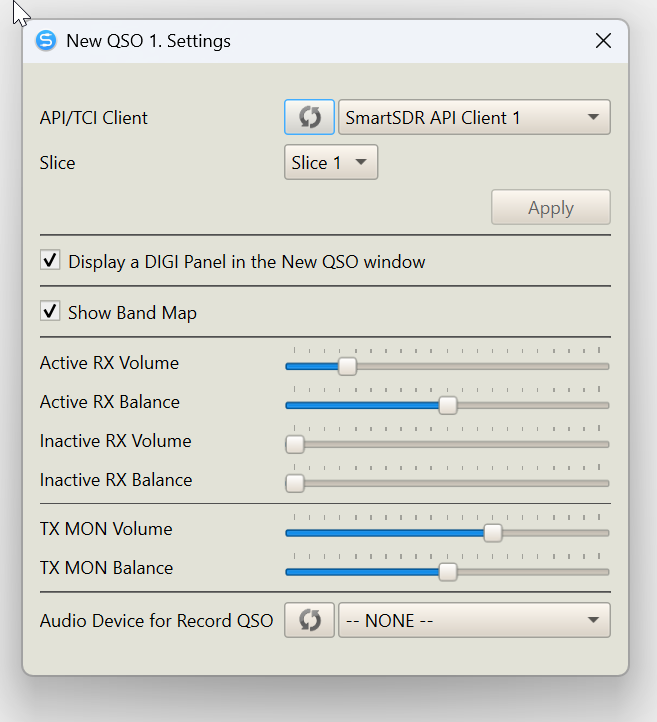
2 Audio levels are set with SDC. Open the New QSO settings (cog icon top right of window)
 0
0 -
Hi Rich,
ALT+T hotkey in contest mode opens the terminal where you can either send interactively or from pre-defined macros. For interactive sending, just start typing and SDC will start transmitting (provided you have the "terminal" option ticked just above where you enter the text), it will go back to receive when all has been sent.
The "no tune in RTTY mode" is an annoying bug that still needs to be fixed on the Flex side. The radio doesn't send a tune signal whilst SDC has an IQ connection open. The only workarounds I have found is either to change mode (if the contest rules allow, otherwise you have to stop SDC Contest first), or stop SDC then you should get the tune carrier back again.
73,
Jonathan G4IVV0 -
Thank you gentlemen,
The learning curve continues.
Rich - N5ZC
0 -
Yes thank you Jonathon. I did not know about ALT-T.
Regarding workarounds for no Tune whilst using SDC, the one I use is to disconnect the SmartSDR Client, activate Tune, then (re)Connect it. DIGI restarts and this I find is a bit quicker than stopping SDC. Changing modes though, I can see, is better still.
0 -
Rich, regarding your issue with 'TUNE' not working in SmartSDR has nothing to do with SDC. What version of SmartSDR and which Flex radio are you using? There is a bug in some of the 3.9.x and 3.10.x versions of SmartSDR that caused no carrier to be generated when pressing 'TUNE' in RTTY mode or when hitting TUNE on the Tuner Genius. It works fine in all other modes. This was corrected in v4.0.1. See the release notes.
However, v4.1.3 and v4.1.5 may have re-introduced the issue when SDC is running and connected to the radio. Disconnect SDC and TUNE works as expected. At least that's the case with my 8600. A few others have reported seeing this problem. Others have reported not seeing the problem. I filed a trouble ticket with Flex on Friday when I discovered it preparing for RTTY RU.
Eric - NR4O0 -
Eric,
I'm running 4.1.5 and your 2nd paragraph describes my behavior.
When SDC is not running, I have no issues with TUNE.
Rich - N5ZC
0 -
I am trying SDC and having one issue with the spots. They don't seem to stay on the waterfall for more than a few seconds then disapear. The "Decoded callsign" box shows plenty, How do I increase the display time of the spots?
0 -
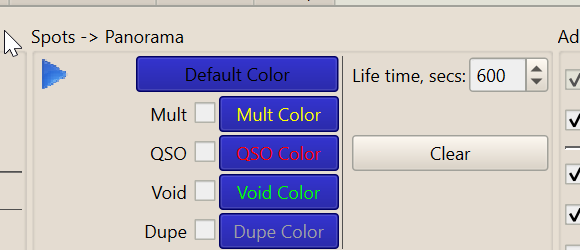
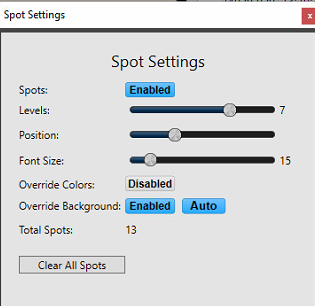
This should set the lifetime though I have to say, quickly disappearing Spots are not normal and not the default. There may be something else at play. I presume Spots are enabled in SSDR. Please check and advise. Meanwhile someone else might know more so look out for further replies.
1 -
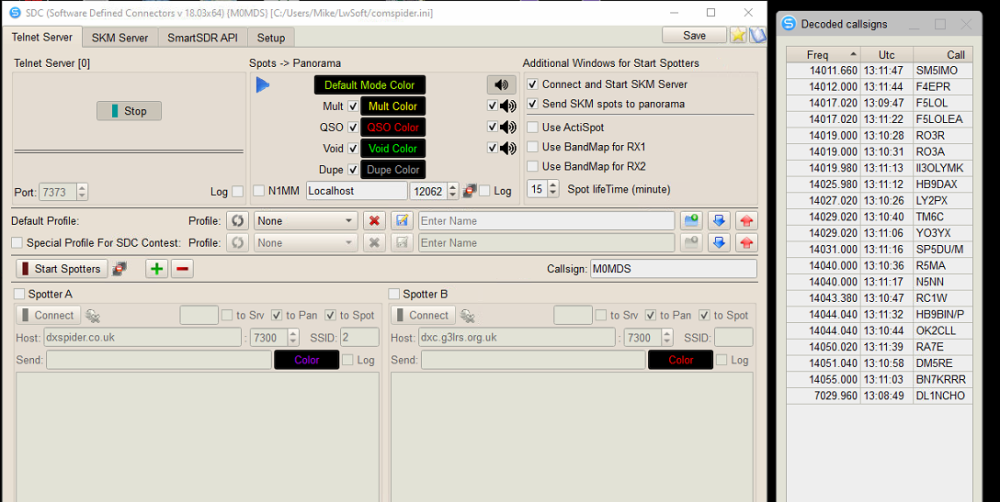
Hi, this is how mine is dislayed.
0 -
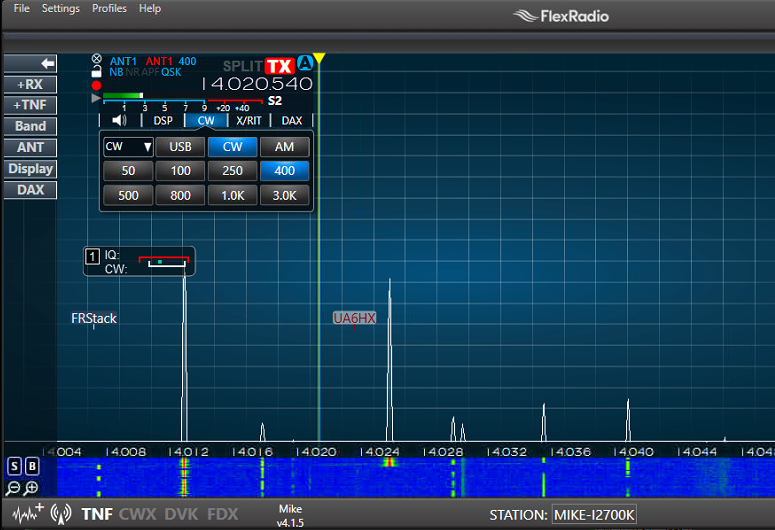 0
0 -
Ok, you are on an old version and I cannot remember why, when you have lifetime at 15 minutes, that you should have this issue. Someone else may chime in here. Or else, post your question to
Yuri UT4LW will probably answer you directly.
1 -
Thankyou. will post also on the other site.
Mike M0MDS
0 -
One thing …. I just tried your old version. It seems incompatible now. I would install the latest version if I were you, 19.0508 on the SDC website.
1 -
Thankyou all, especially Yuri, installed newer version and all working perfectly.
Thankyou for the fast response, much appreciated.
0



Leave a Comment
Categories
- All Categories
- 390 Community Topics
- 2.2K New Ideas
- 662 The Flea Market
- 8.4K Software
- 157 SmartSDR+
- 6.5K SmartSDR for Windows
- 186 SmartSDR for Maestro and M models
- 440 SmartSDR for Mac
- 275 SmartSDR for iOS
- 265 SmartSDR CAT
- 204 DAX
- 386 SmartSDR API
- 9.4K Radios and Accessories
- 55 Aurora
- 297 FLEX-8000 Signature Series
- 7.2K FLEX-6000 Signature Series
- 971 Maestro
- 58 FlexControl
- 867 FLEX Series (Legacy) Radios
- 945 Genius Products
- 472 Power Genius XL Amplifier
- 347 Tuner Genius XL
- 126 Antenna Genius
- 308 Shack Infrastructure
- 216 Networking
- 468 Remote Operation (SmartLink)
- 142 Contesting
- 814 Peripherals & Station Integration
- 144 Amateur Radio Interests
- 1.1K Third-Party Software