SmartSDR v4.2.20 | SmartSDR v4.2.20 Release Notes
SmartSDR v3.10.15 | SmartSDR v3.10.15 Release Notes
The latest 4O3A Genius Product Software:
The latest 4O3A Genius Product Software and Firmware
If you are needing assistance with FlexRadio products, please refer to the product documentation or check the Help Center for known solutions. Need technical support from FlexRadio? It's as simple as creating a HelpDesk ticket.
No upgrade, no downgrade

Hi all
Using Flex 6500 , and Win10.
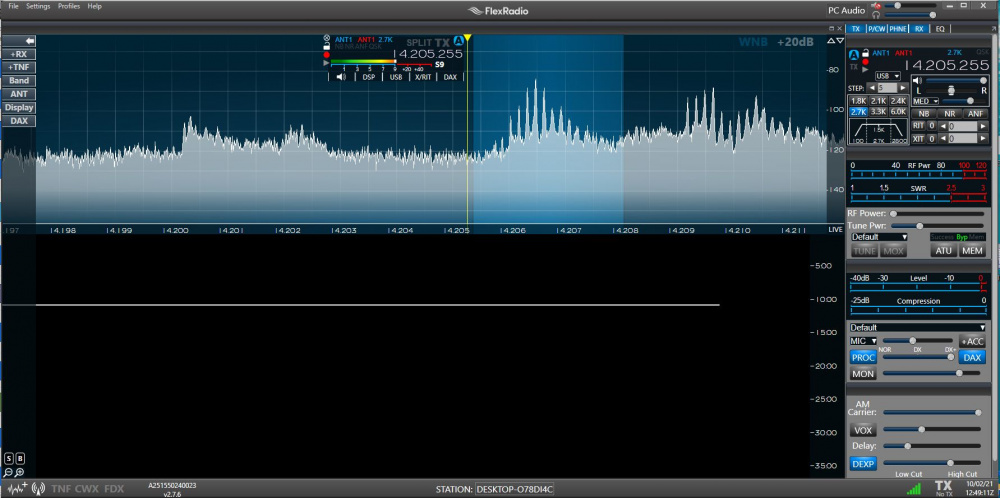
I was using v2.6.something and wanted tio upgrade to V 2.7.6. It did not work, in the sense that the waterfall shows nothing. I tried to downgrade, and this did not work either.
as a test, I wwas monitoring FT8 : the decode works, abut again, no waterfall at all.
Where should I look ?
Tnaks + 73
Paul F6EXV
Comments
-
Trying to be smart, I uninstalled SmartSDR, made sure the .net was up-to-date, reinstalled SmartSDR (version 2.7.6, manually uninstalled and reinstalled SmartSDR CAT, reboot the computer, crossed my fingers... and... and... and... still no waterfall !
I am desperate.
Can someone help ??
0 -
 0
0 -
Hi Paul, have you tried a factory reset? If not, export your profiles, reset, then re-import.
0 -
I read I should file a help ticket before doing the factory reset.
I still van use the radio while waiting for the answer.
Thanks + 73
Paul
0 -
Hi Paul
A lot of times no waterfall is caused by a Network issue
Did you do a HARD reset of the radio?
If you export your profiles DO NOT export the "Preferences" because a lot of problems that flair up resides in the "Preferences" part of the Export/Import.
if all else fails then YES do a help desk ticket.
0 -
Hi Paul!
I hope you are well. I think you have paused the waterfall, try clicking on top of "LIVE" just on the right upper part of the waterfall.
73! Jon EA2W
0 -
Your description of No Waterfall is not very specific, the following thread discusses the solution for a Windows bug that causes this problem, but it is not related to the version of SSDR it is a Windows GPU driver issue.
Ted, WR4T
0 -
 Mike-VA3MW Administrator, FlexRadio Employee, Community Manager, Super Elmer, Moderator adminOptions
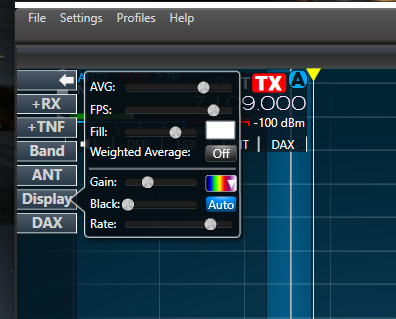
I think you have a waterfall, but your display settings may be wrong.
Under Black - make sure Auto is selected.
73
 0
0 -
Problem solved, it was a disoplay settings issue.
Thanks to the Help desk for prompt and efficient reply.
73
Paul F6EXV
0




Leave a Comment
Categories
- All Categories
- 401 Community Topics
- 2.2K New Ideas
- 689 The Flea Market
- 8.6K Software
- 197 SmartSDR+
- 6.6K SmartSDR for Windows
- 200 SmartSDR for Maestro and M models
- 460 SmartSDR for Mac
- 279 SmartSDR for iOS
- 268 SmartSDR CAT
- 220 DAX
- 395 SmartSDR API
- 9.6K Radios and Accessories
- 111 Aurora
- 348 FLEX-8000 Signature Series
- 7.2K FLEX-6000 Signature Series
- 999 Maestro
- 58 FlexControl
- 872 FLEX Series (Legacy) Radios
- 975 Genius Products
- 482 Power Genius XL Amplifier
- 358 Tuner Genius XL
- 135 Antenna Genius
- 322 Shack Infrastructure
- 227 Networking
- 483 Remote Operation (SmartLink)
- 146 Contesting
- 847 Peripherals & Station Integration
- 147 Amateur Radio Interests
- 1.1K Third-Party Software