SmartSDR v4.1.5 | SmartSDR v4.1.5 Release Notes
SmartSDR v3.10.15 | SmartSDR v3.10.15 Release Notes
The latest 4O3A Genius Product Software:
The latest 4O3A Genius Product Software and Firmware
If you are needing assistance with FlexRadio products, please refer to the product documentation or check the Help Center for known solutions. Need technical support from FlexRadio? It's as simple as creating a HelpDesk ticket.
frTune-28 - Icom RC-28 Controller with SSDR for Windows

If you have an Icom RC-28 controller and would like to use it to control tuning in SmartSDR for Windows, you can now do so with frTune-28.


Comments
-
Thanks, I Just tried this out on Windows 11 and it works well.
73
G6UJB
2 -
The RC-28 is almost twice the price of the FlexControl. Does it provide any more features than the FlexControl?
0 -
@Mike-VA3MW No, frTune-28 does not provide more functionality for the RC-28 than the native Flex Control does. For frTune-28, my focus was to provide tuning control, not a multi-function controller knob, so I did not make the F1/F2 buttons assignable. F1 changes the tuning step and F2 switches between normal tuning and RIT. Transmit of course transmits. I particularly love the snap-tune feature that I added to the software. It makes a click with the mouse in the panadapter always tune to the nearest 1KHz regardless of what the tuning step is set to.
It seems like some users already have an RC-28 sitting around that they want to use. Otheres have mentioned that they feel that the quality of the RC-28 is better. I’ve been able to purchase a couple of brand new RC-28’s off of eBay from Japanese sellers for under $200.
The other thing is that it is very easy to add an RCA jack to the back side of the RC-28 and solder in 2 wires and you suddenly have a port for a foot switch without the need for an additional dongle.2 -
If you just want a smooth tuning knob with a foot switch input, take a look at the TeensyMaestro. Fully built out it has a pair of tuning knobs, 9 other knobs, a bunch of buttons and a color touch screen. It connects via an Ethernet cable to the same local network as the radio. SoftEther VPN can be used if you want to use it remotely.
It is designed so that you can build as much or as little as you like. If you only want the tuning knob and PTT input, you could probably do it for under $60. This arrangement would fit in a very small box.
There is a complete user manual and builder's guide as well as the firmware on my GitHub site:
This version is point-to point wired. There is a link to Simon, NV0E's GitHub site if you want to build hardware version 2 (with or without his PC board set).
Here is a link to the fairly lengthy topic on the Flex Community:
2 -
Nice, another well meaning post stolen. Thanks K9YK for sharing your work. much appreciated.
73 K1UO
3 -
@K1UO Larry Thanks Larry! Yes, I felt a little the same way.
1 -
@K1UO Larry Len is a huge Elmer and contributor to the community. Mentioning his project fits the discussion. If you don't like it, you can mute the discussion.
@K9YK do you have more instructions on the PTT modification?
0 -
@Mike-VA3MW It's very simple, we are just putting the footswitch in parallel with the transmit button on the RC-28.
1. Remove the 4 screws that hold the back on the RC-28
2. Drill a hole in the back of the RC-28 and mount an RCA connector. Be very careful not to hit the PCB board inside the RC-28, and then **** out any little metal shavings that may have ended up inside. You may also want to put a piece of tape over the back side of the encoder (it has an opening) to prevent any metal shavings from getting inside. You can even unplug the encoder and remove the internal PCB if you want.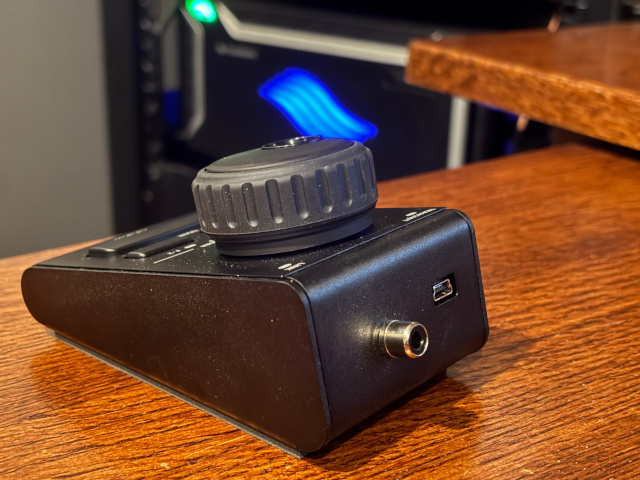
3. Now you need to add two wires. The green wire is going to ground (one of the solder pads near the PCB mounting **** works just fine). The blue wire connects to the transmit button contact. You'll want to use a fine tip soldering iron and some very small gauge wire.
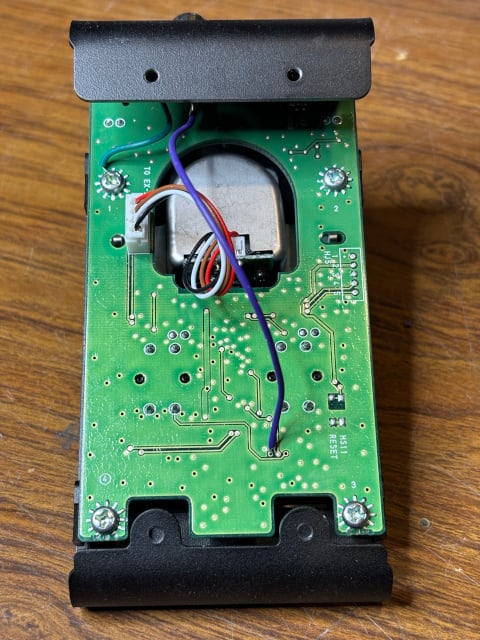
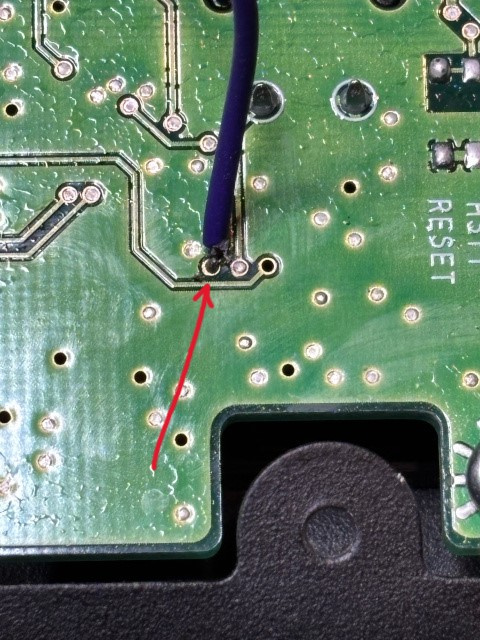
4. Connect the green wire to the shield of the RCA connector and the blue wire to the center pin.
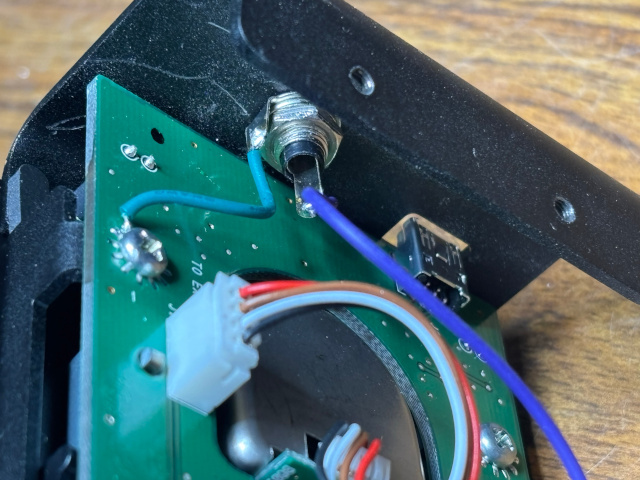
5. Put the back cover back on and you are good to go.
2 -
Hello everyone,
Thanks for the great frTune-28 solution.
I just can't get this thing to work: “Encoder connected,” “Radio Status Connected,” but Station Status “Not Connected.” What am I doing wrong? Thanks for any tips.
Best 73 de HB9EHO Matthias0 -
Matthias. please open SmaettSDR and send me a screenshot of the SmartSDR window. Also, please send a screenshot of the frTune-28 window. You can send these to me in an email if you want.
1 -
@Disu I haven't received any screen shots from you yet, but I had a good guess as to the issue. I discovered that stations that had a space character in the name did not work properly. I just released a new version of frTune (v2.2.2). Please download this latest version and let me know if it fixes your issue.
1 -
@K9YK Hi Mark, thanks again for your help. The program is now running smoothly, which is great! 73 de HB9EHO / Matthias0
-
I am using it with SmartLink.
Indicating the remote IP and opening the 4992, does the trick.
You need to specify teh local STATION NAME (what you see in SmartlInk-SamrtSDR)
Thank you so much!0 -
@ea3in I'm not sure I'm following what you are saying here, but if you are opening port 4992 from the internet to your radio, you should not do that. That would be very insecure. Instead, you should create a VPN connection from your operating location to your radio location and connect frTune-28 over that. You can still use SmartLink for the radio connection.
0 -
Thank you so much for writing this utility! As much as I hated to plunk down $300+ for the RC28, it has been a welcome upgrade from the $200 wasted on the FlexControl whose use has been nothing short of an ongoing exercise in futility and frustration [COM port conflicts, intermittent tuning and loss of control (SmartSDR no longer detects), ongoing removal and reinstall of the driver software, and the lack of any sort of tuning knob “feel”].
My only request at this point would be some added options for the F2 button (e.g., control speaker / headphone volume)
Keep up the good work !
Thanks again !
0 -
@K9YK George,
Thanks for your utility! Does your implentation accelerate the tuning steps = if knob is
turned faster, each step is incremented, depending on the timing ?
Remark: I have implemnted that mentioned behavior via AutoHotkey + Creative MX Dialpad
sending mouse wheel to SmartSDR. Tested with SmartSDR driven by Protoflex.
I am still waiting for my Aurora (pre) ordered 7 month ago ;-)73's de OE1MWW
Wolfgang
0 -
@OE1MWW Woflgang, no I don't have accelerated tuning as part of the app at this time. Tuning speed seems just fine at 100hz steps to get across any of the HF bands pretty quickly. One feature that. I haven't mentioned is that you can change the tuning rates selected by the F1 key. For example, by default when F1 is off, the tuning rate is in 100Hz steps and when F1 is on, the tuning rate is 10Hz steps. These can be changed, for example, if you turn F1 on, you can select any tuning rate from 1Hz-50Hz in SDR, and the app will use that rate any time you turn F2 on. Same works when F2 is off, you could select a faster rate in SSDR (such oas 500Hz steps) and the app will use that rate any time F2 is turned off.
1






Leave a Comment
Categories
- All Categories
- 388 Community Topics
- 2.2K New Ideas
- 658 The Flea Market
- 8.4K Software
- 156 SmartSDR+
- 6.5K SmartSDR for Windows
- 186 SmartSDR for Maestro and M models
- 439 SmartSDR for Mac
- 275 SmartSDR for iOS
- 265 SmartSDR CAT
- 204 DAX
- 386 SmartSDR API
- 9.4K Radios and Accessories
- 52 Aurora
- 297 FLEX-8000 Signature Series
- 7.2K FLEX-6000 Signature Series
- 970 Maestro
- 58 FlexControl
- 866 FLEX Series (Legacy) Radios
- 944 Genius Products
- 471 Power Genius XL Amplifier
- 347 Tuner Genius XL
- 126 Antenna Genius
- 306 Shack Infrastructure
- 215 Networking
- 468 Remote Operation (SmartLink)
- 142 Contesting
- 811 Peripherals & Station Integration
- 144 Amateur Radio Interests
- 1.1K Third-Party Software