SmartSDR v4.2.20 | SmartSDR v4.2.20 Release Notes
SmartSDR v3.10.15 | SmartSDR v3.10.15 Release Notes
The latest 4O3A Genius Product Software:
The latest 4O3A Genius Product Software and Firmware
If you are needing assistance with FlexRadio products, please refer to the product documentation or check the Help Center for known solutions. Need technical support from FlexRadio? It's as simple as creating a HelpDesk ticket.
Remote Latency problems

Im on a cruise ship now trying to succeed with Smartlink. Like on another post, the warerfall freezes on and off quickly and sometimes stops for a few seconds.
I brought with me an iPad and an iPhone and a Windows 11 PC for this trip.
All of them have the same problem. The internet speed here is good, such as 50MB down and 25MB up, it is on the ship WiFi using Starlink sats.
However I found the ping very high at 57 to 200ms using the Ookla Speedtest on all devices.
That said, I can RemotePC log into my home PC to get the video and control of the home PC on the Flex 6600 LAN and its good but no sound. I can also log into my work office PC 5 miles from the home LAN and it is also GOOD.
Also, the video streams like Youtube all are fine on the ship WiFi as well.
So it seems that Smartlink may need whatever buffer system, latency allowance incorporated into all the video stream services as a great improvement.
I did check on the Smartlink network setup and it does say POOR NETWORK. But again, the speeds are good its just a major latency issue. Is this a possible future improvement for SL?
Is there any settings to change right now or we wait for SL updates?
Comments
-
update. SpeedTest again shows just 28ms ping. Still unworkable SL on all devices.
0 -
 Mike-VA3MW Administrator, FlexRadio Employee, Community Manager, Super Elmer, Moderator adminOptions
Im on a cruise ship now trying to succeed with Smartlink. Like on another post, the warerfall freezes on and off quickly and sometimes stops for a few seconds.
Video works, because it is buffered and you don't care if it is 30 seconds late our you loose 20% of the video frames because the eye/brain fills that in. SSB data can't be buffered because it is time sensitive. Imagine if you were up to 30 seconds behind. It all looks good to you, but not usable. Even some remote SDR Receivers run pretty buffered if their upload is questionable.
The same is true on your remote desktop. You are only sending the changes in the BIT map on your desktop, not the entire Desktop Frame.
Jitter deserves a closer look since it's really the core issue for FlexRadio's SmartLink audio in questionable ISP situations.
Jitter is the variation in packet arrival time, not the delay itself. A steady 300ms of latency is imperceptible to a real time audio stream because everything shows up at a predictable interval and the jitter buffer smooths it out. But audio needs a continuous, evenly spaced stream of packets to feed the decoder. When arrival times swing around, whatever buffer is smoothing that stream either runs dry (causing a dropout or freeze) or overflows (forcing discarded packets).
That is precisely why a satellite link like Starlink is a rough environment for it. Starlink doesn't behave like a stable pipe. It hands off between satellites every few minutes, contends for bandwidth with every other user in the cell, and the routing path through the ground station can shift. Each of those introduces small, irregular timing hiccups. None of them show up as high latency in a ping test, since average round trip time can look fine, but they show up as variance between individual packets, which is exactly what jitter measures and what a speed test doesn't.
Add Deep Packet Inspection (done in all public ISP to prevent huge streaming) driven traffic shaping on top of that and the effect compounds. If the ISP is deprioritizing or throttling what it detects as streaming traffic, it likely is not doing so smoothly. It is probably applying shaping in bursts, which introduces exactly the kind of irregular delay pattern that produces jitter.
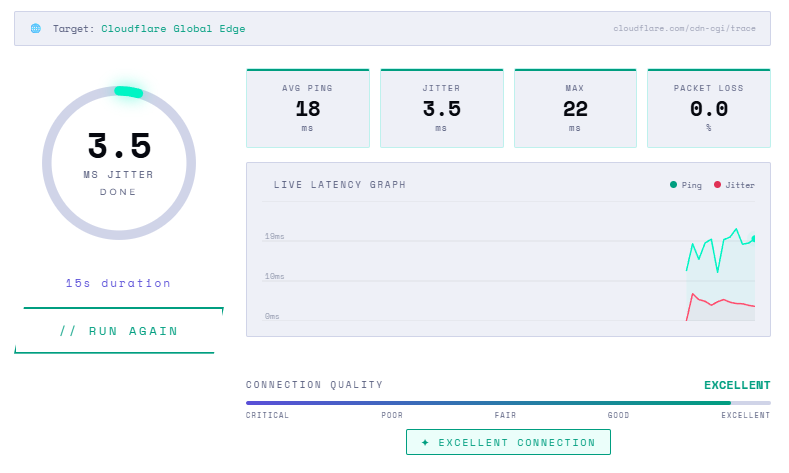
You can test your Jitter and see what it looks like: https://jitter.is/
This is what a stable terrestrial connection looks like. It will be interesting to see what you are seeing.
 0
0 -
Per Mike, getting a network to work is pretty easy, getting it to work well can be challenging.
1 -
Mike,
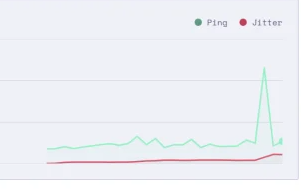
super good to get your message. Ive tried so many things and finally your message says what is happening. I had no idea so now I know. Ive read about other hams doing well on Starlink so I thought I was good to go. So, some areas work and some dont? Or is it the long route from the Starlink to my WiFi that is making it worse? Here is an image of my jitter test now. Heading N at 20 knots to the Bahamas. (from USVI area)
0 -
Mike-VA3MW Administrator, FlexRadio Employee, Community Manager, Super Elmer, Moderator adminOptions
I suspect it is the DPI that is killing you and this is to be expected in something like a cruise ship or even a hotel. It is something controlled by the Shipline (or Hotel) as example.
This 250ms delay is likely contributing and that happens that you got slowed down because bandwidth was allocated to another user or it was Starlink switching birds. Sadly, I am only guess and there really is no way to know.
But, also make sure it isn't on the radio end. Dial down your FPS and RATE on your client to reduce the waterfall data and the panadapter data amount. Make it the minimum and you can do it on both iOS and Windows. This knocks down the upstream data from the radio just in case your router at the radio or your ISP is limiting you.
 0
0 -
I am sorry you're frustrated in using remote operation … sure, Starlink seems to have a reputation for working, and I would be like you - expecting something sorta working.
Aside: I am surprised and curious about your Cruise - is it one of the "big name" cruise-lines, or a charter you did on your own, etc?
I ask because last summer we cruised to Alaska on Celebrity, and their policies (backed by forums) were clear: No Starlink, no Ham radio (in any of it's many forms, these days).
0


Leave a Comment
Categories
- All Categories
- 401 Community Topics
- 2.2K New Ideas
- 691 The Flea Market
- 8.6K Software
- 197 SmartSDR+
- 6.6K SmartSDR for Windows
- 200 SmartSDR for Maestro and M models
- 462 SmartSDR for Mac
- 280 SmartSDR for iOS
- 268 SmartSDR CAT
- 220 DAX
- 395 SmartSDR API
- 9.6K Radios and Accessories
- 113 Aurora
- 352 FLEX-8000 Signature Series
- 7.2K FLEX-6000 Signature Series
- 999 Maestro
- 58 FlexControl
- 872 FLEX Series (Legacy) Radios
- 978 Genius Products
- 484 Power Genius XL Amplifier
- 358 Tuner Genius XL
- 136 Antenna Genius
- 323 Shack Infrastructure
- 228 Networking
- 485 Remote Operation (SmartLink)
- 147 Contesting
- 847 Peripherals & Station Integration
- 148 Amateur Radio Interests
- 1.1K Third-Party Software