SmartSDR v4.2.20 | SmartSDR v4.2.20 Release Notes
SmartSDR v3.10.15 | SmartSDR v3.10.15 Release Notes
The latest 4O3A Genius Product Software:
The latest 4O3A Genius Product Software and Firmware
If you are needing assistance with FlexRadio products, please refer to the product documentation or check the Help Center for known solutions. Need technical support from FlexRadio? It's as simple as creating a HelpDesk ticket.
RF Gain Settings on Aurora 510

I am a new Flex user (received my Aurora earlier this year) and am now thoroughly confused about how to use RF Gain. In looking at other posts on this subject someone posted a tech article which explained that RF Gain is generally not needed on Flex radios. Some users mentioned they usually leave it a 0 or 8dB. My issue is I cannot hear any signals or see anything on the panadapter unless I move the gain to at least 16db and many times 32 is needed. I have run an A/B test by connecting two good antennas to the radio, one on ANT1 and one on ANT2 and both show the same behavior. Before I trouble the help desk on this, am I missing something?
Comments
-
There's actually two settings that effect signal strength ( besides band conditions and antenna) . The AGC-T slider on the right side of SmartSDR and the RF Gain slider in the Antenna menu on the left side of the screen. I have found in my case + 8dB on the Ant slider works well for 20 Meyers and my antenna. I adjust the AGC-T slider in the Filter box under the RX tab on the right side of the screen. I turn off any noise reduction and starting with the slider nearly all the way to the right, I reduce it till the background noise starts to drop off noticeably. Then, I use whatever noise reduction feature I want to try to eliminate the background noise.
It takes a bit of practice to get things right. Setting the Ant RF Gain too high can actually have a negative effect on reception.
James
WD5GWY
1 -
 Mike-VA3MW Administrator, FlexRadio Employee, Community Manager, Super Elmer, Moderator adminOptions
Roughly, the higher in frequency, you can dial in more RF-Gain. You should not need it on 160, 80 or 40M after sunset.
Add gain as you need to see the signals as James says.
It also depends a lot on your antenna system, meaning from the connector on the back of the radio to the actual antenna. What are you using for feedline, length, and antenna?
0 -
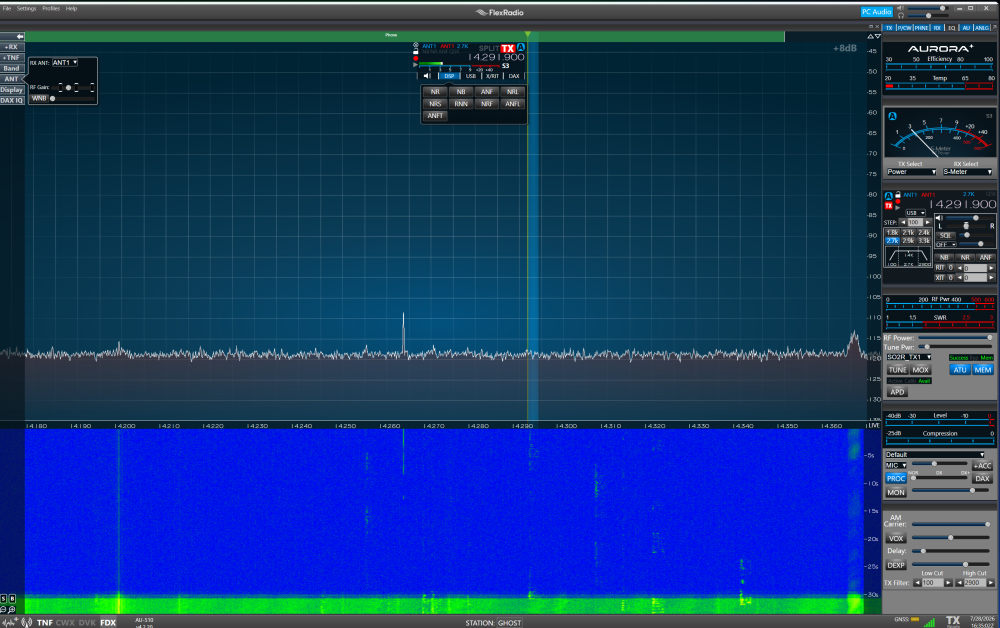
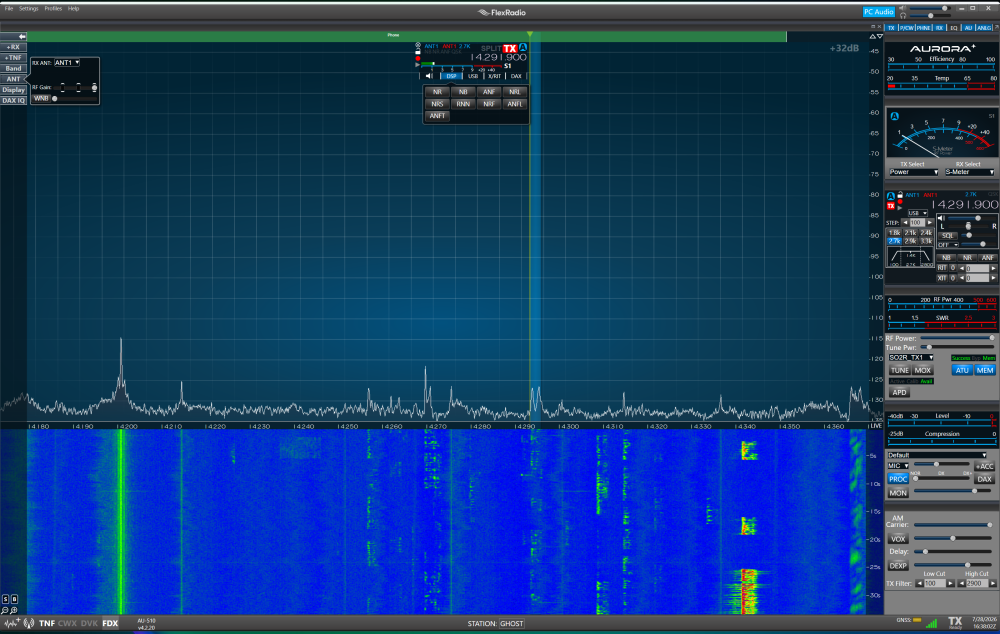
Here are two screenshots showing RF Gain set to 8dB and 32db. Adjusting the AGC-T slider does change the noise level but does nothing to improve audio signal. The antenna is a Chameleon Tactical Delta Loop connected with 100' LMR 400 directly to the radio. Not my normal antenna. Set it up as a test to compare to my usual antenna - a MyAntennas 66' EFHW. Normally this is connected through a wall mounted box with lightning arrestors. That arrangement behaves the same way — it requires full RF Gain on 20m to hear a good signal.
0 -
Mike-VA3MW Administrator, FlexRadio Employee, Community Manager, Super Elmer, Moderator adminOptions
thanks.. the picture really helps. What happens if you take the ATU and put it in bypass? I would also try ANT2. Even thought it is the same SCU, there might be a change.
If you have a different HF radio, what do you get when you do an A/B test between the 2 radios?
73
0 -
Plus , turn on AGC-T. I normally set it to Slow in the drop down section menu next to the slider. Also, what type of antenna are you using? Is it a multi-band antenna or are you having to use an external tuner for multi-band operation? Having to turn the gain up so high tells me that the antenna is not resonate for the band you are operating on. As Mike mentioned, put the ATU in the radio on bypass to see if the signal strength increases or decreases. A clear description of your antenna system ,outboard tuner if any, type of feed line and type of antenna ,would help in determining what the problem is and where to start looking for it. It's possible it's the radio. But, highly unlikely until you rule out your antenna system as a possible source of the problem. It could be something as simple as a bad coax connector or the coax itself. A lot of things can cause this problem.
James
WD5GWY
0 -
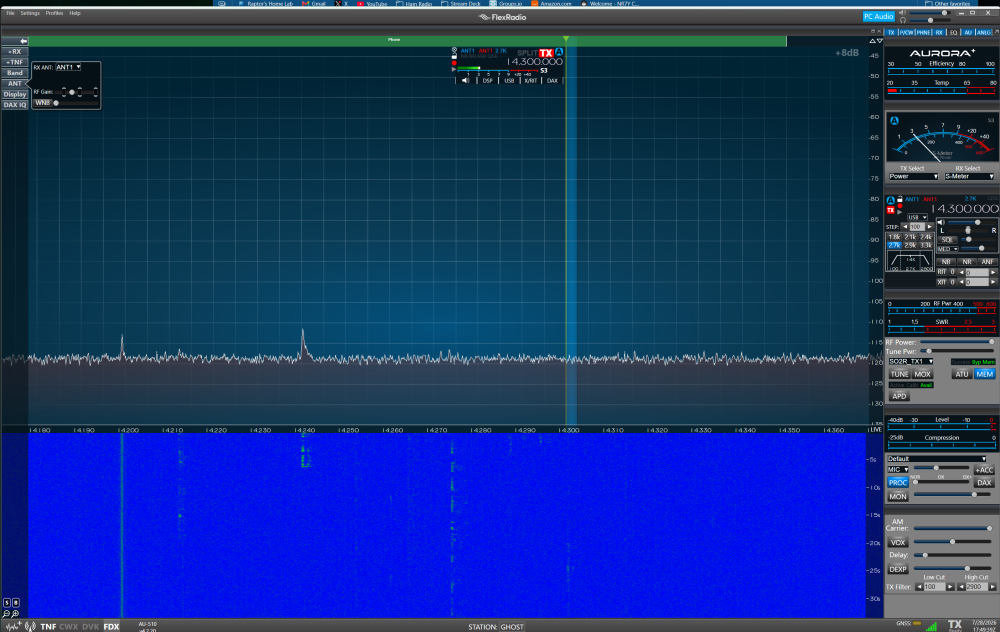
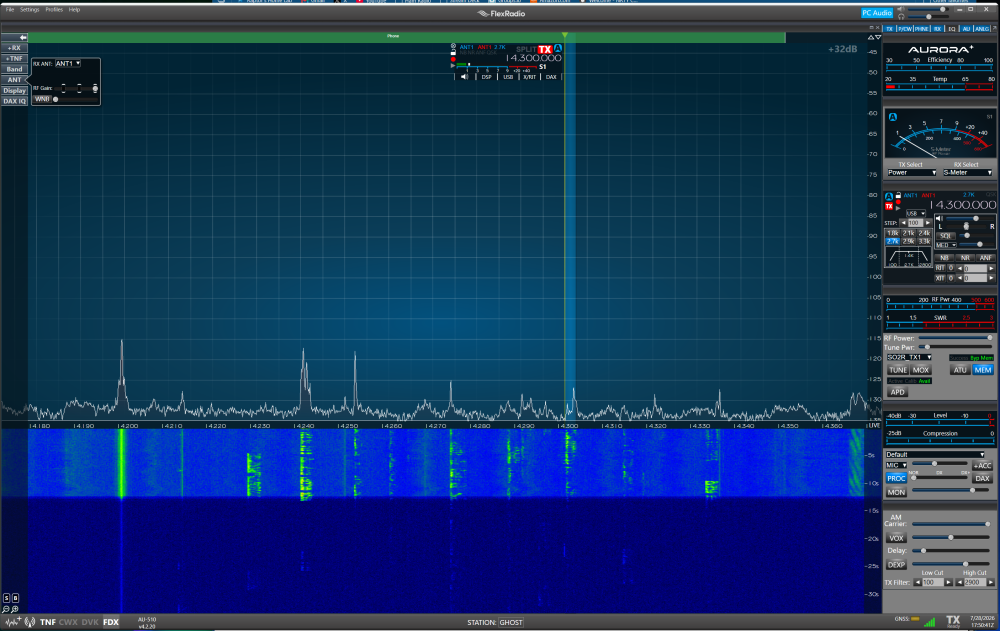
Hi Mike, thanks for the replies. Here are screenshots at 8dB and 32dB with ATU bypassed. Nothing changed. Also tried ANT2 and got the same results. I also see another comment has come in about setting AGC-T to Slow. Nothing I do with AGC-T changes anything other than adjusting noise. Bottom line is I have to run RF Gain at 32dB to see anything on the waterfall and to hear signals. When I drop it to 8, everything disappears on the waterfall and I cannot hear anyone.
0 -
I know the discussion is about gain, but I noticed in the screen above, the tune power looks greater than 2. I had interlock and many other problems when the adjustment for tuning was above three using my TGXL tuner.
Mike
0 -
Another test. Swapped out the coax with a 50' Messi and Paoloni POTA cable. No change. Anything less than 32dB is useless. As for Mike58's comment, I am using the internal tuner of the Aurora 510 and have not had any issues tuning with less than 10.
So in sum, I have tried three different coax cables, three different antennas and run all all of the combinations both through and bypassing my lightning arrestors next to the shack.
0 -
Time to open a Help Desk ticket to get this sorted.
James
WD5GWY
0 -
Mike-VA3MW Administrator, FlexRadio Employee, Community Manager, Super Elmer, Moderator adminOptions
Yes, open a ticket please. They are going to ask similar questions, so it would be good to share all we asked here.
And, I gather you don't have another HF radio to test with just to be 100% sure it isn't the antenna system?
0 -
I copied the settings in the photos you posted and couldn't get the same results as you show. I could still see signals on the spectrum and waterfall displays. My antenna is a 130' doublet fed with 600 ohm open wire feedline to a 1:1 balun and a short section of coax ( 1 1/2ft) to a TenTec 238b antenna tuner. I normally don't use the internal tuner of my AU-520M. But, I can get a good match on nearly all bands between 80 and 10 meters. Nothing I could do with my setup and using your settings could reproduce the problem you are having. My suggestion is you should open up a Help Desk ticket as it sounds like you have tried everything you can and that the problem is possibly with the radio and not your antenna system.
James
WD5GWY
0 -
Many thanks to all of you. I dropped the unit off this morning at my local UPS Store so it is on the way back for evaluation. Tim Ellison was very responsive. @Mike-VA3MW - I do have a backup radio (Yaesu FT-710) and have connected it to my main antenna in the usual way with no issues. Reception is excellent and it tuned up very easily. BTW, really appreciate the videos you have done. In fact it was the one you did about RF Gain/AGC-T that made me realize something was off with my radio. 73 de N6WAX
2


Leave a Comment
Categories
- All Categories
- 401 Community Topics
- 2.2K New Ideas
- 691 The Flea Market
- 8.6K Software
- 197 SmartSDR+
- 6.6K SmartSDR for Windows
- 200 SmartSDR for Maestro and M models
- 461 SmartSDR for Mac
- 280 SmartSDR for iOS
- 268 SmartSDR CAT
- 220 DAX
- 395 SmartSDR API
- 9.6K Radios and Accessories
- 113 Aurora
- 349 FLEX-8000 Signature Series
- 7.2K FLEX-6000 Signature Series
- 999 Maestro
- 58 FlexControl
- 872 FLEX Series (Legacy) Radios
- 976 Genius Products
- 483 Power Genius XL Amplifier
- 358 Tuner Genius XL
- 135 Antenna Genius
- 323 Shack Infrastructure
- 228 Networking
- 483 Remote Operation (SmartLink)
- 146 Contesting
- 847 Peripherals & Station Integration
- 147 Amateur Radio Interests
- 1.1K Third-Party Software