SmartSDR v4.2.20 | SmartSDR v4.2.20 Release Notes
SmartSDR v3.10.15 | SmartSDR v3.10.15 Release Notes
The latest 4O3A Genius Product Software:
The latest 4O3A Genius Product Software and Firmware
If you are needing assistance with FlexRadio products, please refer to the product documentation or check the Help Center for known solutions. Need technical support from FlexRadio? It's as simple as creating a HelpDesk ticket.
SSDR 4.2 and full-duplex satellite operation

Since installing SmartSDR 4.2.18 I find that, when operating on satellites in full-duplex with transverters, the waterfalls in both panadapters (VHF and UHF) completely freeze when MOX/PTT is engaged on either band. This makes it impossible to see the downlink on the panadapter and to make uplink corrections for Doppler shift. Is this issue unique to me, or have others experienced the same issue when using full duplex mode?
Comments
-
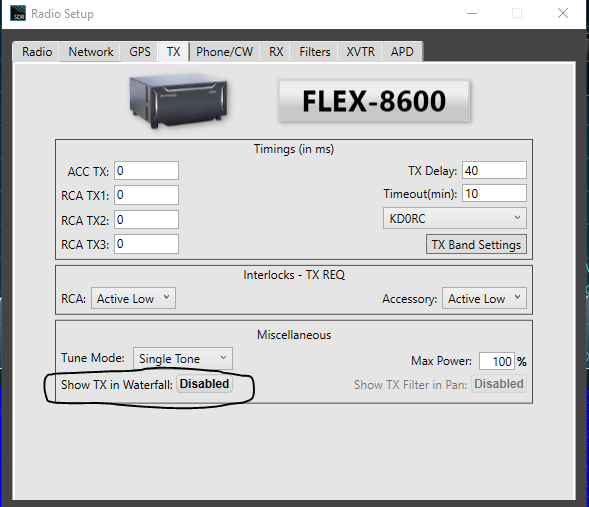
Hi Mark, do you have Show TX in Waterfall enabled?
 0
0 -
Thanks. That resolved the issue. Previous upgrades to SSDR have not changed that setting, but the installation of 4.2.18 apparently did.
0 -
OK, now another transverter issue — a little strange. When the TX is set to the transverter, the TUNE button in SSDR no longer functions. The transverter works, but I can't turn on a carrier in TUNE (used for frquency spotting on the satellite). I've checked the settings and can't see an issue. Any hints???
0 -
Hi Mark, I just checked it out on my transverter and Tune works fine in SSB, CW, FM and DIGU. Do you have Tune Pwr turned up? You might have to set it a bit higher than on HF bands.
0 -
 Mike-VA3MW Administrator, FlexRadio Employee, Community Manager, Super Elmer, Moderator adminOptions
I recreated this, exactly once. I was on 2M with no TUNE carrier. I changed bands on that slice to 80M and TUNE worked. I went back to 2M and TUNE worked.
0 -
I also have this issue with a slice set to use a transverter. The Tune button does not work. Tune works OK for any other normal band without a transverter. I tried Mike's solution of switching bands in the slice and back to the transverter but no dice. I had sent this to the helpdesk 2 days ago. Tim says he was going to forward it to "Sustaining Engineering group" and I have heard nothing from them.
0 -
Mike-VA3MW Administrator, FlexRadio Employee, Community Manager, Super Elmer, Moderator adminOptions
Are you band changing to your transverter band or recalling a saved profile?
0 -
Mike-VA3MW Administrator, FlexRadio Employee, Community Manager, Super Elmer, Moderator adminOptions
Can both of you open a support case regarding this pleases.
0 -
As posted, I already opened a helpdesk ticket. I have tried with a profile and also without after a factory reboot of my Flex 6500.
Jay KA9CFD
0 -
Mike, TUNE doesn't work on my transverter too. I tryed to go to 80m where TUNE is working and back to XVTR where it doesn't.
Boyan LZ2BE
0 -
Mike-VA3MW Administrator, FlexRadio Employee, Community Manager, Super Elmer, Moderator adminOptions
Thanks all… this has been logged in the bug system. If you are seeing the same issue, there is no need to open a support ticket.
1 -
Those of you that are having trouble with TUNE output, are you using TX1 (or TX2 or TX3) to key your XVTR? If so, can you confirm whether it is being keyed when using TUNE? Thanks.
0 -
I am using TX1 to key my transverter. The Tune button does nothing. Its clickable but it does not stay on or key anything when the slice is set up for xvtr.
0 -
Erik,
the radio doesn't go to TX when I press TUNE on my Maestro. Just a single short blink of Tune button.
Everything else is OK, I'm making QSOs via QO100.
73 Boyan
0 -
I believe this was addressed in SmartSDR v4.2.20 that was released yesterday. Give that a shot and let us know what you're seeing.
0 -
Eric, it appears to have been corrected on my system. Thank you!
Jay KA9CFD
0



Leave a Comment
Categories
- All Categories
- 401 Community Topics
- 2.2K New Ideas
- 689 The Flea Market
- 8.6K Software
- 196 SmartSDR+
- 6.6K SmartSDR for Windows
- 200 SmartSDR for Maestro and M models
- 460 SmartSDR for Mac
- 279 SmartSDR for iOS
- 268 SmartSDR CAT
- 220 DAX
- 395 SmartSDR API
- 9.6K Radios and Accessories
- 109 Aurora
- 348 FLEX-8000 Signature Series
- 7.2K FLEX-6000 Signature Series
- 999 Maestro
- 58 FlexControl
- 872 FLEX Series (Legacy) Radios
- 975 Genius Products
- 482 Power Genius XL Amplifier
- 358 Tuner Genius XL
- 135 Antenna Genius
- 321 Shack Infrastructure
- 226 Networking
- 483 Remote Operation (SmartLink)
- 145 Contesting
- 847 Peripherals & Station Integration
- 147 Amateur Radio Interests
- 1.1K Third-Party Software