SmartSDR v4.1.5 | SmartSDR v4.1.5 Release Notes
SmartSDR v3.10.15 | SmartSDR v3.10.15 Release Notes
The latest 4O3A Genius Product Software:
The latest 4O3A Genius Product Software and Firmware
If you are needing assistance with FlexRadio products, please refer to the product documentation or check the Help Center for known solutions. Need technical support from FlexRadio? It's as simple as creating a HelpDesk ticket.
Aurora 510 + Maestro C cannot transmit

Just received my Aurora 510 and Maestro C. Cannot transmit. When mic is keyed I get a message "Interlock Is Preventing Transmission". No further explanation. I am trying to get them going stand alone at this point no plugged into my computer/SmartSDR. Any ideas would be appreciated.Joe/K4PX
PSNotoutsideofband.SWR1.2to1
Answers
-
Hi Joseph, there are a few things that can prevent transmission. I don't have a Maestro, so I will have to show you the SmartSDR equivalents.
First, make sure that the PTT Inhibit is not checked for bands that you want to transmit on:
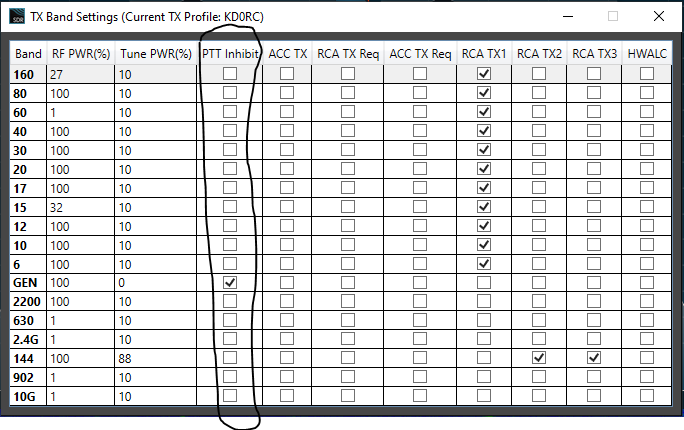
If you are on 60 meters, you need to be sure that your TX Filter High Cut does not take your signal past the narrow allocation that we have there. On any band, make sure that you are not too close to the band edge. Even if your carrier frequency is in band, the high or low end (depending on sideband) of your TX Filter may take part of your signal out of band.
If you use the TX REQ signal from an amp or other device, that may be part of the problem.
Do you have a PGXL or TGXL that could prohibit TX based on some antenna condition or another?
0 -
Hi Joseph
I also commented on your FB post. I see you narrowed this down, but if you are still stuck, don't hesitate to open a support ticket.
73
0



Leave a Comment
Categories
- All Categories
- 391 Community Topics
- 2.2K New Ideas
- 664 The Flea Market
- 8.4K Software
- 157 SmartSDR+
- 6.5K SmartSDR for Windows
- 187 SmartSDR for Maestro and M models
- 441 SmartSDR for Mac
- 275 SmartSDR for iOS
- 265 SmartSDR CAT
- 206 DAX
- 386 SmartSDR API
- 9.5K Radios and Accessories
- 61 Aurora
- 299 FLEX-8000 Signature Series
- 7.2K FLEX-6000 Signature Series
- 974 Maestro
- 58 FlexControl
- 867 FLEX Series (Legacy) Radios
- 949 Genius Products
- 473 Power Genius XL Amplifier
- 348 Tuner Genius XL
- 128 Antenna Genius
- 308 Shack Infrastructure
- 216 Networking
- 471 Remote Operation (SmartLink)
- 143 Contesting
- 816 Peripherals & Station Integration
- 145 Amateur Radio Interests
- 1.1K Third-Party Software