SmartSDR v4.2.20 | SmartSDR v4.2.20 Release Notes
SmartSDR v3.10.15 | SmartSDR v3.10.15 Release Notes
The latest 4O3A Genius Product Software:
The latest 4O3A Genius Product Software and Firmware
If you are needing assistance with FlexRadio products, please refer to the product documentation or check the Help Center for known solutions. Need technical support from FlexRadio? It's as simple as creating a HelpDesk ticket.
smartlink crashes (red light port forwarding)

After my recent network change my smartlink wont connect any more remotely. On the local network all fine.
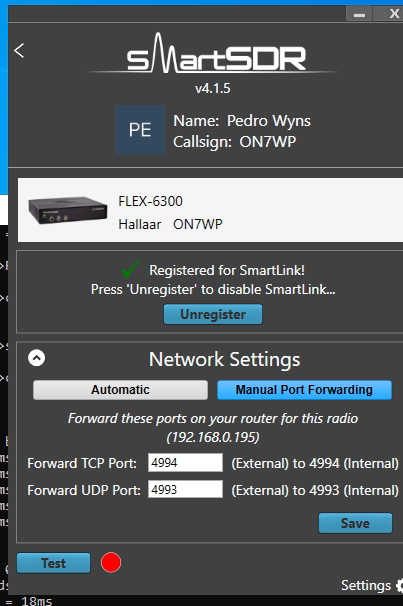
The funny thing is the 6300 shows up in the smartlink window with the ports I am forwarding in my router. Same ports as in the past nothing changed. The test button stays red in both cases (I tried both UPNP and manual). Whatever port I assign and forward shows up while hovering over the remote client (that has multiple radios) but once I connect the smartlink screen disappears and I get multiple popups : "unable to connect to the radio, please try again" and after clicking them away the missing radio shows up again on the remote PC screen.
I am totally puzzled (and very familiar with port forwarding). All other port forwardings on that router (and there are many..) are working properly.
After reading the forum here I also did try to reset my cable modem but no result…
What is cursed ????
Pedro ON7WP
Comments
-
 Mike-VA3MW Administrator, FlexRadio Employee, Community Manager, Super Elmer, Moderator adminOptions
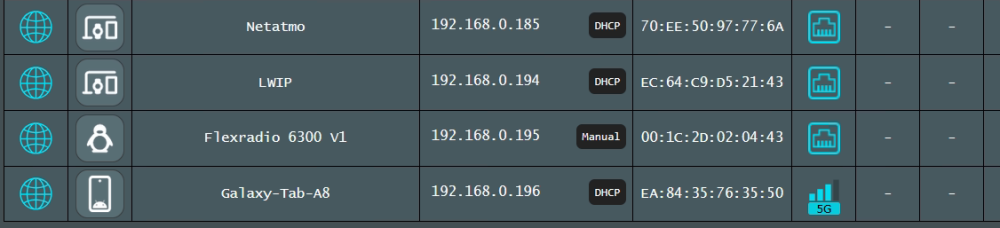
Can you share your internal network settings and screen shots? The internal IP Gateway address, the Port Forwarding page and the IP address of the radio? In your router, are you blocking any specific type of traffic flow?
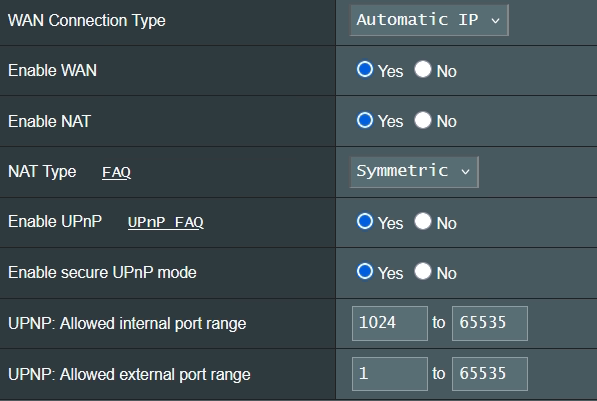
Can you turn on uPNP in your router and set both radios to Automatic and see if that resolves the issue? uPNP does work very well and if you just use the automatic mode, it does repair itself with a simple radio reboot. This eliminates any confusion with port forwarding.
I have multiple radios on my home network, all using uPNP with my router and I can access all of them remotely if need be. It sounds like you have some sort of configuration issue going on you might have missed.
73
0 -
No firewalls active on W11 PC or Router. Not blocking any traffic.
Tried uPNP but it does not work. Asus AC86 router. Tried also forwarding via ports 21000 22000 no difference. Tried TCP/UDP, now on both, no difference.
The funny thing is that the remote PC displays the right ports when hovering over it (cannot maker screenshot), and also shows multiflex when somebody is using it locally, but crashes completely when I try to select the radio…
see below "radio internet NOT available" what does this mean ????? I can ping the radio from the network. I see the radio on the router. tried both DHCP or fixed IP no difference…
Totally puzzled…
Serial: 2114-4043-6300-3279, Max Licensed Version: v4, Radio ID: 00-1C-2D-02-04-43, Radio IP: 84.196.245.231, Radio Internet: NOT Available, Radio Firmware: v4.1.5.39794
port forwarding table:

uPNP settings:
 0
0 -
Mike-VA3MW Administrator, FlexRadio Employee, Community Manager, Super Elmer, Moderator adminOptions
This is not going to work and while it looks like BOTH should work, it doesn't. You need one for TCP and one for UDP.
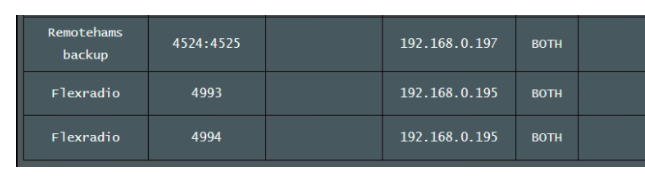
Since you have UPnP turned on in your router, delete all the manual port forwards in your Router.
On the Radios SmartSDR use Automatic settings. It will do all the hard work for you and do it correctly. Reboot router and the radios.
Reboot the Router and the Radios and then check your UPnP tables.
The Source Port can be anything assigned by the radio. When do, your port forwards look like this. You can see that the source ports are all unique, and they need to be. The INT ports are unique, but only for each radio.
This is my pfSense table for my 2 radios.

73
0 -
BOTH does work, it was previously on TCP and UDP and it did not work either.
Of course I deleted the manual entries before going to uPNP but it did not work.
But I found it….
The problem seems to be related to the Cisco Catalyst 2960 switch, even if this got a proper reset before being used so shouid be fully transparent like a dumb switch, but it isn't…
Replaced it with another "el cheapo" Chinese switch and all works now, even in "both" setting on the default ports…
Happy me. I said once "name me one decent product made in the USA after 2000"… Well clearly it does not exist, even Cico switches being total rubbish…
Thanks for the help anyway. I have to admit Flex service is fabulous compared to EU hardware providers. Congratz on that !!!!
Pedro C5WP AA9HX ON7WP
0


Leave a Comment
Categories
- All Categories
- 401 Community Topics
- 2.2K New Ideas
- 689 The Flea Market
- 8.6K Software
- 196 SmartSDR+
- 6.6K SmartSDR for Windows
- 200 SmartSDR for Maestro and M models
- 460 SmartSDR for Mac
- 279 SmartSDR for iOS
- 268 SmartSDR CAT
- 220 DAX
- 395 SmartSDR API
- 9.6K Radios and Accessories
- 109 Aurora
- 348 FLEX-8000 Signature Series
- 7.2K FLEX-6000 Signature Series
- 999 Maestro
- 58 FlexControl
- 872 FLEX Series (Legacy) Radios
- 975 Genius Products
- 482 Power Genius XL Amplifier
- 358 Tuner Genius XL
- 135 Antenna Genius
- 322 Shack Infrastructure
- 227 Networking
- 483 Remote Operation (SmartLink)
- 145 Contesting
- 847 Peripherals & Station Integration
- 147 Amateur Radio Interests
- 1.1K Third-Party Software