SmartSDR v4.2.20 | SmartSDR v4.2.20 Release Notes
SmartSDR v3.10.15 | SmartSDR v3.10.15 Release Notes
The latest 4O3A Genius Product Software:
The latest 4O3A Genius Product Software and Firmware
If you are needing assistance with FlexRadio products, please refer to the product documentation or check the Help Center for known solutions. Need technical support from FlexRadio? It's as simple as creating a HelpDesk ticket.
zerotier and flex8600 stoped working after 4.2.18 WHY

zerotier and flex8600 stoped working after 4.2.18 WHY
ZeroTier works but Radio does not respond after update ??????
Comments
-
Confirmed from my side (Flex 8600M, 6600): Having a stable zerotier running, Firmware starting from 3.x.x to 4.1.5, all working fine. Can access and work with Smartsdr on a Flex < 4.2.18.
On any Flexradio with 4.2.18, i can see the Radio remote, i can click on it, its starting up, i can see for a short time the frequency boy/ruler, i see the box "client connected from ip", all as usual. But than i get the error "SmartSDR for Windows has lost connection to the radio. Please reconnect". Smartsdr is closed.
Crosscheck with AetherSdr 26.5.2.1 => No issues. Can see Waterfall, no error.
Crosscheck with Smartsdr 4.1.5 => No issues. Can see Waterfall, no error.
@FlexRadio I can help for searching/hunting the bug when necessary
73 from mike dm5xx0 -
[Tested on Windows 10]0
-
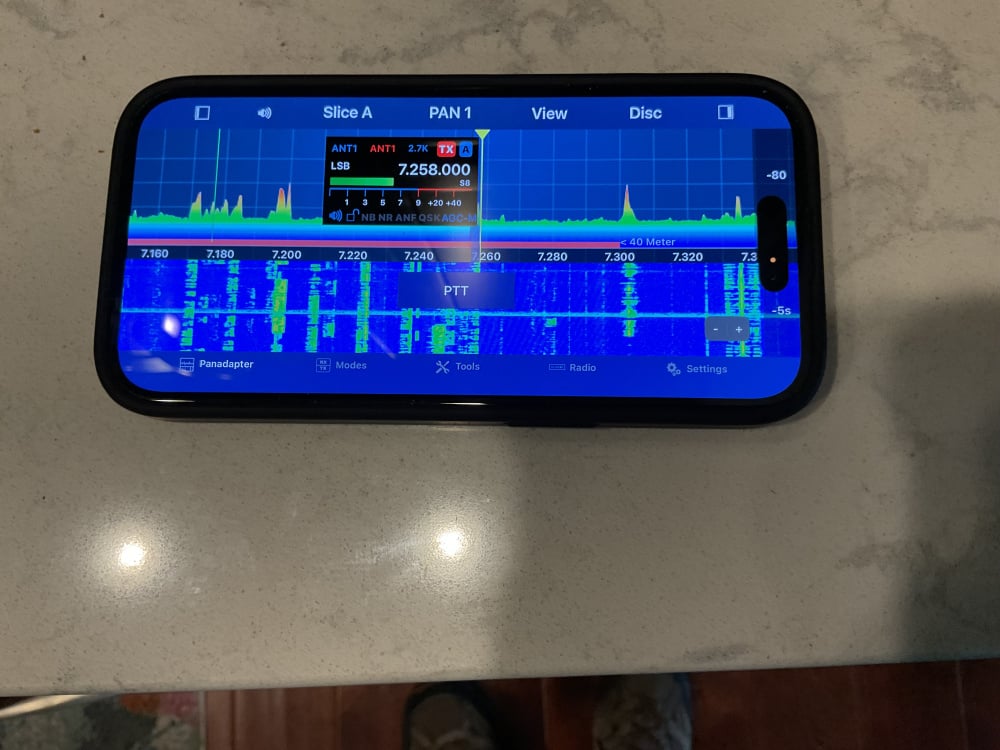
Mike FYI, The setup and install you did for me this weekend is working perfectly. I use it on my iPhone with both the 8600 and AU520. Version 4.2.18. Windows 11
Thanks for great job.
Tom
N9RU
0 -
Tom N9RU
did you conerct direct to 8600? with Iphone not using windows?
try that and report back
/Lars SM4IVE
0 -
Lars, yes I connected directly to the iPhone to the 8600 and also to the AU520, both radios on the newest SmartSDR version.
SmartSDR was not running but it works with it running also.
I turned the Wifi off on the phone to be sure it was using the outside network.
This is the first time I have been able to remotely access my Flex radios!
Tom
N9RU
 0
0 -
Thanks Lars and Tom, AetherSDR and Marcus Version for IOS seems to make things different - and this still works. Great to see i could help you with it. But Windows User with Zerotier running for months or years will be still doomed, when using 4.2.18 :/
73 de Mike DM5XX0 -
Come on Flex! Lots of us are stuck with CGNAT, with no other real choices. You need to work with Mike to ensure ZeroTier works … assuming you want to sell HW to some of us.
0 -
I had to set Fixed IP in Smartsdr for IOS on my Iphone then it worked,
So something in the 4.2.18 are screewd up
0 -
 Mike-VA3MW Administrator, FlexRadio Employee, Community Manager, Super Elmer, Moderator adminOptions
I have a bug opened for this: SMART-12837. We are not aware of anything that changed in the network part, but we will look into it. Any further data points would be greatly appreciated.
We may need some very detailed steps on how to recreate this in a lab environment as things like this can be hard to fix when you can't actually capture the problem.
0 -
it seems like a good idea for your team to have a ZeroTier RPI set up for testing as quite a few of your customers use it. I am sure Mike would set it up for you with their standard D40 configuration.
0 -
Mike-VA3MW Administrator, FlexRadio Employee, Community Manager, Super Elmer, Moderator adminOptions
There is more than just setting it up. It is gaining expertise with this solution as well and dealing with other projects, etc.
The more factual detail that the field can provide the faster we will understand the actual root cause of the problem.
0 -
If you need my help, just reach out to me. I am happy to help.
Further testing of 4.2.18: it cld happen:
- that u dont see the Radio in sdr, dax, cat WindowIf u See radio, u click on it and get ssdr starting with immediate error
- U get ssdr starting and there is no error, but ssdr started without waterfall etc.
- U get sdr starting and get smartsdr
You might get a running ssdr in 1 out of 7-10tries.
There seems to be no issues on OS and aethersdr. Only Windows and only Flexradio Version starting 4.2.18. Version 4.1.5 and lower works. Zerotier is in the default 10users free Version without any special settings for rerouting etc.
Hope that helps a little for investigation.
Mike0 -
Still seems not working with SmartSDR 4.2.20 … OK with ASDR.
0


Leave a Comment
Categories
- All Categories
- 401 Community Topics
- 2.2K New Ideas
- 691 The Flea Market
- 8.6K Software
- 197 SmartSDR+
- 6.6K SmartSDR for Windows
- 200 SmartSDR for Maestro and M models
- 462 SmartSDR for Mac
- 280 SmartSDR for iOS
- 268 SmartSDR CAT
- 220 DAX
- 395 SmartSDR API
- 9.6K Radios and Accessories
- 113 Aurora
- 352 FLEX-8000 Signature Series
- 7.2K FLEX-6000 Signature Series
- 999 Maestro
- 58 FlexControl
- 872 FLEX Series (Legacy) Radios
- 978 Genius Products
- 484 Power Genius XL Amplifier
- 358 Tuner Genius XL
- 136 Antenna Genius
- 323 Shack Infrastructure
- 228 Networking
- 485 Remote Operation (SmartLink)
- 147 Contesting
- 847 Peripherals & Station Integration
- 148 Amateur Radio Interests
- 1.1K Third-Party Software