SmartSDR v4.2.20 | SmartSDR v4.2.20 Release Notes
SmartSDR v3.10.15 | SmartSDR v3.10.15 Release Notes
The latest 4O3A Genius Product Software:
The latest 4O3A Genius Product Software and Firmware
If you are needing assistance with FlexRadio products, please refer to the product documentation or check the Help Center for known solutions. Need technical support from FlexRadio? It's as simple as creating a HelpDesk ticket.
Mic and speaker audio for setup help 6600 via the PC

With other details set up by now its time to place the 6600 and PGXL away from the office/shack at home. In the garage. Ive bought a good USB mic for it. I need the detailed setup info for transmit voice audio and fore the receive audio.
I welcome any recommended info docs or YouTube videos, for Win-11.
Right now the mic keys the radio PTT if I set VOX. but no audio transmits. Also no audio TX if I click MOX on SSB. DAX streams show up as active.
Any help high appreciated.
Comments
-
 Mike-VA3MW Administrator, FlexRadio Employee, Community Manager, Super Elmer, Moderator adminOptions
Raul
You will likely get SSB output if you put the radio into TX using MOX (not PTT on the radio).
If that works, they the HaliKey should solve your issues.
73
0 -
If I hit MOX it keys the radio but no audio or power out. If I choose VOX the mic keys the radio and I see a tall column on the signal screen, but to audio or power out.
The radio is till on the PC desk so I can use the FHM-3 thats conected to it. But moving the radio to the garage I need to use all via PC.
Take a look at this. Its probably the DAX mic stream off? but it doesnt just turn ON when I hit that yellow button. Clicking that and it goes gray or yellow, never blue
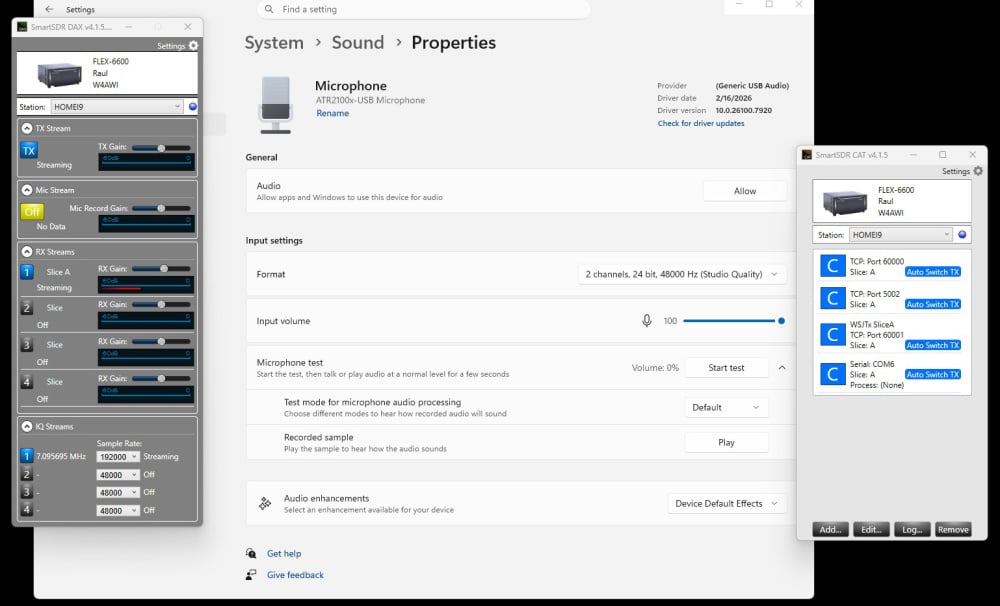 0
0 -
Mike-VA3MW Administrator, FlexRadio Employee, Community Manager, Super Elmer, Moderator adminOptions
There can be many things:
- Check mode
- DAX is not required, so you can terminate it up
- Make sure TX DAX is not on
- Reboot the radio and test again.
0 -
Mode was USB so thats fine. I thought DAX is the audio interface or manager between the PC and the radio. I dont know what terminate up means. Is there a YT video you know of that touches on this?
The TX DAX turns off in the slice flag? or where?
0 -
Mike-VA3MW Administrator, FlexRadio Employee, Community Manager, Super Elmer, Moderator adminOptions
For Voice, DAX is not required. That is only for digital modes and using it to send audio from things like N1MM Voice Keyer.
For using PC Audio, it is discussed in this video on using a radio remotely (which is the same thing when you aren't using a MIC plugged into the radio).
0 -
great info, thanks. Radio and amp now 100 FT away in garage on ethernet and working well. I have not gotten into the mic task yet, but the receive audio is good.
0

Leave a Comment
Categories
- All Categories
- 401 Community Topics
- 2.2K New Ideas
- 691 The Flea Market
- 8.6K Software
- 197 SmartSDR+
- 6.6K SmartSDR for Windows
- 200 SmartSDR for Maestro and M models
- 462 SmartSDR for Mac
- 280 SmartSDR for iOS
- 268 SmartSDR CAT
- 220 DAX
- 395 SmartSDR API
- 9.6K Radios and Accessories
- 114 Aurora
- 352 FLEX-8000 Signature Series
- 7.2K FLEX-6000 Signature Series
- 999 Maestro
- 58 FlexControl
- 872 FLEX Series (Legacy) Radios
- 980 Genius Products
- 485 Power Genius XL Amplifier
- 359 Tuner Genius XL
- 136 Antenna Genius
- 323 Shack Infrastructure
- 228 Networking
- 485 Remote Operation (SmartLink)
- 147 Contesting
- 847 Peripherals & Station Integration
- 148 Amateur Radio Interests
- 1.1K Third-Party Software