Welcome to the FlexRadio Community! Please review the new Community Rules and other important new Community information on the Message Board.
The latest SmartSDR Software:
SmartSDR v4.2.20 | SmartSDR v4.2.20 Release Notes
SmartSDR v3.10.15 | SmartSDR v3.10.15 Release Notes
The latest 4O3A Genius Product Software:
The latest 4O3A Genius Product Software and Firmware
SmartSDR v4.2.20 | SmartSDR v4.2.20 Release Notes
SmartSDR v3.10.15 | SmartSDR v3.10.15 Release Notes
The latest 4O3A Genius Product Software:
The latest 4O3A Genius Product Software and Firmware
How to Receive Technical Support::
If you are needing assistance with FlexRadio products, please refer to the product documentation or check the Help Center for known solutions. Need technical support from FlexRadio? It's as simple as creating a HelpDesk ticket.
If you are needing assistance with FlexRadio products, please refer to the product documentation or check the Help Center for known solutions. Need technical support from FlexRadio? It's as simple as creating a HelpDesk ticket.
Need Help with Verizon Actiontec MI424WR Router
Options

Wheelin Rev
Member
I have Version 2.0.17 installed on my FLEX-6500 and have the SmartSDR iOS app installed on my iPhone 7 with iOS v10.3.3 installed. What I have is one-way connectivity from my iPhone to the radio. I can change the frequency, control all of the settings, change the power, activate ATU, etc. including transmit PTT with SSB modulation and 100 watts power output. But from the radio to the iPhone there is nothing. No received audio (yes REMOTE is active for the PC), no meter readings, no panadapter, no waterfall, etc. Here is the router's port forwarding:
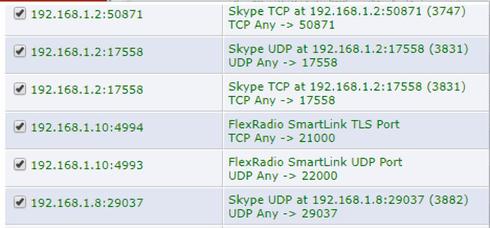
Dudley had noticed just prior to quitting time on Friday that the TCP port forwarding was marked TLS. He was not sure if this was an issue or not. It is shown on the above picture.
I am NOT a router guru so I was wondering if somebody could TeamView into my PC and see if you could get the TLS port forwarding to be TCP port forwarding to see if that resolves the one-way issue?
I also tried access over the Verizon Cellular LTE Network and nothing worked. I've read that remote control over cellular may not be possible because carriers apparently do not allow port forwarding. I don't know...
So any takers? Thanks in advance! 73, Dave K4EET
Dudley had noticed just prior to quitting time on Friday that the TCP port forwarding was marked TLS. He was not sure if this was an issue or not. It is shown on the above picture.
I am NOT a router guru so I was wondering if somebody could TeamView into my PC and see if you could get the TLS port forwarding to be TCP port forwarding to see if that resolves the one-way issue?
I also tried access over the Verizon Cellular LTE Network and nothing worked. I've read that remote control over cellular may not be possible because carriers apparently do not allow port forwarding. I don't know...
So any takers? Thanks in advance! 73, Dave K4EET
0
Comments
-
TLS is just a label that comes from the Flex radio. Your router is properly setup and if you are not getting audio or waterfall the problem is elsewhere.0
-
Sal,
Thanks for your comment. I'll open a new Community Post with a different Topic to better reflect what is happening.
73, Dave K4EET0 -
Keep it here, all the information could help solve your issue. What are you using for internet connection at the remote location? It looks like "something" is blocking UDP packets. Also, just make sure you have selected an antenna input with an antenna connected to it. First time I tried Smartlink I didn't have the correct antenna selected and I thought it didn't work.0
-
Check this thread and Tim's reply https://community.flexradio.com/flexradio/topics/smartlink-waterfall-and-spectrum-do-not-display-from-specific-geographic-location0
-
Oh yes, I see them now. Never mind
 0
0 -
Is the actiontec your only router? Make sure you aren't double NATing.0
-
Out of curiosity, how do I mark this thread as "Solved"?
0 -
FYI - I have a Verizon phone with the hotspot activated and it refuses to work with Smartlink.0



Leave a Comment
Categories
- All Categories
- 401 Community Topics
- 2.2K New Ideas
- 689 The Flea Market
- 8.6K Software
- 196 SmartSDR+
- 6.6K SmartSDR for Windows
- 200 SmartSDR for Maestro and M models
- 460 SmartSDR for Mac
- 279 SmartSDR for iOS
- 268 SmartSDR CAT
- 220 DAX
- 395 SmartSDR API
- 9.6K Radios and Accessories
- 109 Aurora
- 348 FLEX-8000 Signature Series
- 7.2K FLEX-6000 Signature Series
- 999 Maestro
- 58 FlexControl
- 872 FLEX Series (Legacy) Radios
- 975 Genius Products
- 482 Power Genius XL Amplifier
- 358 Tuner Genius XL
- 135 Antenna Genius
- 321 Shack Infrastructure
- 226 Networking
- 483 Remote Operation (SmartLink)
- 145 Contesting
- 847 Peripherals & Station Integration
- 147 Amateur Radio Interests
- 1.1K Third-Party Software