SmartSDR v4.2.20 | SmartSDR v4.2.20 Release Notes
SmartSDR v3.10.15 | SmartSDR v3.10.15 Release Notes
The latest 4O3A Genius Product Software:
The latest 4O3A Genius Product Software and Firmware
If you are needing assistance with FlexRadio products, please refer to the product documentation or check the Help Center for known solutions. Need technical support from FlexRadio? It's as simple as creating a HelpDesk ticket.
Cat not working in WXJT-X
Trying to configure wsjt-x on my 8400M. W9NWR and I worked on it for 2 hrs this morning and it keeps saying rig control error. we followed the guide that Ken Wells put out to the letter but still does not work. When I try to test it with the test button, it says rig control error. Any suggestions.
Answers
-
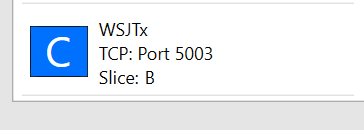
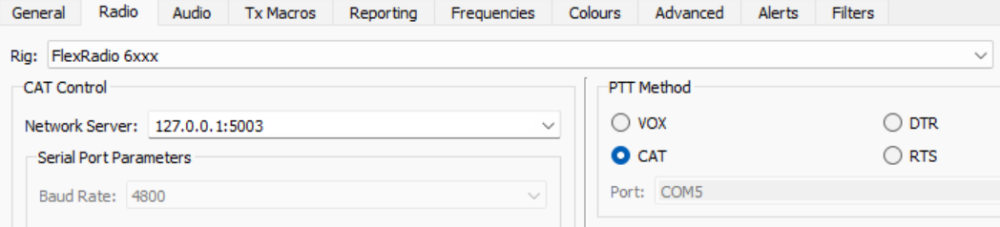
SmartSDR CAT + WSJTx configured on same port (yours will say Slice A). The port parameters are Protocol = CAT, Type = TCP.
 0
0 -
Mine says 9600 baud rate. CAT is checked under PTT method. We went by Ken Wells guide when we set it up.
0 -
Baud rate is irrelevant for a TCP connection.
0 -
Baud rate is irrelevant, only applies to serial ports and not TCP ports.
0 -
Forgot to mention that when we were testing, the was 2 A slices on the display. don't know if that would help.
0 -
 Mike-VA3MW Administrator, FlexRadio Employee, Community Manager, Super Elmer, Moderator adminOptions
If you have more than 1 slice, then is uses a different CAT port (RS232 or Network).
I have a number of videos onhow to do it on YouTube. As there are many ways, they are all correct.
The key part depends on which version of SmartSDR you use and that will dictate which Audio Input and Output device you use.
Here are the key parts:
- CAT control - how to communicate with the radio for frequency and band information. FlexRadios can use several CAT protocols, either FlexRadio or Kenwood. Using a Kenwood TS-480 as the radio in WSJT works.
- PTT - Today, it is now part of CAT control so you want to say PTT via CAT on the radio setup screen. Stop here and hit the CAT and PTT Tests. If this doesn't work, stop here and resolve it.
- RX Audio - FlexRadio have multiple audio paths starting at number 1. In SmartSDR you need to assign the slice (VFO) you are using to a number and for those of us just starting, number 1 is a good choice. Next, in WSJT Audio, you need to pick the one DAX RX 1 so that WSJT can hear the audio from the radio
- TX Audio - this is how you send the audio to the radio when in transmit.
I would watch the one for SmartSDR v4.2 and up first.
Feel free to ask more questions and we can get this sorted out for you.
0 -
Just curious, how can you have 2 A slices?
0 -
Hi Geoff and all,
I was trying to help John get up and running on wsjt-x. Followed Ken Wells instructions. I have a AU-510m and set up mine according to the same instructions, works perfect. John set his up the same as mine. I think he has a 8400. His rx is working just fine but fails Cat Test within wjst.
He has two A slices (nope, don't know how that is possible) and I wonder if that is somehow tied to the Cat failure...grabbing at straws here...
Do you folks think a rig Reset is the next step and start over. I wonder if the double "A" is causing other unknown issues. I think that needs to be resolved first.
I am stumped.
73 Chuck, W9NWR0 -
Mike-VA3MW Administrator, FlexRadio Employee, Community Manager, Super Elmer, Moderator adminOptions
WSJT can support multiple slices by having multiple WSJT profiles. It takes a bit of manual editing.
0 -
Mike…Yes I have that working. But how do you get 2 A slices???
0 -
Mike-VA3MW Administrator, FlexRadio Employee, Community Manager, Super Elmer, Moderator adminOptions
You can't on the same Client. Why do you need 2 A slices? Sorry, I must have miss explained something. :)
0 -
Hi Mike,
That is one of John's issues, he does have 2 slice "A" showing from what he tells me. I assume that is not normal? We were doing a plain vanilla wsjt-x set up, had a failed CAT Test, and ran across these two A slices.
Wanted to resolve the two A slices and then get back to the failed CAT Test within wsjt-x.0 -
From John:
"Forgot to mention that when we were testing, the was 2 A slices on the display."
0 -
Two A slices are because there are two GUI clients connected at the same time (multiFLEX). My guess is that the front panel is one of those GUI clients.
1 -
On an M model, the front panel is one of the two multiflex clients. The other client is probable the pc used for WSJT. Each client gets a slice A. A Maestro and a PC or two PC's work the same way.
0 -
Mike-VA3MW Administrator, FlexRadio Employee, Community Manager, Super Elmer, Moderator adminOptions
I would like to see the screen shot of 2 Slice A's on the same client.
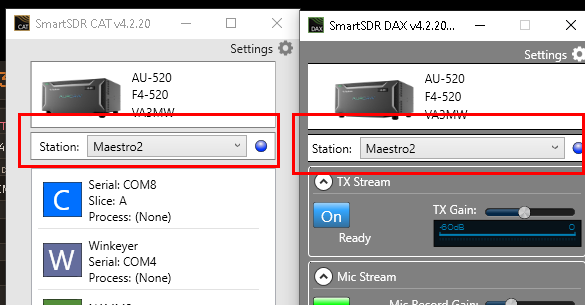
You can have 2 Slices A's when using MultiFlex but you can only assign DAX and CAT to one of the clients, assuming it was something like SmartSDR and a Maestro or M Model.
This is why there is this station selection. That is the name at the bottom of the SmartSDR screed, which you can edit by clicking on it, or under the Maestro TAB in Settings "Station Name"
Hopefully, that answers the question and outlines the limitation.
73
 0
0 -
MultiFlex must be the case but it certainly was not clear in John's OP.
0 -
John informed me that his Multiflex is disabled. He will try to work up a screen shot and post it.
He has bad storms now so it will probably be tomorrow.
73, Chuck w9nwr0 -
Mike-VA3MW Administrator, FlexRadio Employee, Community Manager, Super Elmer, Moderator adminOptions
On Windows, use the Snipping Tool or built-in keyboard shortcuts:
Snipping Tool (best for editing/annotating)
Press Windows key + Shift + S. Your screen dims and a small toolbar appears at the top letting you choose rectangular, freeform, window, or full-screen snip. The capture goes to your clipboard, and a notification lets you click through to annotate and save it. You can also open the Snipping Tool app directly from the Start menu for more options (delay timer, etc).Keyboard shortcuts
- Windows key + PrtScn: captures the full screen and automatically saves it to Pictures > Screenshots.
- Alt + PrtScn: captures just the active window and copies it to your clipboard (paste with Ctrl+V into Paint, Word, email, etc).
- PrtScn alone: copies the full screen to clipboard without saving a file.
0 -
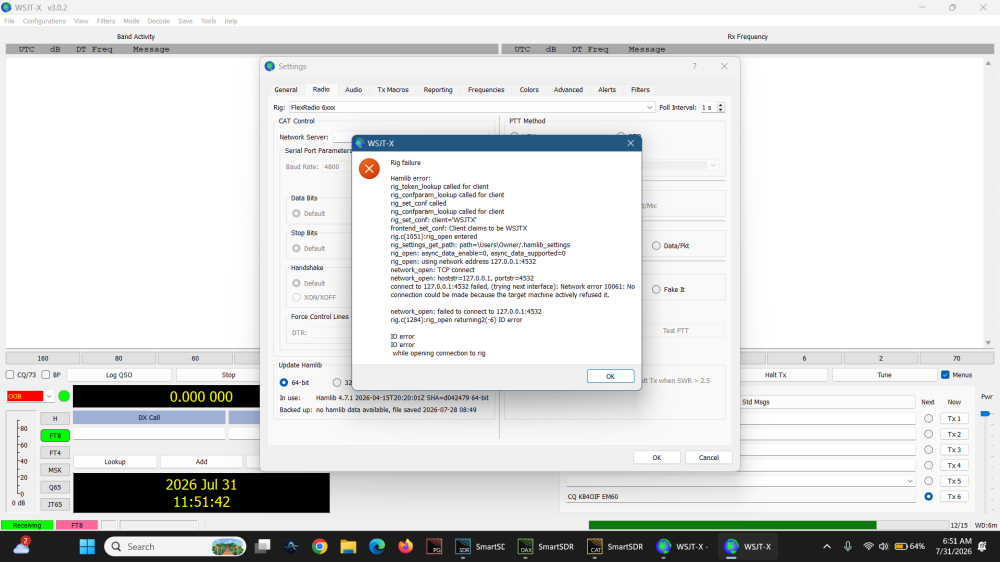
here is the screen shot. also error message. finally got clipboard to work right.
 0
0 -
Hi John,
What happened to Network Server in WSJT? Its blank from the looks of it.
Chuck,
w9nwr0 -
Sorry, I don't see the 2 A slices. Perhaps a screenshot of SSDR?. I'm realy curious…
0 -
OK, the both of those refer to the slice A in the top panadapter.
You do have another panadapter open below the A slice panadapter.
For now to make things simpler, just close the second panadapter by clicking the "X"
marked here: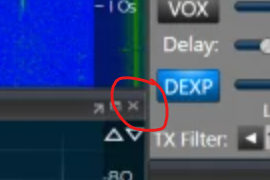 0
0 -
Thanks Geoff. Chuck and I found the problem and it is working correctly. Somehow Network server got deleted. after it was put back in, things are working now. thanks everyone for your thoughts and help.
0







Leave a Comment
Categories
- All Categories
- 401 Community Topics
- 2.2K New Ideas
- 691 The Flea Market
- 8.6K Software
- 197 SmartSDR+
- 6.6K SmartSDR for Windows
- 200 SmartSDR for Maestro and M models
- 462 SmartSDR for Mac
- 280 SmartSDR for iOS
- 268 SmartSDR CAT
- 220 DAX
- 395 SmartSDR API
- 9.6K Radios and Accessories
- 113 Aurora
- 352 FLEX-8000 Signature Series
- 7.2K FLEX-6000 Signature Series
- 999 Maestro
- 58 FlexControl
- 872 FLEX Series (Legacy) Radios
- 978 Genius Products
- 484 Power Genius XL Amplifier
- 358 Tuner Genius XL
- 136 Antenna Genius
- 323 Shack Infrastructure
- 228 Networking
- 485 Remote Operation (SmartLink)
- 147 Contesting
- 847 Peripherals & Station Integration
- 148 Amateur Radio Interests
- 1.1K Third-Party Software