SmartSDR v4.2.20 | SmartSDR v4.2.20 Release Notes
SmartSDR v3.10.15 | SmartSDR v3.10.15 Release Notes
The latest 4O3A Genius Product Software:
The latest 4O3A Genius Product Software and Firmware
If you are needing assistance with FlexRadio products, please refer to the product documentation or check the Help Center for known solutions. Need technical support from FlexRadio? It's as simple as creating a HelpDesk ticket.
RX Audio Recording

Hi,
I can't set up DAX for recording with my audio recording software. In Win10, I select DAX RX1 in the audio settings. If the audio settings window in Win10 is open, I see a red band noise bar in DAX. If I close the WIN10 audio settings window, there's no audio signal from the band in DAX. I think SMART SDR+ DAX works differently.
Slawomir
Answers
-
What are you actually recording via DAX? There must be a client attached, a digital audio source. When you attach W10 audio settings you will see the DAX RX Stream Slice A color go green. Close W10 settings and it will turn blue. So you must actually have an audio source streaming on DAX RX1 and when you activate your recording software, it will record it.
If there is a failure, the fool proof failsafe is to test with a simple experiment. Have FT8 software attached on DAX RX1 and install / open Audacity. Set it to RX1 and record. You should get a recording.
0 -
Hi Eric, I want to record my audio signal from the second transceiver. I'm transmitting with a dummy load at 0.5W on the second transceiver. I turn on the Flex 8600 and see my signal on the same frequency. I can hear it clearly through my headphones. I want to record it using the DAX RX1 recording program. When I open "Sounds" in Win10, the RX stream lights up green and the audio bar is red. When I close it, the "1" icon lights up blue, but there's no red audio bar. That's where I'm having trouble configuring this.
0 -
OK I understand. So forget about W10 audio settings. When this is not open there is no audio source and the DAX button will be blue. Set your recording software to record DAX RX1 and activate record. You should see the DAX RX Stream Slice A button turn green and you should be recording.
I just did it using Audacity. It is in the zip file. So it should work for you.
0 -
I believe you are using Gold Wave. I do not know why you have a problem. I just this minute downloaded and installed it. In Control properties I set DAX RX 1. All other settings were at default. It recorded perfectly.
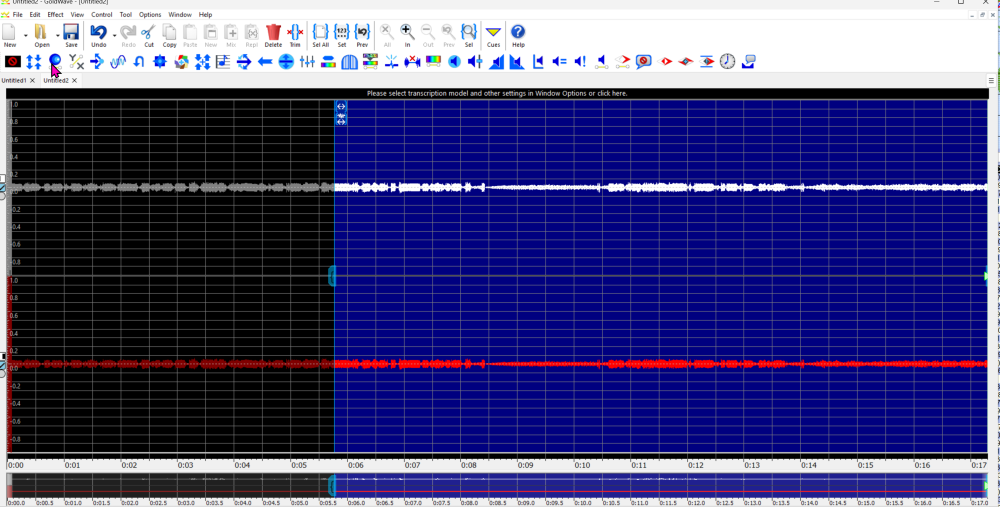
There might be an error with settings are some other issue with Gold Wave.
I am not convinced that your DAX has a problem. Before you installed 4.2.x with DAX v2 did you uninstall the old SmartSDR version with the original DAX?
You could try, as I suggested earlier, to record with the free Audacity software. If that works, DAX is OK.
0 -
Eric,
I uninstalled the older SmartSDR. I currently have versions 3.10.15, 4.0.0.1, 4.1.5, and 4.2.20 available, which I'm working with. GoldWave is a very good audio recording program. I've been using it for years and have never had a problem. I think there's a problem with DAX. I don't know if reinstalling version 4.20.20 can solve it. I'll keep trying, as it should work without a problem.Slawomir
0 -
I had not used Gold Wave before but I di like it and it works well. You could try uninstalling 4.2.20 and reinstalling. Back up your settings and Profiles. Don't copy them back until you test if it works in case the issue is in the settings.
0 -
I installed Audacity and still have no sound. FT8 works fine on WSJTX
0 -
That is totally strange. I think you have to completely uninstall SmartSDR and install fresh version. I do not see any other alternative. Maybe something is corrupted, very unusual though.
0 -
 Mike-VA3MW Administrator, FlexRadio Employee, Community Manager, Super Elmer, Moderator adminOptions
The old DAX drivers and new DAX drivers can actually co-exhist as they are 100% unique. This is why we gave them different names. I can confirm this works because for months, I had both. We do highly suggest you remove the old versions only to limit any confusion.
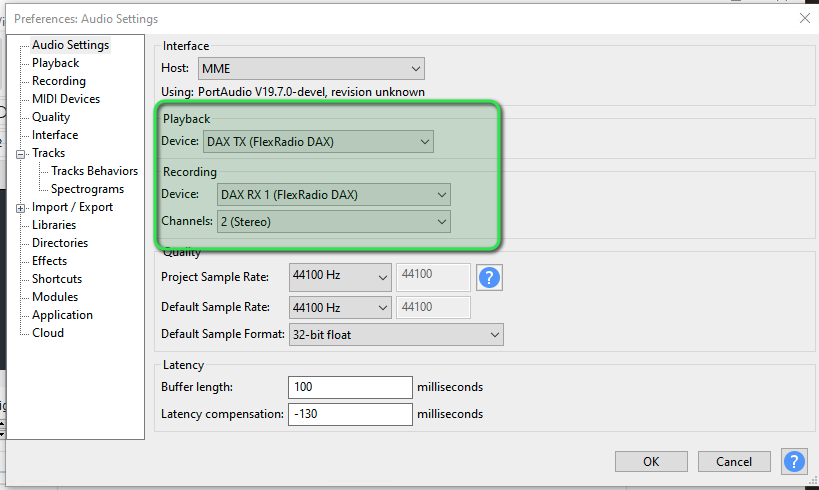
In Audacity, you do have to correct Audio Input and Output settings. Typically, this is what you want unless you want another source of audio. This setup would playback audio into the Radio TX chain and record from whatever slice you have assigned to DAX 1. I tested both 44100Hz and 48000Hz sample rates.
 0
0 -
Good morning, Mike,
Thank you for your help. I have the audio set up in Audacity in Win10 as shown in the photo. Unfortunately, Audacity isn't recording because it doesn't have the audio from the Flex 8600. In Win10, when the record window is open, the audio level is controlled, as shown by the green vertical bar. When I close that window, the RX1 DAX disappears in the RX streams, with the audio level bar red. I'm not sure if this is correct. In Smart SDR, in the PROCESSOR window, I have DAX enabled in blue. In the upper window, below the frequency, DAX is set to Channel 1. Please advise what else I can do to record RX audio? I have WSJTX configured to work on FT8 using the same settings. Everything is working properly.
Have a nice day,
Slawomir0 -
Mike-VA3MW Administrator, FlexRadio Employee, Community Manager, Super Elmer, Moderator adminOptions
It looks like you have the wrong DAX RX 1 selected as that is the old DAX driver.
Look for "DAX RX 1"
0


Leave a Comment
Categories
- All Categories
- 401 Community Topics
- 2.2K New Ideas
- 691 The Flea Market
- 8.6K Software
- 197 SmartSDR+
- 6.6K SmartSDR for Windows
- 200 SmartSDR for Maestro and M models
- 461 SmartSDR for Mac
- 280 SmartSDR for iOS
- 268 SmartSDR CAT
- 220 DAX
- 395 SmartSDR API
- 9.6K Radios and Accessories
- 113 Aurora
- 349 FLEX-8000 Signature Series
- 7.2K FLEX-6000 Signature Series
- 999 Maestro
- 58 FlexControl
- 872 FLEX Series (Legacy) Radios
- 976 Genius Products
- 483 Power Genius XL Amplifier
- 358 Tuner Genius XL
- 135 Antenna Genius
- 323 Shack Infrastructure
- 228 Networking
- 483 Remote Operation (SmartLink)
- 146 Contesting
- 847 Peripherals & Station Integration
- 147 Amateur Radio Interests
- 1.1K Third-Party Software