SmartSDR v4.2.20 | SmartSDR v4.2.20 Release Notes
SmartSDR v3.10.15 | SmartSDR v3.10.15 Release Notes
The latest 4O3A Genius Product Software:
The latest 4O3A Genius Product Software and Firmware
If you are needing assistance with FlexRadio products, please refer to the product documentation or check the Help Center for known solutions. Need technical support from FlexRadio? It's as simple as creating a HelpDesk ticket.
How to Output a Contact Closure from Flex 6600 on Transmit?

I want to use a contact closure output from my Flex 6600M to key an external amp on transmit. How to I set that up? I've tried using the TX1 and TX2 sockets but can't get them to work. Any suggestions?
73,
Al, K0AD
Answers
-
Hi Al, TX1 TX2 or TX3 can be used. You then need use the TX Band Settings screen to select the RCA socket of choice for the bands that you will use. Here is what mine looks like:
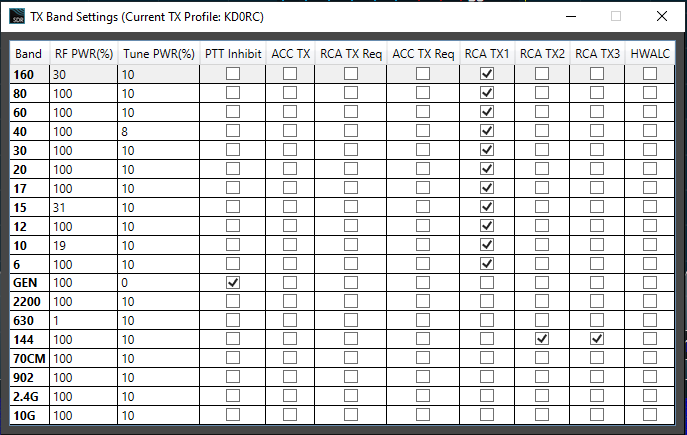
I have a KPA 500 amp plugged into RCA TX1 that I can use on 160 - 6 meters. TX2 keys my 2 meter transverter and TX3 keys my 2 meter amp.
0 -
Len;
My Flex 6600M is at version 4.220.41343. When I click on the SDR option, I am told that I need to I need to downgrade the version of SW in my Radio to run SDR. Do I really want to do that or is there a way around this?
As you can tell, I am not real sure how the version thing works.
73,
Al, K0AD
0 -
Hi Al, this generally indicates that the SmartSDR software that you are running on your computer is at a lower version than that of the radio. I would uninstall all previous versions from your PC, then download 4.2.20 from the Flex website, and run that.
The version on the radio needs to match the version on the computer. If you run an older version on the computer than what is on the radio, it asks you if you want to downgrade on the assumption that you are running the desired version on the computer (usually a false assumption…). Once you get rid of all previous versions, you won't accidentally run the wrong version on the PC.
0


Leave a Comment
Categories
- All Categories
- 401 Community Topics
- 2.2K New Ideas
- 691 The Flea Market
- 8.6K Software
- 197 SmartSDR+
- 6.6K SmartSDR for Windows
- 200 SmartSDR for Maestro and M models
- 461 SmartSDR for Mac
- 280 SmartSDR for iOS
- 268 SmartSDR CAT
- 220 DAX
- 395 SmartSDR API
- 9.6K Radios and Accessories
- 113 Aurora
- 349 FLEX-8000 Signature Series
- 7.2K FLEX-6000 Signature Series
- 999 Maestro
- 58 FlexControl
- 872 FLEX Series (Legacy) Radios
- 976 Genius Products
- 483 Power Genius XL Amplifier
- 358 Tuner Genius XL
- 135 Antenna Genius
- 323 Shack Infrastructure
- 228 Networking
- 483 Remote Operation (SmartLink)
- 146 Contesting
- 847 Peripherals & Station Integration
- 147 Amateur Radio Interests
- 1.1K Third-Party Software