SmartSDR v4.2.20 | SmartSDR v4.2.20 Release Notes
SmartSDR v3.10.15 | SmartSDR v3.10.15 Release Notes
The latest 4O3A Genius Product Software:
The latest 4O3A Genius Product Software and Firmware
If you are needing assistance with FlexRadio products, please refer to the product documentation or check the Help Center for known solutions. Need technical support from FlexRadio? It's as simple as creating a HelpDesk ticket.
Multiple WSJT-X Instances

OK, I have 2 instances of WSJT-X configured, open, and running. Both are on 6 meters at 50.313 and 50.323 with 2 panadapters, one slice A and one slice B.
However, they do not stay on those frequencies. Both change to the same frequency, say 50.323.
It seems as though I have to lock the frequencies on both slices to keep them on their original frequencies.
Is this correct, or am I missing something?
Thanks…
Answers
-
Geoff,
You will need to have a separate port configured in SSDR CAT for each slice (with auto switch TX slice enabled) and then each instance of WSJT configured for that slices port.
AL, K0VM
0 -
Al,
CAT and DAX are configured correctly:
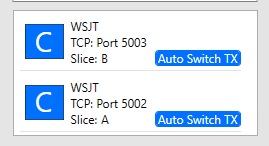
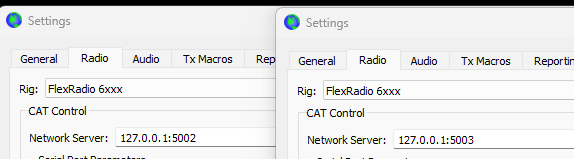
Both instances seem to operate with no problem other than the frequency change.
0 -
Geoff,
When you say "both change to the same frequency", when do they both change ?
I have not been able to duplicate you situation, yet.
AL, K0VM
0 -
Al,
I just did a factory reset and recreated the same situation.
Slice A in on 50.313, Slice B is on 50.323.
At the end of a receive period, either 1st or 2nd, Slice B changes to 50.313.
If I lock Slice B it does not change but Slice A changes instead. If I lock them both all is good.
I am not transmitting.
0 -
Geoff,
I am not seeing any of that at all… SSDR/SSDR CAT has no knowledge of when a FT8 RX period ends unless CAT is sending it something strange.
Suggest that you open a 'log' for 5002 and 5003 in SSDR port and observe what WSJT is generating for FA and IF when the switch occurs.
If you have "Fake it" enabled in WSJT? doe the issue change if you select "none" instead ?
If you push the 6m band button in wsjt, the slice will go to the 6m default ( 50.313).
If you select 50.323 in wsjt, does the correct slice go to 50.323.
AL, K0VM
0 -
AL,
I do not use "Fake It"
Definately something odd. I deleted the existing CAT ports in SSDR and created 2 new ones with different port numbers. I changed the ports in WSJT to match. The frequencies do not change at the end of a period.
Now in SSDR I have 2 panadapters Slice A 50.313 and Slioce B 50.323.
Both instances of WSJT show 50.313. If I manually change one in WSJT with the wheel on the mouse they both change in WSJT and SSDR. For example, I change the Slice A instance to 50.319 both instances show 50.319 as do both slices in SSDR.
I'm going to delete and recreate the WSJT shortcuts I made.
Made new instances. I cannot set the frequencies separetely.
The frequencies still change at the end of a period.
Done for today…
Thanks for your suggestions
0 -
I sounds like the two instances may be using the same CAT path. I would try running only one WSJT at a time and see if they control only the slice expected.
I assume your have already tried a factory reset of the radio.
AL, K0VM
0 -
 Mike-VA3MW Administrator, FlexRadio Employee, Community Manager, Super Elmer, Moderator adminOptions
Is this on SSDR 4.2.20?
0 -
Yes, I mentioned the factory reset a couple posts ago.
I don't see how they could be sharing a CAT path as the ports assigned to the slices are different in both SSDR and WSJT. I see what you are thinking but I sure don't see it.
I have both slices open in SSDR and only the Slice A instance of WSJT running. When I change to frequency in WSJT using the mouse wheel the frequency changes on both slices in SSDR.
I am running WSJT v3.0.0 improved PLUS edition
0 -
Geoff,\
I would be comparing the logs for each CAT port in SSDR CAT and see if there is a clue there. And maybe trying to issue a frequency change ( FA00050313000; ) from a SSDR CAT port logging window to see what happens.
Maybe Mike has other ideas.
AL, K0VM
0 -
Is there a way to copy the CAT log window text? I tried selecting all and Copy. But could not paste in notepad.
0 -
I use … highlight the text with the mouse in SSDRCAT log, CTL-C, and then CTL-V to paste into note pad.
AL, k0VM
0 -
I'll try that later today. I used CRTL-A which did highlight everything.Then CRTL-C and CRTL-V but there was no paste option available in notepad…
0 -
Do you have another program running that is using rig control? I’ve experienced this when N3FJP AC log is running and using the Flex API interface.
0 -
Ctl-V IS the universal paste option. Works in note pads.
AL, K0VM
0 -
Chuck…You nailed it. I had experienced something similar in the past but totally forgot about it AC log is the culprit.
Al… Yes, I know CTRL-V is the paste shortcut but I was unable to paste into notepad and the option was grayed out as well. SO maybe the copy option did not work as there was nothing on the clipboard.
Thanks to both of you!
0 -
Chuck…What do folks use instead of AC log to permit logging multiple instances of WSJT without taking control of the radio?
Or, do I just not use AC log and manually copy the adi file?
0 -
Mike-VA3MW Administrator, FlexRadio Employee, Community Manager, Super Elmer, Moderator adminOptions
I moved away from the traditional logs. Lately, I have been testing out this one since it integrates so well to so many things. It has some Genius Integration, multiple slice support, award tracking, etc.
I can even email a QSL card if I like
0 -
Thanks Mike, I'll have a look.
0 -
Geoff,
I use WSJT>JTAlert>DXlab
AL, K0VM
0


Leave a Comment
Categories
- All Categories
- 401 Community Topics
- 2.2K New Ideas
- 688 The Flea Market
- 8.6K Software
- 196 SmartSDR+
- 6.6K SmartSDR for Windows
- 200 SmartSDR for Maestro and M models
- 457 SmartSDR for Mac
- 278 SmartSDR for iOS
- 268 SmartSDR CAT
- 220 DAX
- 395 SmartSDR API
- 9.6K Radios and Accessories
- 105 Aurora
- 348 FLEX-8000 Signature Series
- 7.2K FLEX-6000 Signature Series
- 998 Maestro
- 58 FlexControl
- 872 FLEX Series (Legacy) Radios
- 972 Genius Products
- 481 Power Genius XL Amplifier
- 358 Tuner Genius XL
- 133 Antenna Genius
- 321 Shack Infrastructure
- 226 Networking
- 483 Remote Operation (SmartLink)
- 145 Contesting
- 846 Peripherals & Station Integration
- 147 Amateur Radio Interests
- 1.1K Third-Party Software