SmartSDR v4.2.20 | SmartSDR v4.2.20 Release Notes
SmartSDR v3.10.15 | SmartSDR v3.10.15 Release Notes
The latest 4O3A Genius Product Software:
The latest 4O3A Genius Product Software and Firmware
If you are needing assistance with FlexRadio products, please refer to the product documentation or check the Help Center for known solutions. Need technical support from FlexRadio? It's as simple as creating a HelpDesk ticket.
SmartSDR v4.2.20 and Slice Master v0.11.0h

I use a Flexradio 6500 and Slice Master to start my EME rig since years - and I'm very satisfied with it.
With the installation of v4.2.20 slice master doesn't work anymore.
I installed the latest Slice Master v0.11.0h - but no luck . . .
Smart SDR v4.2.20 seems to run correctly on my Flex6500 (CW + SSB).
For EME I used Slice Master to configure and start WSJT-X - as I do since years with various Flexradio and Slice Master software versions.
Now that results in an error message:
TCI audio Error in Sound Output - No audio output device configured.
I checked the Audio setting in WSJT-X: It is TCI Audio (for Rx and Tx).
A manual change to DAX Rx 1 and DAX Tx 1 seems to be accepted but the Slice Master restarts automatically and put the Audio Channels back to TCI.
Again - with previous sw version DAX was set correctly and there was no issue at all.
What can I do . . . ?
Thank's in advance !
Wolf - DF7KB
Comments
-
Wolf
i Have the same/sililar problem with 4.2.20 and Slice Master Version H.
I had submitted a Flex helpdesk ticket and testing. DAX V2 works with out Slice Master. Ken did help with one pice of information, after changing input and output hit the new Refresh button on the Soundcard screen. So ticket was closed. I did communicate to Don K1DBO.For some reason the Soundcard is not able to find the DAX V2 Audio input and output. Between DAX V2, WSJT-x and Slice Master Version H. Where the problem of finding the Soundcard channels is not clear. Windows 11 Device Manager shows the Audio channels are properly setup for the New DAX V2 channels.
I have found some manual work arounds but it doesn’t get around the basic problem. One of my work arounds is start another slice using a manual shortcut outlined by Flex then go back to slice A and manually reset Soundcard input and output then hit Refresh and then OK.
I have not contacted anyone at WSJT-x Support. If you make any progress let me know.
73
Bill W9JJB
Bahillen@comcast.com
0 -
Bill - thank you for the information.
I will give it a try tomorrow and keep you posted.73 Wolf - DF7KB
0 -
Good Evening Bill and Wolf,
I am also having the same Issues.
When SliceMaster starts WSJT my Rig setting of FLEXRADIO SMARTSDR SLICE A is changed to Ham Radio Deluxe.
And may DAX settings are not found and I need to reset them.
There are probably other issues that I have not found yet as I am brand new to a FlexRadio and SliceMaster
I will be grateful if you could keep me in the loop
FYI: My DAX is V4.2.2 and SliceMaster 6000 v0.11.0h
Kind Regards
Ron VK4JE
0 -
Ron
Slice Master does use HRD for Rig control. I don’t believe is commands are different from FlexRadio 6xxx but am not technically knowledgeable of the details.
Hopefully someone will analyze what causes this problem.
73Bill W9JJB
0 -
GM All,
Just checked what Slice Master does "automatically":
That the configuration - and it worked for years.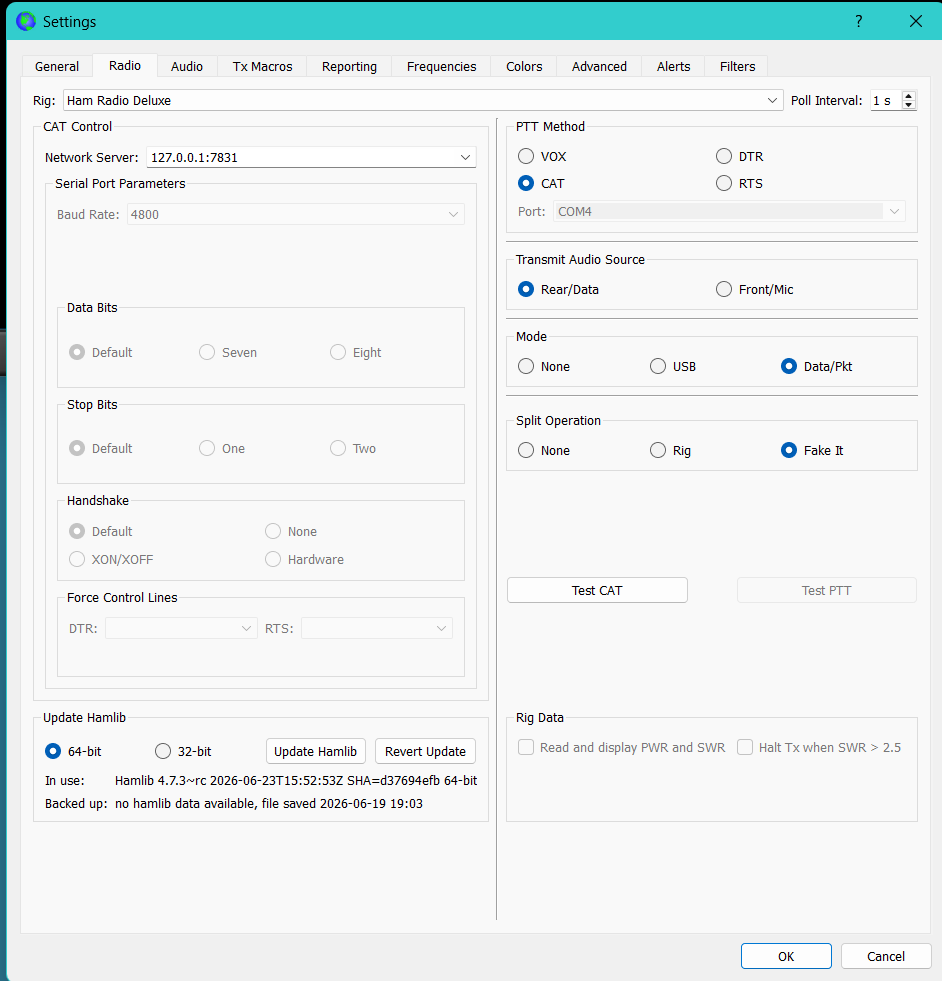
With the new SmartSDR v4.2.20 Slice Master doesn't set the audio channels to Rx1 / Tx1 but to TCI audio.
I guess it is an easy fix for Don K1DBO - but not for us . . .0 -
Another remark . . .
In my configuration I need Slice Master to connect to HRD Logbook.
It's all nicely automated with Slice Master . . .0 -
 Mike-VA3MW Administrator, FlexRadio Employee, Community Manager, Super Elmer, Moderator adminOptions
I published this python program that might help to communicate to HRD Logbook and WSJT.
But, I am in the process of moving off HRD Logbook and over to Tim's SliceLogger as it has support for more than 1 slice.
and if you want to move to a new logger
73, Mike va3mw
0 -
Hello Wolf,
This may help:
Ham Radio Deluxe - WSTJ-X - SmartSDR 4.2.2 — FlexRadio Community
Cheers
Ron
VK4JE
0 -
@Mike-VA3MW — Hi Mike… I was intrigued by your mention of SliceLogger and followed the link you provided to GitHub (above). But when I get there, I can't see any link to download the actual program. What am I missing??
Thanks
D.
0 -
Hi Don, you need to click on the Releases link on the GitHub page.
Once there, click on Assets and you will see the available downloads.
0 -
Thanks Len… a little convoluted, but I found the Assets button at the bottom of the page… :-)
0




Leave a Comment
Categories
- All Categories
- 401 Community Topics
- 2.2K New Ideas
- 683 The Flea Market
- 8.6K Software
- 194 SmartSDR+
- 6.6K SmartSDR for Windows
- 199 SmartSDR for Maestro and M models
- 456 SmartSDR for Mac
- 278 SmartSDR for iOS
- 268 SmartSDR CAT
- 219 DAX
- 394 SmartSDR API
- 9.6K Radios and Accessories
- 102 Aurora
- 347 FLEX-8000 Signature Series
- 7.2K FLEX-6000 Signature Series
- 994 Maestro
- 58 FlexControl
- 872 FLEX Series (Legacy) Radios
- 968 Genius Products
- 481 Power Genius XL Amplifier
- 355 Tuner Genius XL
- 132 Antenna Genius
- 321 Shack Infrastructure
- 226 Networking
- 482 Remote Operation (SmartLink)
- 144 Contesting
- 845 Peripherals & Station Integration
- 147 Amateur Radio Interests
- 1.1K Third-Party Software