SmartSDR v4.2.20 | SmartSDR v4.2.20 Release Notes
SmartSDR v3.10.15 | SmartSDR v3.10.15 Release Notes
The latest 4O3A Genius Product Software:
The latest 4O3A Genius Product Software and Firmware
If you are needing assistance with FlexRadio products, please refer to the product documentation or check the Help Center for known solutions. Need technical support from FlexRadio? It's as simple as creating a HelpDesk ticket.
FlexLIB question

Can someone please tell me how to get a FlexLIB.dll file? Everything I can find seems to be out of date. This is typical of what I can find:

There are no .dll files in the install location. The file "FlexLIB.dll" is not found anywhere on my computer (W11 Pro). I have downloaded the API library. Other instructions say to use .sln or .csproj files to build the dll but I see no .sln files and one .csproj file in UiWpfFramework. Almost all the files seem to be .cs files.
I have done some c# programming but apparently getting started on programming for the Flex is tough (for me)!
Thanks, Mark K5XH 6600/PGXL/TGXL/AGXL
Comments
-
Hi Mark, Flex now creates the executable with the DLLs incorporated instead of in a separate library. This means that you need to compile the DLLs yourself.
What I do to compile FlexLib with Visual Studio 2022 is the following (if this isn't correct or optimal, someone please let me know):
- Open FlexLib.csproj
- Add project UiWpfFramework.csproj to the solution
- Add project Util.csproj to the solution
- Add project Vita.csproj to the solution
- Build FlexLib
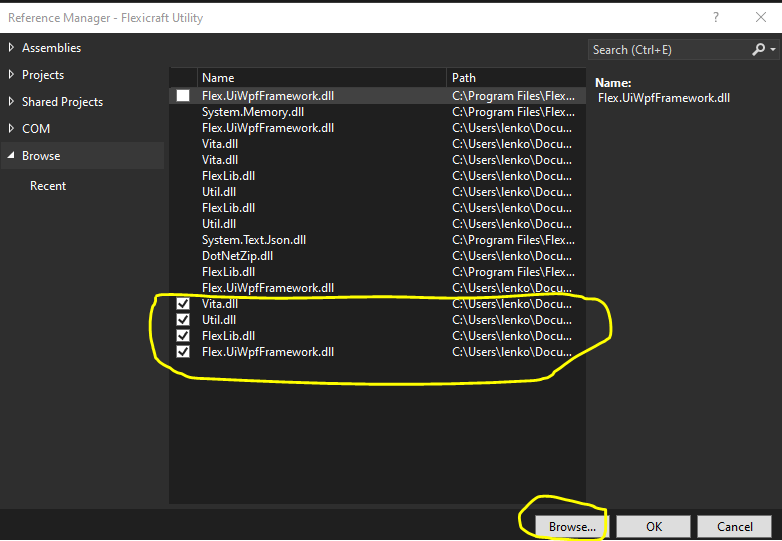
In my application, I add references to the four DLLs (note that the unchecked ones are from older builds)
They then show in the Solution Explorer:
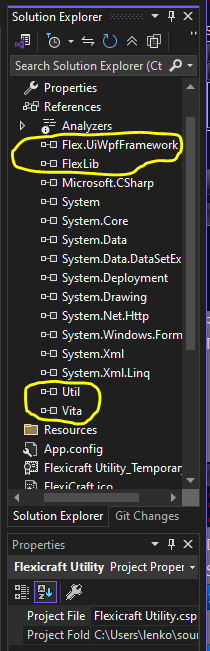
Now I can compile my app using FLexLib.
1 -
Thanks for sharing this. I have avoided compiling from source code for the dll files as I never seemed to be able to get them built in the correct order.
James
WD5GWY
0 -
Thanks Len!
I was beginning to think that I had picked a bad time to try a little API programming! I have spent many hours working on the .dll problem over the last several days. I about wore out my welcome on ChatGPT and Google searching for a solution but none of them worked. I think most of the info was for the older versions of SmartSDR.
I just tried your method and I now have the dll files! Now I get to see if I can do anything with them.
I wonder why Flex doesn't just add those dll files to their downloads and save dummies like me from wasting a lot of time.
Thanks again Len,
Mark K5XH
1 -
Hi Mark, I'm glad you got it working. Good luck with your project!
0



Leave a Comment
Categories
- All Categories
- 401 Community Topics
- 2.2K New Ideas
- 685 The Flea Market
- 8.6K Software
- 195 SmartSDR+
- 6.6K SmartSDR for Windows
- 200 SmartSDR for Maestro and M models
- 456 SmartSDR for Mac
- 278 SmartSDR for iOS
- 268 SmartSDR CAT
- 220 DAX
- 395 SmartSDR API
- 9.6K Radios and Accessories
- 102 Aurora
- 348 FLEX-8000 Signature Series
- 7.2K FLEX-6000 Signature Series
- 994 Maestro
- 58 FlexControl
- 872 FLEX Series (Legacy) Radios
- 971 Genius Products
- 481 Power Genius XL Amplifier
- 357 Tuner Genius XL
- 133 Antenna Genius
- 321 Shack Infrastructure
- 226 Networking
- 482 Remote Operation (SmartLink)
- 144 Contesting
- 845 Peripherals & Station Integration
- 147 Amateur Radio Interests
- 1.1K Third-Party Software