SmartSDR v4.2.20 | SmartSDR v4.2.20 Release Notes
SmartSDR v3.10.15 | SmartSDR v3.10.15 Release Notes
The latest 4O3A Genius Product Software:
The latest 4O3A Genius Product Software and Firmware
If you are needing assistance with FlexRadio products, please refer to the product documentation or check the Help Center for known solutions. Need technical support from FlexRadio? It's as simple as creating a HelpDesk ticket.
ICOM 7300 to Power Genius XL connectivity issues.

I need some help connecting an ICOM 7300 to a PG XL using an Ameritron ARB 704.
The radio is connected with an 13 pin cable to the ARB 704 box, and from the ARB box to the Amp using an RCA cable (male) but I'm having issues with the Amp, because is not being recognized by the radio.
I'm using the Amp in manual mode AAB, baud: 9600.
Let me know what I´m doing wrong so i can fix it! thanks 73
Answers
-
hi Eduardo,
Use an RCA male to male cable from the Icom Send jack to the ARB704. Then RCA to PTT A in on PG XL.
set the TX Delay in radio menu for 30 ms for both HF and 6 meters.73 Dave wo2x
Presale Support
0 -
Hi Dave, thank you very much for writing. I did the test as you told me but no luck. I also connected the male RCA cable directly from the radio output (send) to the PTT A of the amplifier and there was no change either. However, I really appreciate your help. I will have to wait to resolve 73.0
-
Check menu of the Icom to see if you need to enable the Send jack for non-Icom amps.
Also, remove the RCA from the back of the radio and temporarily short it to see if the PG XL goes into transmit. Then you will know which piece of equipment to troubleshoot.
73 Dave wo2x
0 -
Ok David, thank you very much for the information. I'm going to check the radio and do the tests.0
-
 Mike-VA3MW Administrator, FlexRadio Employee, Community Manager, Super Elmer, Moderator adminOptions
I emailed Eduardo privately. But, it sounds like the RCA PTT feature on the PGXL is not enabled. As well, you should only need an RCA cable from the IC-7300 Send jack to the PTT IN on the A side of the PGXL.
 0
0 -
Ok Mike, thank you very much for your kind help. I have already put the amplifier into operation. I had the RCA cable connected to the white PTT A and I passed it to the red PTT IN and it worked perfectly. Regards.0
-
Hello. I am using the Power Genius XL amplifier on the 30-meter band with a 40-meter wire dipole in FT8 mode at 300W. The amplifier shut down and then turned back on, but it won't activate. The radio being used is a Yaesu FTdx 101D. Thank you for addressing my inquiry.Eduardo Ti2SD0
-
Is there some missing information, Eduardo? If you are using the PGXL on 30m with a 40m dipole there is a SWR mis-match. How did you mitigate against that and can you be sure that any high SWR did not get presented to the PGXL? Also, to be clear, when it "shut down" do you mean it totally powered off? "..won't activate" means what exactly - it does not transmit in operate mode i.e. there is no RF output?
Check for any errors that you did not see at the failure by using the PGXL application, selecting the Usage Chart and examining the output. As an example:
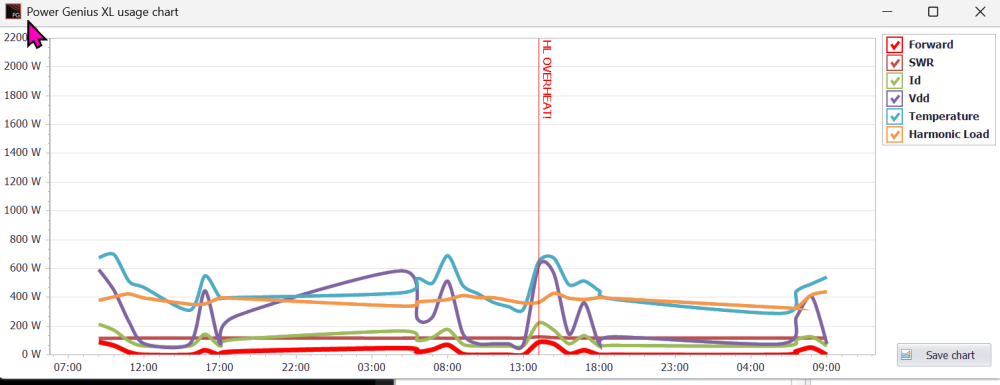
You might see a recorded error - in the picture you see HL Overheat - yours might show HIGH SWR or something else (or maybe nothing at all).
Have you tried a full reset? Power off, wait a few seconds, power on while holding the STBY/OPERATE button until the amp boots. You see a blue dot on the screen, press it with a finger and repeat twice more. The amp will be reset and your parameters will need to be re-entered. After, check for any change in the operation of the amp.
Above all else, in the event of continued failure, open a Help Desk ticket and provide as much information as possible.
0




Leave a Comment
Categories
- All Categories
- 401 Community Topics
- 2.2K New Ideas
- 689 The Flea Market
- 8.6K Software
- 196 SmartSDR+
- 6.6K SmartSDR for Windows
- 200 SmartSDR for Maestro and M models
- 460 SmartSDR for Mac
- 279 SmartSDR for iOS
- 268 SmartSDR CAT
- 220 DAX
- 395 SmartSDR API
- 9.6K Radios and Accessories
- 109 Aurora
- 348 FLEX-8000 Signature Series
- 7.2K FLEX-6000 Signature Series
- 999 Maestro
- 58 FlexControl
- 872 FLEX Series (Legacy) Radios
- 975 Genius Products
- 482 Power Genius XL Amplifier
- 358 Tuner Genius XL
- 135 Antenna Genius
- 321 Shack Infrastructure
- 226 Networking
- 483 Remote Operation (SmartLink)
- 145 Contesting
- 847 Peripherals & Station Integration
- 147 Amateur Radio Interests
- 1.1K Third-Party Software