SmartSDR v4.2.20 | SmartSDR v4.2.20 Release Notes
SmartSDR v3.10.15 | SmartSDR v3.10.15 Release Notes
The latest 4O3A Genius Product Software:
The latest 4O3A Genius Product Software and Firmware
If you are needing assistance with FlexRadio products, please refer to the product documentation or check the Help Center for known solutions. Need technical support from FlexRadio? It's as simple as creating a HelpDesk ticket.
520M just won't transmit! Zero RF output

I've gone through all the troubleshooting steps I could find. Even did a factory reset, and I can't get any RF out from my new 520M.
I've had it for a few weeks now, but it's taken me this long to get a halfway decent antenna set up.
I checked all the settings tried it on AM, CW etc. The TX Band Settings are correct. When I try to transmit either from the Maestro front panel or Smart SDR+, Absolutely zero RF out!
I'm a retired Engineer and Network Expert, but am at a loss to figure out what's wrong.
Anyone have any ideas?
Comments
-
What mode are you trying? I would suggest, to rule out a serious problem, connect a key/paddle to the key input on the back, go to CW mode and see if it transmits then.
Because the Flex Radios have so many different audio inputs it is very possible you just do not have the right audio input selected. So definitely try CW to be sure.
0 -
Can you post a screenshot of SmartSDR? Are operating locally or remotely? To add to what Mark suggests, try the Tune button. It should work regardless of mode.
0 -
I tried all the modes, CW, AM, SSB. In voice mode the microphone shows on the panadapter but there's not RF output. Like I said, it's not an obvious problem. I don't see how to post a screenshot in a comment. I'll look into doing it as a new post.0
-
And I'm on my local LAN and all the TCP/IP communications are working properly.0
-
OK, I tried to find a way to upload an image and no joy. There isn't an option anywhere in the discussion board I could find that would allow it.
SO, I put it on my personal website. The screenshot can be viewed at
https://williamfinkelstein.com/images/AURORA_Screenshot_in_TX_with_zero_output_2026-06-23_183617.jpg
I took the screenshot in CW Transmit mode. It shows zero output.0 -
Tried posting it using HTML, wouldn't work.0
-
Hi Bill, I could see the image. Were you keying the rig or did you click the MOX button? The MOX button in CW won't key the rig, you need to hit the key or paddles. Also, it looks like you are in multiFLEX mode, so your front panel might be what is getting keyed, not SmartSDR.
Go to Settings, multiFlex… and make sure that Local PTT is set to SmartSDR. I only have one entry in the example below, but you will have two - one for the front panel and one for SmartSDR on your PC.
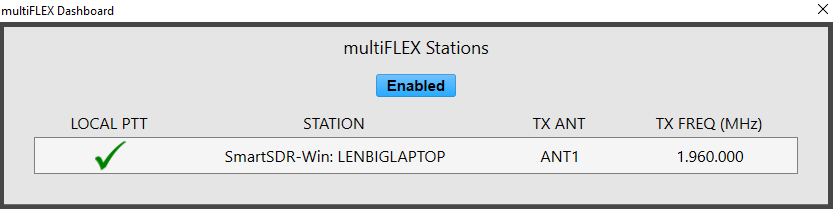
If you haven't tried it yet, put your front panel into SmartControl mode (Chapter 9 of the Maestro User's Guide). It gives you the best of both worlds - the big display with mouse and keyboard control along with the front panel knobs and buttons controlling the same slice(s).
0 -
 Mike-VA3MW Administrator, FlexRadio Employee, Community Manager, Super Elmer, Moderator adminOptions
The screenshot is a must have for help anyone solve problems.
it is built into Windows
Windows key + Shift + S is the quickest method. It opens the Snip & Sketch overlay and lets you drag to select exactly what you want to capture. The screenshot copies to your clipboard and a notification pops up that you can click to annotate or save it.
Other quick options:
- PrtScn copies the full screen to clipboard
- Alt + PrtScn captures just the active window
- Windows key + PrtScn saves a full-screen shot automatically to
Pictures > Screenshots
0 -
Mike - doing the screenshot was no problem. Posting it on this board is the issue.
However, I just got "Promoted" from new board user to "Seasoned Member" and additional functions appeared in this "Leave a Comment" field, these new functions include add a picture, attach a file, etc. So I can now do that. and it's below.
I did file a trouble ticket with my issues and Tim Ellison has responded and is sending a replacement unit and RMAing my current radio.
Leonard, KD0RC - Controlling the slice isn't the issue. I'm doing that correctly. Note I did do some additional debugging using a tinySA and I do get some output when keying CW, but it doesn't show on the front panel PO gauge. Also nothing appears on the tinySA when I try SSB (yes, I'm saying "Test" etc.). Mic level is set mid point and the Waterfall display shows my voice, but no RF is apparent.
I've been doing most of my debugging since I did the factory reset from the front panel of my Aurora 520M, I'll try Smartcontrol later today. I have been able to control the radio fine from either the front panel or SmartSDR+ fine.
We'll see if the replacement radio works as it should!
73s,
Bill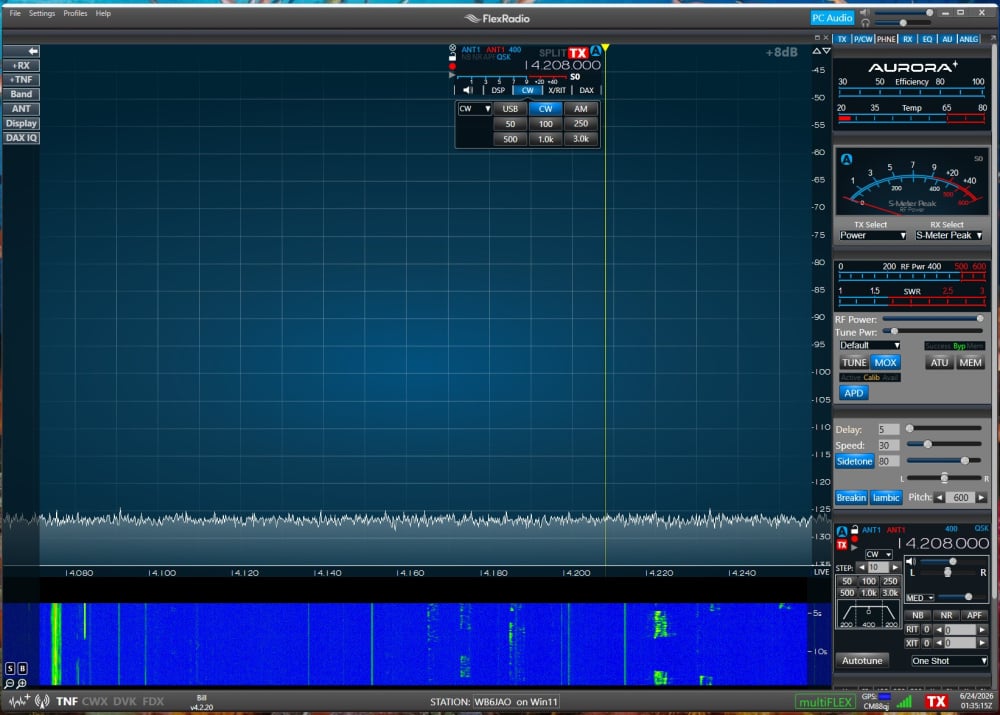 0
0 -
I just ran a quick test with my AU-520M. If you have your microphone connected to the radio, and are using SmartSDR on your computer, you need to select in input source ( MIC, BAL, LINE, ACC,) from the P/CW menu in SmartSDR on your computer. Also you need to select the type of microphone ( if listed) at the top of the P/CW controls. You will see your transmit signal in SmartSDR and on the front panel. But, power output will only display on the radio's meters. ( at least that is how it works on my AU-520M)
James
WD5GWY
0 -
Exactly - all that is fine except there's not power output on the radio's meters and my tinySA shows no RF.
I see my voice fine on the radio display's waterfall, but no output. I'm using the stock microphone and it's set up as such correctly.0 -
Okay, that definitely sounds like a problem with the radio itself. . One final test you might try is connecting an external watt meter and using the Tune button on the front of the radio to see if the watt meter shows any output. If you have a dummy load you can run the tests without worrying if your antenna is causing the radio to fold back power output for some reason.
James
WD5GWY
0 -
I just ordered a dummy load. But the tinySA would show if any RF was produced. It showed nothing.
FlexRadio is sending me a replacement. Tim agrees with me that she's got problems 😞
1 -
Another thing to try is using the Tune button with a dummy load, just to see if there is steady RF.
1




Leave a Comment
Categories
- All Categories
- 401 Community Topics
- 2.2K New Ideas
- 689 The Flea Market
- 8.6K Software
- 196 SmartSDR+
- 6.6K SmartSDR for Windows
- 200 SmartSDR for Maestro and M models
- 460 SmartSDR for Mac
- 279 SmartSDR for iOS
- 268 SmartSDR CAT
- 220 DAX
- 395 SmartSDR API
- 9.6K Radios and Accessories
- 109 Aurora
- 348 FLEX-8000 Signature Series
- 7.2K FLEX-6000 Signature Series
- 999 Maestro
- 58 FlexControl
- 872 FLEX Series (Legacy) Radios
- 975 Genius Products
- 482 Power Genius XL Amplifier
- 358 Tuner Genius XL
- 135 Antenna Genius
- 321 Shack Infrastructure
- 226 Networking
- 483 Remote Operation (SmartLink)
- 145 Contesting
- 847 Peripherals & Station Integration
- 147 Amateur Radio Interests
- 1.1K Third-Party Software