SmartSDR v4.2.20 | SmartSDR v4.2.20 Release Notes
SmartSDR v3.10.15 | SmartSDR v3.10.15 Release Notes
The latest 4O3A Genius Product Software:
The latest 4O3A Genius Product Software and Firmware
If you are needing assistance with FlexRadio products, please refer to the product documentation or check the Help Center for known solutions. Need technical support from FlexRadio? It's as simple as creating a HelpDesk ticket.
Slice-Master H Virus

Been using with no issues Slice-Master H since release with no issues.
This morning windows found it as a Threat and removed it.
Tried to download it several times with no luck as it continues to Block it despite trying to force the download. Via the CTRL J function.
Is anyone else having this issue????
Ian
KM4CQG
Answers
-
I've found the same thing. When I tried to run the app, I got the usual "this is an unsigned app' messages, but I told Windows to run it anyway. Then I got messages saying that Windows Security sees this as a threat and I dismissed those, but now the app has disappeared from the download folder and has been replaced with a CONF file.
There are notes saying that we may have to tell the windows firewall to let it through, but I can't find where to do this in win11.
Don't have this issue with the 'g' version, although I do see the CONF file in the 'g' folder.
K1BDO — help???
0 -
Hmmmm… it appears Windows Anti-virus thinks there is a Trojan ('bearfoos'???) in the Slicemaster h executable.
0 -
Hree's the message from Windows Anti-Virus:
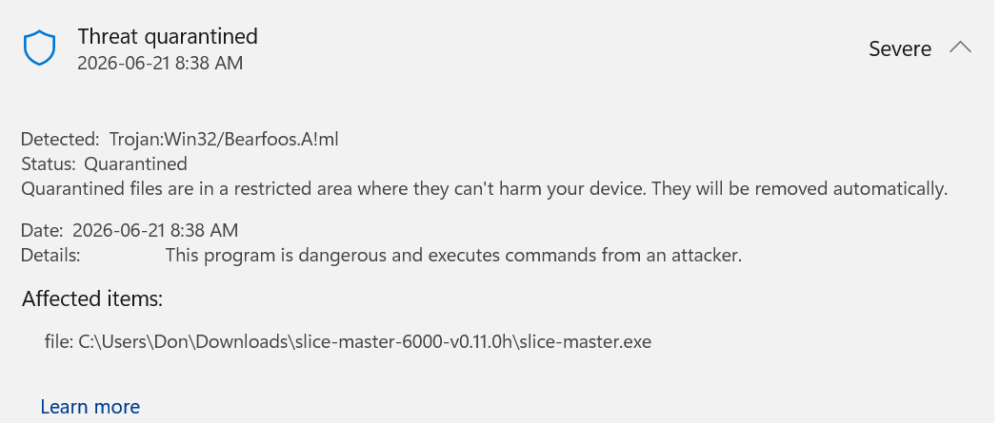
So, either the downloadable file has been infected, or Windows AV has had a recent update which is identifying the content as a Trojan.
0 -
I have the exact same Threat message.
0 -
 Mike-VA3MW Administrator, FlexRadio Employee, Community Manager, Super Elmer, Moderator adminOptions
Trojan:Win32/Bearfoos.A!mlis detected by Microsoft Defender Antivirus. The!mlsuffix indicates it was flagged by machine learning rather than a traditional signature match, and Microsoft's own threat encyclopedia notes that technical details are not available for this detectionThe
!mldesignation means the detection is from machine learning, which means there is no specific explanation for why a given file was flagged. Developers who have had their legitimate software flagged this way have reported the issue to Microsoft, which then updated definitions to stop incorrectly flagging their programs. Steam Community0 -
Don & Mike
I had the previous copy of Slice Master "G" and have found this is working properly. I am not running the latest version 4 of Smart SDR so for my 3.10.15 it's performing properly.
Ian
KM4CQG
0 -
Hi Ian… yes, I've found that 'g' works fine for me as well with 4.2.20 of SmartSDR. I've talked to Don (the originator) and he is aware of the problem but can only suggest staying on 'g' if it works for you.
It may be, as Mike suggests, that this is something that MS will need to address in their next update of the AV softare.
0


Leave a Comment
Categories
- All Categories
- 401 Community Topics
- 2.2K New Ideas
- 691 The Flea Market
- 8.6K Software
- 197 SmartSDR+
- 6.6K SmartSDR for Windows
- 200 SmartSDR for Maestro and M models
- 462 SmartSDR for Mac
- 280 SmartSDR for iOS
- 268 SmartSDR CAT
- 220 DAX
- 395 SmartSDR API
- 9.6K Radios and Accessories
- 113 Aurora
- 352 FLEX-8000 Signature Series
- 7.2K FLEX-6000 Signature Series
- 999 Maestro
- 58 FlexControl
- 872 FLEX Series (Legacy) Radios
- 978 Genius Products
- 484 Power Genius XL Amplifier
- 358 Tuner Genius XL
- 136 Antenna Genius
- 323 Shack Infrastructure
- 228 Networking
- 485 Remote Operation (SmartLink)
- 147 Contesting
- 847 Peripherals & Station Integration
- 148 Amateur Radio Interests
- 1.1K Third-Party Software