SmartSDR v4.2.20 | SmartSDR v4.2.20 Release Notes
SmartSDR v3.10.15 | SmartSDR v3.10.15 Release Notes
The latest 4O3A Genius Product Software:
The latest 4O3A Genius Product Software and Firmware
If you are needing assistance with FlexRadio products, please refer to the product documentation or check the Help Center for known solutions. Need technical support from FlexRadio? It's as simple as creating a HelpDesk ticket.
HELP !! Smartlink is still down here in EU !!

I have no more connection to any of my radios although running 4.1.5 version.
Status page says all green but me nor my other remote users cannot log in, radios do not appear on the smartlink screen.
One must understand it is difficult to update a radio that is 1000 miles away…
Comments
-
 Mike-VA3MW Administrator, FlexRadio Employee, Community Manager, Super Elmer, Moderator adminOptions
You can check the status of SmartLink here:
Are you able to remotely reboot your radios and see if that clears the problem?
3 -
Wow, this is fantastic! I really appreciate Flex putting this together.
0 -
I told you I already checked the status pages, all green, like my internet provider when nothing works any more lol…
No I cannot reboot, that functionality unfortunately is not available via the ethernet port of the Flex as far as I know….…
I have a remote PC on both locations with Anydesk, that is all….
Are you telling me is am FuckPEEEEPed ?
Pedro.
0 -
Mike-VA3MW Administrator, FlexRadio Employee, Community Manager, Super Elmer, Moderator adminOptions
The remote PC is great. You can fix this.
If you are not using the Remote RC connector on the back of the radio then we can do this in software.
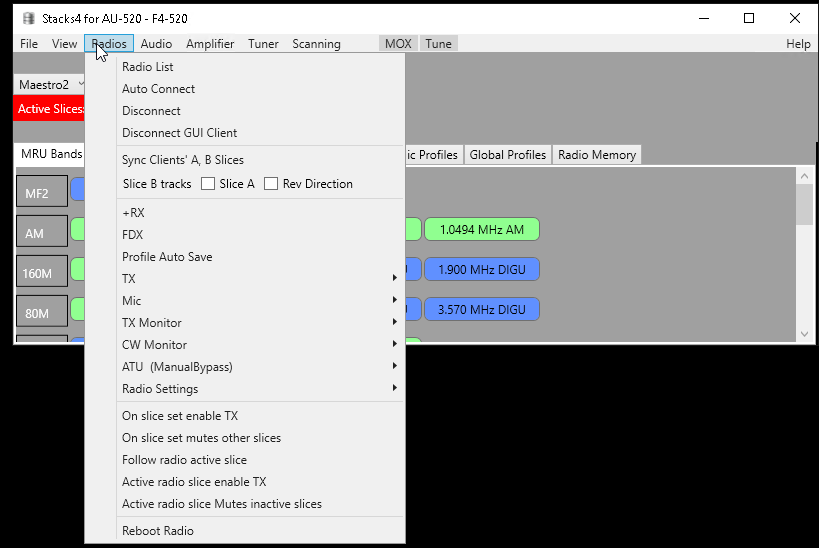
Within the remote PC, install FRstack and connect to the radio. Click the Reboot Radio button.
 0
0 -
Absolutely awesome !!
Installed the app, rebooted the radio, works again on smartlink.
This saves me buying a remote on/off switch !
Great !!!
Now going to do the same with the second radio in Cote D' Azur France..
0 -
Mike-VA3MW Administrator, FlexRadio Employee, Community Manager, Super Elmer, Moderator adminOptions
If anyone else has had to do this, can you just comment here for me. Let me know the radio model, SmartSDR version as well. And, if you have to do it very often. thanks
0 -
MIke,
After the smartlink outage a few days ago I also had to reboot the radios. 6600 and AU 520m. 4.2.20 on both. I have also seen this when I've had a local internet outage. The radios drop off from smartlink and never recover. If there is a keepalive in the radio that is supposed to detect not being properly connected to smartlink servers and reestablish the connection I don't think it's working right under all cases.
Dan
0 -
I could not reach my '6400 over SmartLink Tues June 18. I did non-ham stuff for the 6hrs I had intended to operate.
This morning (Wed June 19) I powered-down my '6400, removed power while I went for a coffee, and subsequently re-powered / re-started my '6400. It became immediately available again via SmartLink.
Prior to cold re-start, I could never get a SmartSDR response regarding Smartlink SETUP nor the "green light" TEST. After cold re-start, everything showed normal, and "just worked" again.
Software 4.2.20.41343
0 -
Hi Mike,
Yes, I often have to reboot my 6700's one in particular because they are not seen by the Smartlink server. However, they are almost always viewable on the Lan. SmartSDR v4.2.20.
73,
Bill AB7AA
0



Leave a Comment
Categories
- All Categories
- 401 Community Topics
- 2.2K New Ideas
- 685 The Flea Market
- 8.6K Software
- 194 SmartSDR+
- 6.6K SmartSDR for Windows
- 200 SmartSDR for Maestro and M models
- 456 SmartSDR for Mac
- 278 SmartSDR for iOS
- 268 SmartSDR CAT
- 220 DAX
- 395 SmartSDR API
- 9.6K Radios and Accessories
- 102 Aurora
- 347 FLEX-8000 Signature Series
- 7.2K FLEX-6000 Signature Series
- 994 Maestro
- 58 FlexControl
- 872 FLEX Series (Legacy) Radios
- 970 Genius Products
- 481 Power Genius XL Amplifier
- 357 Tuner Genius XL
- 132 Antenna Genius
- 321 Shack Infrastructure
- 226 Networking
- 482 Remote Operation (SmartLink)
- 144 Contesting
- 845 Peripherals & Station Integration
- 147 Amateur Radio Interests
- 1.1K Third-Party Software