SmartSDR v4.2.20 | SmartSDR v4.2.20 Release Notes
SmartSDR v3.10.15 | SmartSDR v3.10.15 Release Notes
The latest 4O3A Genius Product Software:
The latest 4O3A Genius Product Software and Firmware
If you are needing assistance with FlexRadio products, please refer to the product documentation or check the Help Center for known solutions. Need technical support from FlexRadio? It's as simple as creating a HelpDesk ticket.
Can someone help with MRP40

Answers
-
Hi Bruce,
I think you want to do CW and not transmit the CW audio tone in SSB over DAX.
To do this, your configuration needs to be slightly different.
First, a Winkeyer must be created in SmartCat.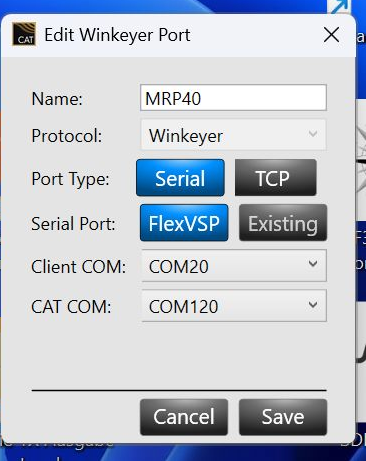
Then set WinKey as the send option in MRP.
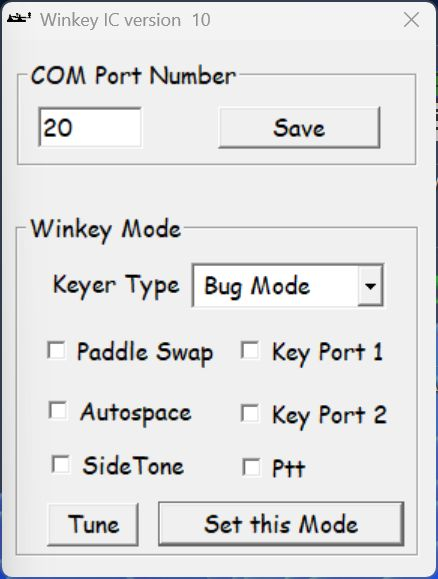
and switch to bug mode!
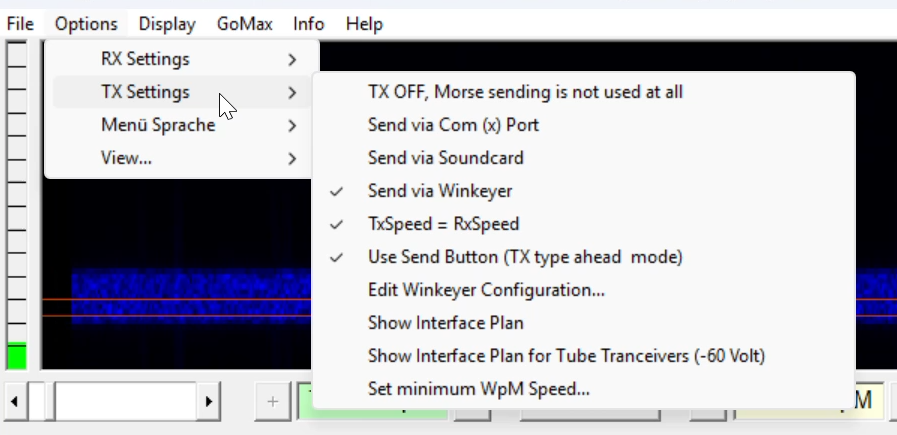
vy73 55 Klaus2 -
Klaus.....thank you so much for helping me with this.Got it working perfectly this morning. I believe this will help a lot of people with Flex Radios, that have this program and cannot get it working.
73
Bruce KO4UHL2 -
Hi Bruce,
Could you please tell me which version of MRP40 you are using. It appears that there are a few versions and I'm not sure of which one is compatible with the recent Flex updates, particularly to DAX.
Tnx es 73 de Mike N2YBB0 -
Hi Klaus-
Could you please tell me which version of MRP40 you are using. It appears that there are a few versions and I'm not sure of which one is compatable with the recent Flex updates, particularly to DAX.
Tnx es 73 de Mike N2YBB0 -
Hi Mike,
my MRP 40 is the latest Version MRP4067
and it works very well with SmartSDR 4.2.20.here my configuration
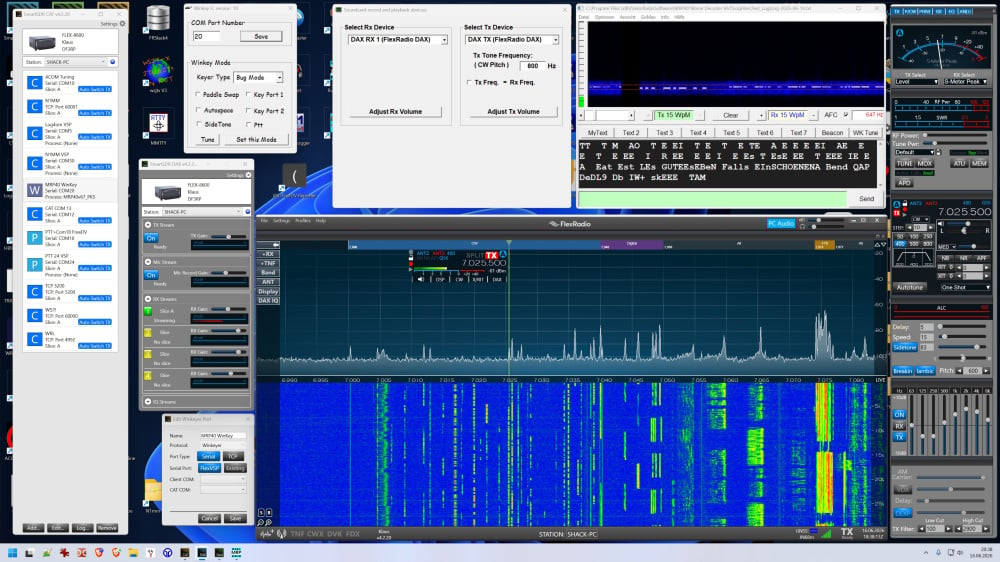
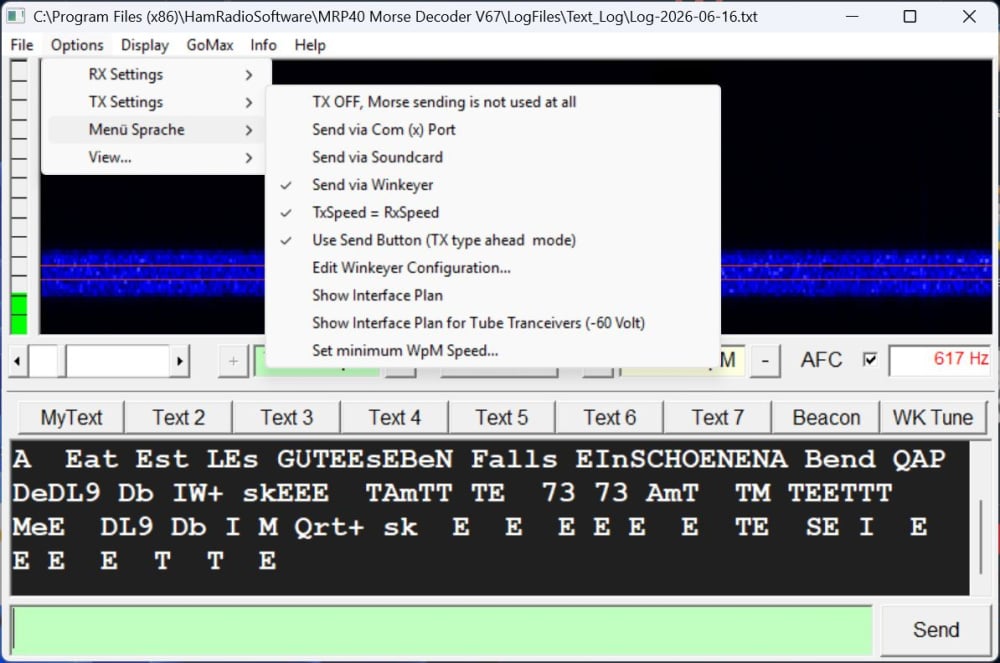
73 Klaus
0 -
I paid for this app a few years ago and had it running on a win 10 PC that I no longer have. After following this thread I decided to install and try it again on my new win 11 machine. Is it just me or does one have to jump thru hoops to get this program to install properly- the instructions are quite detailed but seem way more involved then the average ham program install. I made a valid attempt to follow his steps but still failed. The program did not wind up in the x86 program folder it was suppose to and when I did find the exe folder - it would not run.
Any hints or suggestions in just getting installed and running on a Win11 PC/
73 Paul w2eck
0 -
Hi Paul,
No, unfortunately there's no easy way.
Because of Microsoft's restrictions, the lengthy process described is necessary.
Perhaps there's a string in the program that's being detected as a virus or something similar.
Or maybe the program needs to access areas that Microsoft considers off-limits.
You have to follow the instructions exactly, since the browsers are also restricting us.73 Klaus DF3RP
0 -
Hi Klaus-
Thank you very much for answering my plea. Using the information in your instruction I was able to install MRP40. It is working on my Flex8400m in both RX and TX.
My Vy 73 de Mike N2YBB0


Leave a Comment
Categories
- All Categories
- 401 Community Topics
- 2.2K New Ideas
- 691 The Flea Market
- 8.6K Software
- 197 SmartSDR+
- 6.6K SmartSDR for Windows
- 200 SmartSDR for Maestro and M models
- 462 SmartSDR for Mac
- 280 SmartSDR for iOS
- 268 SmartSDR CAT
- 220 DAX
- 395 SmartSDR API
- 9.6K Radios and Accessories
- 113 Aurora
- 352 FLEX-8000 Signature Series
- 7.2K FLEX-6000 Signature Series
- 999 Maestro
- 58 FlexControl
- 872 FLEX Series (Legacy) Radios
- 978 Genius Products
- 484 Power Genius XL Amplifier
- 358 Tuner Genius XL
- 136 Antenna Genius
- 323 Shack Infrastructure
- 228 Networking
- 485 Remote Operation (SmartLink)
- 147 Contesting
- 847 Peripherals & Station Integration
- 148 Amateur Radio Interests
- 1.1K Third-Party Software