SmartSDR v4.2.20 | SmartSDR v4.2.20 Release Notes
SmartSDR v3.10.15 | SmartSDR v3.10.15 Release Notes
The latest 4O3A Genius Product Software:
The latest 4O3A Genius Product Software and Firmware
If you are needing assistance with FlexRadio products, please refer to the product documentation or check the Help Center for known solutions. Need technical support from FlexRadio? It's as simple as creating a HelpDesk ticket.
No power out from new 8400ATU

I've opened a ticket on this, but in the meantime, perhaps someone can point out my folly. I'm probably omitting something painfully obvious, but I am getting no power output from a new, out of the box 8400ATU which I just bought from FlexRadio as a “previously loved” factory reconditioned unit.
Because this is not my first Flex, SmartSDR 4.2.20 was already on my computer. When I hooked up the new 8400, the first thing it asked for was to update the radio from the previous version (which I presume was 4.2.18). So I updated the radio before doing anything else.
I'm connected to a dummy load (I've actually tried 2 different dummies). When I click on tune, the TUNE and MOX buttons light and the panadapter waterfall stops, but there is no indication on the TX meter, even if I slide the tune power up to 100%. This is consistent on all bands. I've performed a full reset (twice), but there is no change.
I plugged in the microphone, and the Level and Compression indicators dance in keeping with my voice, but there is no indication of power output in the TX window, even with the power slider at 100%. TX filters are set with Low Cut at 100 and High Cut at 3000. And yes, I am in band.
Answers
-
Hi Mark, can you post a screenshot of SmartSDR?
0 -
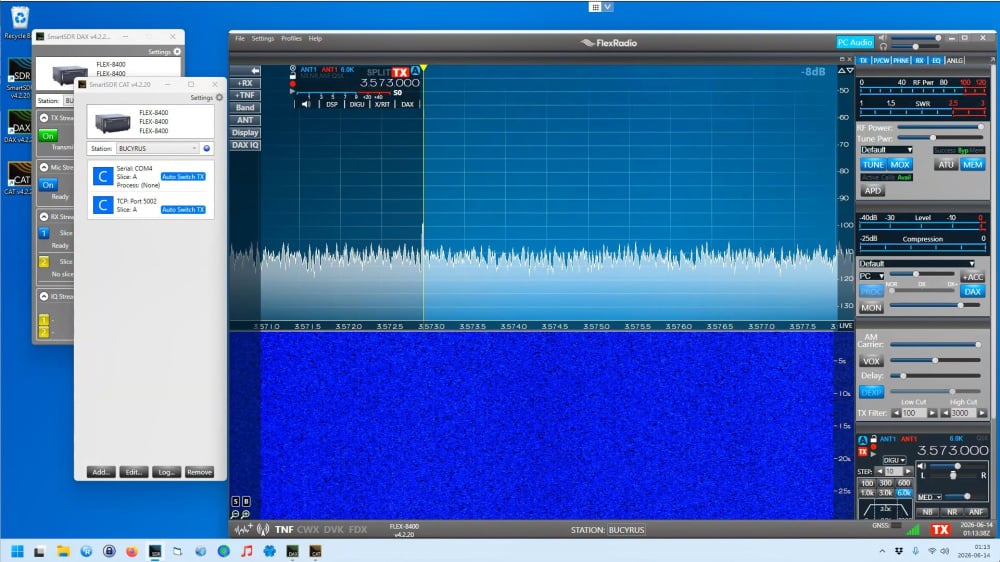
Here's a screenshot while the TUNE is on but the RF is not indicating.
0 -
Hi Mark, Can you check your TX Band Settings to be sure that PTT Inhibit is not checked for 80m meters?
0 -
In the TX Band Settings there are no boxes checked of any kind on any band.
0 -
What about Radio Setup-TX-Max Power?
0 -
-
Nice call sign, by the way. :-)
73, John N1JM
1



Leave a Comment
Categories
- All Categories
- 401 Community Topics
- 2.2K New Ideas
- 691 The Flea Market
- 8.6K Software
- 197 SmartSDR+
- 6.6K SmartSDR for Windows
- 200 SmartSDR for Maestro and M models
- 462 SmartSDR for Mac
- 280 SmartSDR for iOS
- 268 SmartSDR CAT
- 220 DAX
- 395 SmartSDR API
- 9.6K Radios and Accessories
- 113 Aurora
- 352 FLEX-8000 Signature Series
- 7.2K FLEX-6000 Signature Series
- 999 Maestro
- 58 FlexControl
- 872 FLEX Series (Legacy) Radios
- 978 Genius Products
- 484 Power Genius XL Amplifier
- 358 Tuner Genius XL
- 136 Antenna Genius
- 323 Shack Infrastructure
- 228 Networking
- 485 Remote Operation (SmartLink)
- 147 Contesting
- 847 Peripherals & Station Integration
- 148 Amateur Radio Interests
- 1.1K Third-Party Software