SmartSDR v4.2.20 | SmartSDR v4.2.20 Release Notes
SmartSDR v3.10.15 | SmartSDR v3.10.15 Release Notes
The latest 4O3A Genius Product Software:
The latest 4O3A Genius Product Software and Firmware
If you are needing assistance with FlexRadio products, please refer to the product documentation or check the Help Center for known solutions. Need technical support from FlexRadio? It's as simple as creating a HelpDesk ticket.
AetherSDR — Open-Source Linux Client for Flex Radios
Comments
-
I have sent it in as a issue as well, several weeks ago now.
Wish it looked more like RimuSDR on Linux
0 -
I added my two cents for making user defined interface color schemes. Hopefully, it will be something that they consider doing.
James
WD5GWY
0 -
I continue to test AetherSDR. There is much to like, and it is still in development, but some aspects are not optimal.
Clearly there are more features than in SSDR and the DSP functions work much better. It appears, I could be wrong, that AetherSDR adds its own processing power to some of the DSP functions.
I am particularly happy to see TCI as a means of connecting digital mode software such as JTDX. Never a glitch unlike DAX. The new DAXv2, I should note, is a step forward though I am sure it has too much gain and a small change inward results in a larger change outward than in DAXv1. Flex disagree with me and they should know so I cannot explain it.
The ability to put forward a feature addition or enhancement is amazing. I utilized their system using AI to suggest making the DX Spot display on the panorama allow for more than the currently restricted 10 lines for those users who have vertical screen space to show more Spot data. Well, I say I used AI - ha, I mean I guessed at using it. What do I know? When I was at school it was 2 tin cans and a piece of string. But I did get a favorable response and confirmation that it could be done.
What I do not like apart from the UI which is too dark, and aesthetically only a dumbed down copy of SSDR instead of being as inspired as the programming behind the software, is that AetherSDR is over demanding on computer resources. I have a Ryzen 9 7950X running 5.5GHz max, 4.5GHz nominally, with 64GB of very fast RAM. AetherSDR on launch is fine, the computer doesn't blink. But within 30 minutes the computer fans have ramped up, the CPU is at full speed and memory usage is climbing. Bad programming, memory leak, something else but whatever it is a severe drawback. Something else unique to me maybe. Ah well, we are so lucky to have software choice, no matter what the OS platform, to go with our radios.
0 -
Hi Erik, I would be interested in your opinion of RimuSDR by Simon, NV0E (especially as compared to AetherSDR). He has a free demo version that you can download to try it out.
I have used it on Windows 10 and on a Raspberry Pi 4B and find it to be very mature for such a new product.
Congratulations on your award from Flex! Your insights and the help you provide here are well appreciated!
0 -
Erik makes some very good points.
For me, it is way too busy and I could never use it for contesting which needs to be a much cleaner interface.
This only identifies that there is no one perfect layout/interface. Those that want to tinker with every setting want to see everything. PowerSDR was great for this. Those who operate heavily and only want to see the key settings such as CW Speed, Mic Gain, RF Power and filter management want to be able to quickly make adjustments.
Neither is wrong but only identifies the diversity within ham radio.
73
4 -
There is a web browser based Hamclock alternative (Open Hamclock) that has a user configurable UI in which one can call up and position individual dockable units. So, using Mike's wish list, one would be able to select among a plethora of settings widgets those for CW, MIC, PWR, Filters and omit widgets for which there is no interest. You could move them to the bottom or over the Pan, horizontally, vertically etc., all within the SDR UI, wherever your eye favours for instant data input when you need it in a hurry. Colors, font sizes and so on all user configurable. If only I had graduated as a youngster from tin cans to programming.
Len: ok Rimu, not familiar - will download and let you know.
0 -
Way too busy for me. SSDR for Mac or SSDR for Windows are busy enough but good for my type of operation. Also the font size for much of it is too small. I know you can change the size but it changes the size of everything. It would also be nice to change the background from black. For those that like to geek out, Aether or some of the other variants coming along might be for you.
1 -
I am enjoying AetherSDR software more than my words can describe. Super thankful to everyone that has helped out on this project. Gosh, the future sure looks much brighter now.
I suppose I am a bit different. I like the dark UI. It's easier on my eyes. I hope you will leave a UI version that keeps the dark version.
I am not sure how/why people are experiencing high CPU usage. Mine keeps cruising along between 3% - 4% and shows only 335 MB of memory used. And the CPU percentage doesn't change much when I transmit too.
I am using a home-built water cooled computer with the following components:
Processor Intel(R) Core(TM) i7-14700K, 3400 Mhz, 20 Core(s), 28 Logical Processor(s)
MSI MEG Z690 ACE (MS-7D27)
Installed Physical Memory (RAM) 32.0 GB DDR5
Runs cool as a cucumber and rarely goes above 5% CPU usage no matter how long I use AetherSDR software.
The radio I am using is a Flex 8400. I am using AetherSDR software remotely most of the time.
Hope this helps someone!I am ecstatic over this software. Thanks again everyone!
You guys rock!
AJ6XW
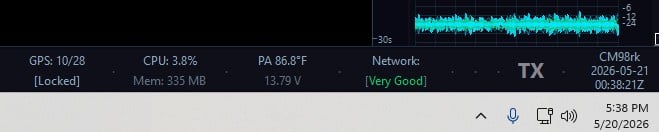 1
1 -
The problem above is fixed in new version 26.5.3 and I am also delighted that my request to increase the number of DX Spot lines from 10 to 15 is already implemented. I asked Flex for this in SSDR a long time ago and got told no. AetherSDR guys said yes. Not having anywhere near so many Spots hidden behind the '+' sign is a real boon for contesters.
1 -
I'm new to AetherSDR but after a few days of running it I am very impressed. I'm able to run all 8 Slices on the 6700 again something Smart SDR hasn't let me do in well over 1.5 years.
0 -
I am surprised that SmartSDR won't let you use a 8 panadapters. This is the first time I have heard of anyone with a 6700 having this problem. I would open a Help Desk ticket as I don't believe that this is normal behavior for SmartSDR.
James
WD5GWY
0 -
All 8 slices are working for me with the latest SSDR version (Flex6700)1
-
I am loving AetherSDR and I love the dark interface. One thing I have always disliked when running SSDR was I needed this software to do this, this other software to do something else, etc. Nothing wrong with that but when you can do more with just one piece of software, it makes life a lot easier. Really looking forward to seeing what new features are added. Might even interest me into buying a 8000 series radio and making my old 6700 the backup.
0 -
After returning from Dayton yesterday, I installed Aether. I really like it and am discovering new features. I wanted to use AetherVoice, but it only works when the microphone is connected to the computer and PC audio is enabled. My microphone is connected to the Apollo Thunderbolt X4 interface, and the Apollo's output jack is connected via cable to the BAL jack on the Flex 8600M. I probably need to change this to connect the audio wirelessly. Does anyone know how to do this using Apollo?
Best regards,
Slawomir SP6DLO0 -
The dark interface, if it does not suit you, can now be changed in the latest version. I have not yet finished my amendments but I like the colors below more than the all black. You can now have exactly what you want per section of UI.
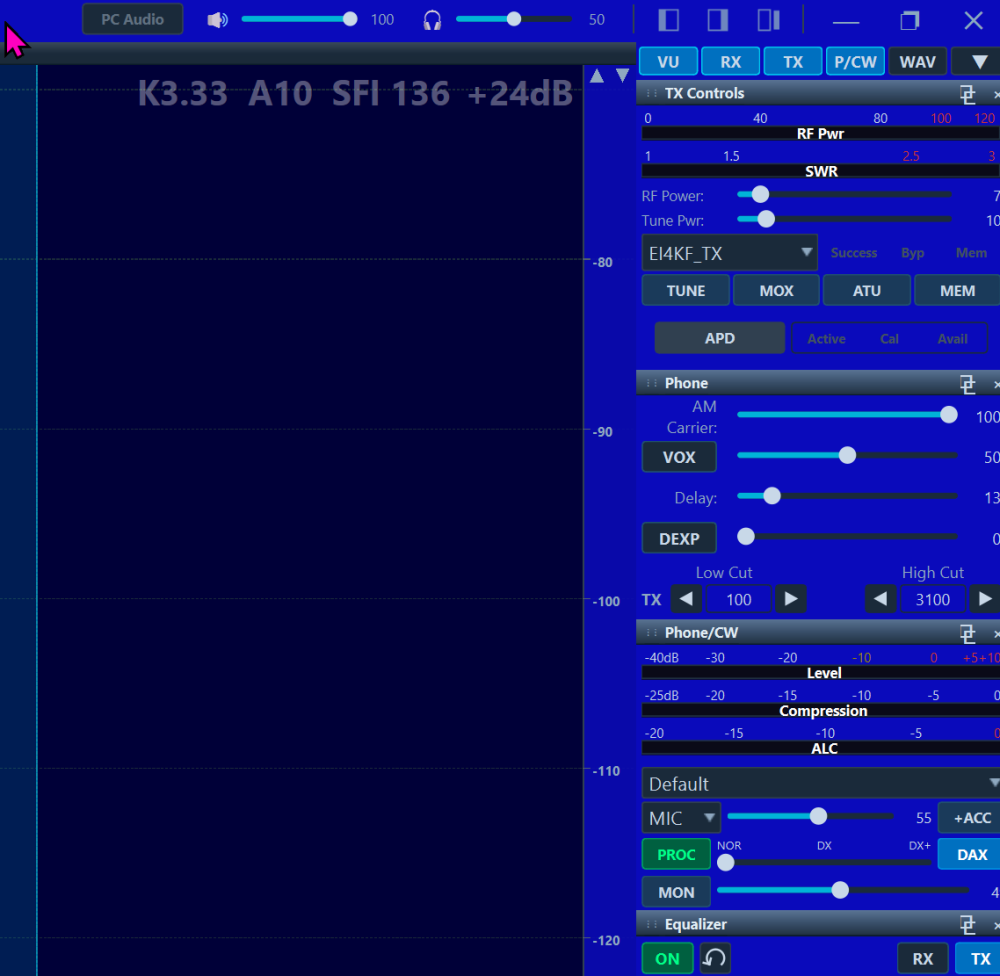
Also many other changes. I am quite impressed by the speed of development.
0 -
Yay!
I love choice, but at first glance I have to say the large number of elements that can be adjusted is overwhelming 😯
The Default Dark isn't to my liking, but the Default Light isn't usable.
Perhaps with a couple of cold 807s, I'll tailor the huge list of adjustables to something I like and can use. THANK YOU for providing choice!
0 -
I am impressed, just installed a few different versions of it, and it worked right out of the box.
The first install was the linux one…on a Ubuntu install on Parallels on a Mac (mine is too old to run the Mac version v10…needs v13)…I was surprised the remote login worked. Ran great with no hickups.
Second install was on a RPi5 on the Pi Touch Display 2 (720x1280). Ran better than the later windows install, I couldn't figure out Pi Bluetooth audio…but that isn't a problem with the AetherSDR software.
Finally a Windows version…I used the portable one. The only thing I noticed, on a big screen (1920x1080) the graphics were a bit low definition…that may be intentional, but it was distracting, especially compared to the other two.
I can't believe this has only been out a short length of time!
Mike KF5DEY
0 -
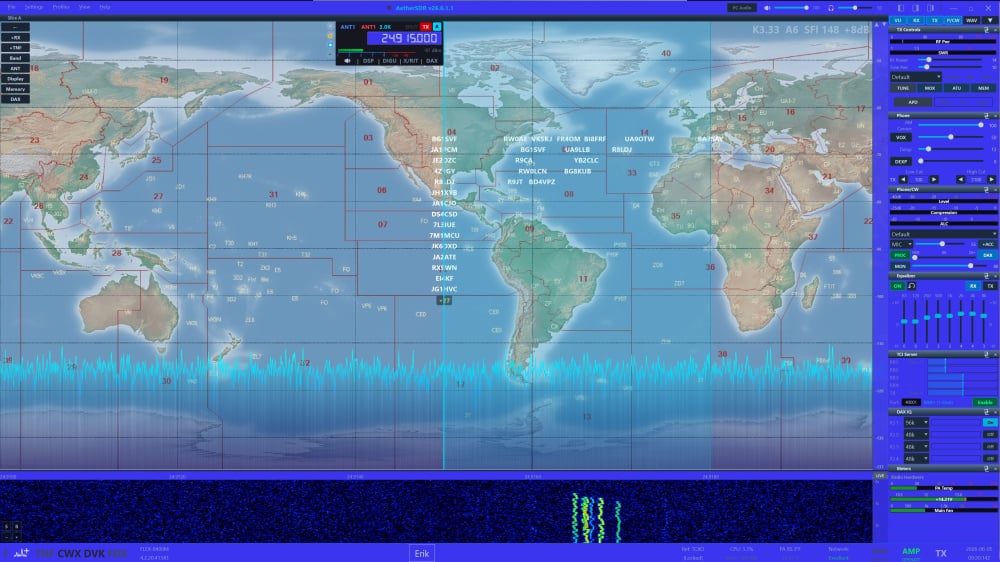
This is in Windows but, as Mike says, definition was not quite the same as in other OS until I made adjustments to scaling. The picture doesn't do it justice because in reality it is very clear, sharp and with the same definition as SSDR and RimuSDR. I still have not got the colours that suit me and I do find the Theme Editor a bit of a fiddle. I don't doubt it will improve. As everyone says, it has come a long way so quickly.
 0
0 -
Pretty cool. Giving it a whirl on Mac.
I could not find a way in theme editor to put a picture in. Will have to poke around a bit more.
Is there a way to log a QSO? IE when click on a spot and work that station it would be nice to have a log button that could send the log details like freq, call, date time etc to a logging program. Maybe its where somewhere but I missed it. Will keep looking.
0 -
You can change the Background image in the Display settings panel at the top left of the AetherSDR screen. There's a button at the bottom of the slide out panel that opens up a file explorer window so you can navigate to the image you want to use.
James
WD5GWY
0 -
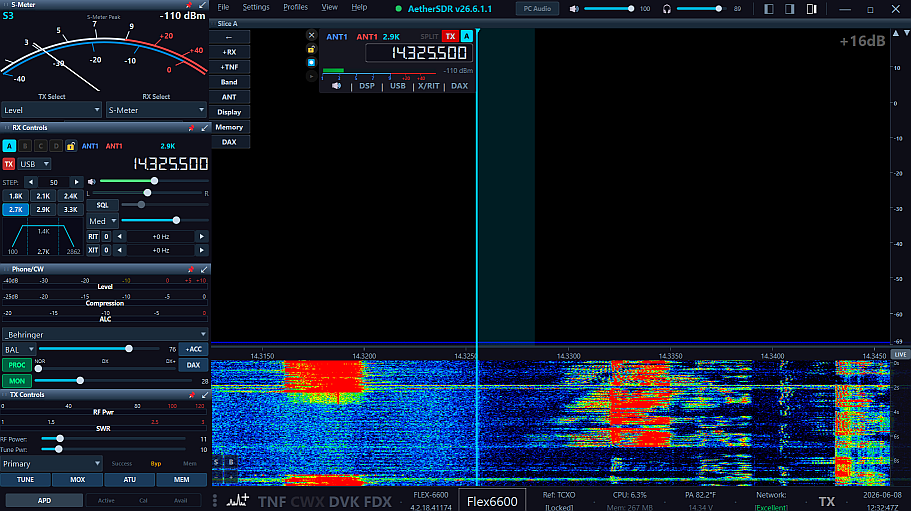
Just a couple of things I've found that has made it easier on the eyes….you can increase the font size on the applets without increasing the size of everything. Go to View/UI Scale and find a percentage that works for you.
Along with that, I've used the fly-out on the applets that I'm most interested in and resized them considerably larger and moved them to my preferred side.
 0
0













Leave a Comment
Categories
- All Categories
- 396 Community Topics
- 2.2K New Ideas
- 677 The Flea Market
- 8.5K Software
- 188 SmartSDR+
- 6.6K SmartSDR for Windows
- 193 SmartSDR for Maestro and M models
- 454 SmartSDR for Mac
- 278 SmartSDR for iOS
- 267 SmartSDR CAT
- 216 DAX
- 390 SmartSDR API
- 9.5K Radios and Accessories
- 87 Aurora
- 328 FLEX-8000 Signature Series
- 7.2K FLEX-6000 Signature Series
- 986 Maestro
- 58 FlexControl
- 870 FLEX Series (Legacy) Radios
- 959 Genius Products
- 477 Power Genius XL Amplifier
- 351 Tuner Genius XL
- 131 Antenna Genius
- 314 Shack Infrastructure
- 219 Networking
- 477 Remote Operation (SmartLink)
- 143 Contesting
- 840 Peripherals & Station Integration
- 146 Amateur Radio Interests
- 1.1K Third-Party Software