SmartSDR v4.2.20 | SmartSDR v4.2.20 Release Notes
SmartSDR v3.10.15 | SmartSDR v3.10.15 Release Notes
The latest 4O3A Genius Product Software:
The latest 4O3A Genius Product Software and Firmware
If you are needing assistance with FlexRadio products, please refer to the product documentation or check the Help Center for known solutions. Need technical support from FlexRadio? It's as simple as creating a HelpDesk ticket.
AetherSDR — Open-Source Linux Client for Flex Radios
Comments
-
I installed 0.5.1 Win x64.
Works well with Aurora and mic plugged into radio.
My 8600 is in my garage and I use PAC audio. Windows has correct mic in but no TX audio. Dax is disabled and not running.
73 Dave wo2x1 -
The 2nd client should see that Slice A is unavailable and it should automatically select slice B or whatever next slice is available. That how I see it working on my setup. I'm working on multi-panadapter support right now. Should be available later tonight.
2 -
Thanks, I appreciate all you do. I understand how you see it. And it might seem logical. But, that isn't the behavior Flex Radio chose for SmartSDR. As long as it works, it doesn't really matter. I think they chose this method of presentation to provide a consistent look and feel for each operator.
James
WD5GWY
0 -
@David Decoons, wo2x I think if you are trying to use PC Audio to connect to the 8600 in the garage, the DAX button in the P/CW applet needs to be enabled. Can you try it out and let me know?
0 -
Hello, I have v0.5.8 up and running. It is built from source in Ubuntu 24.04lts. It seems to be working pretty well, but I am not sure if this is a bug or a feature not implement as of now. VOX isn't working.
Radio: Flex 6600m running software v3.10.15. Does the radio need to be update to version 4?0 -
I got this working on my Mac with MacPorts. Just needed to install "qt6-qtbase" and "portaudio" (trying to install ALL of Qt6 took forever and never succeeded due to some broken stuff in some of the MacPorts Qt extra libraries).
Anyway, it's looking good so far, especially being able to explicitly enter an IP address instead of going through SmartLink (useful when I VPN back to my house). I'll have to play with this some more on an actual Linux system and see how it behaves there.
BTW I haven't checked GitHub yet but any possibility of having an option to directly use PortAudio or pipewire instead? Admittedly it's been a while since I last used PortAudio so the issues I ran into back in the day while maintaining it for the FreeDV project may no longer apply. Speaking of which, as one of the current maintainers of FreeDV, I also really appreciate the built-in RADE support that got added :)
0 -
Am I right in thinking because this is using the Qt6 framework that with some additional effort an Android build should be possible?
0 -
@ten98 qill do in morning. This is opposite of SmartSDR logic. In SmartSDR DAX TX has to be off to use PC Audio in. DAX TX enable in SmartSDR is only for audio via DAX.
I’ll let you know how it works.73
Dave wo2x
0 -
I’m interested in using AetherSDR for remote CW.
Will it support using a real paddle remotely, either with a Maestro or by plugging the paddle directly into the client computer, without needing a K1EL/Winkeyer emulator?
In other words, will native remote paddle keying be supported, or will a Winkeyer-compatible solution still be required?0 -
0
-
out of Ten9876 kindness, He is doing a lot of updates and fix's, I am not sure what version you are using but I know in version 0.6.11 and 0.6.2 he fixed the "Persistence" and added stacking so as of 21:00Z March 24 0.6.2 is the latest version out and may have taken care of your issues.
1 -
Open mouth insert foot. I just installed 0.6.2 Please forgive me😁
0 -
I think people need to remember that AetherSDR has only been in existance for less than 2 weeks. The amount of functionality that Jeremy has achieved in that short time and the rate of improvement is amazing.
Saying things like "If this is the way the software works, it is unusable" I think is very disengenuious and doesn't acknowledge that what you have access to here is very early open source software developed for free by one person in their spare time.
The best way to help is to get involved in the development process. If you can't help implement bug fixes or new features, you can still test and carefully write bug reports describing the steps to reproduce the problem. Do also keep an eye on the existing open bug reports: as that may help you avoid known issues.
73, Jonathan
0 -
I agree Jonathan, People who demand for it to ready for Prime time and have ZERO investment in it have NO business making negative comments or demands.
To me the software is simply AMAZING so far and so is Ten9876, he has explained and told me hold to fix several problems along the way with my LINUX version and compiling his great program.
This is how FLEX used to be back in 2008 with PowerSDR but when people started giving them **** about there hard work instead of being helpful and encouraging and so soon they stopped having it open for the common user to comment on and test which was a shame.
So please guys give the Authors a break and enjoy being able to use it and take advantage of such a great Program and if you can't be positive with your comments and requests then wait for it to be a finished project and fully functional and then Pay for the EYE candy and special features once all the basic functions are done.
3 -
It's definitely a work in progress. But, each release gets so much better that it makes it exciting to see what is going to happen next. Plus, it forces me to learn more about using Linux and the Command line. And it is slowly helping me to improve my typing skills. Most of the problems I have encountered have been improperly typed commands. Linux is pretty picky about that! I have went back to building from the source code in Linux Mint. And as long as I am careful entering commands, everything works well. It's easier to use the AppImage. But, I have found with other applications I have installed in Mint, that building from Source code can avoid problems with a system having incompatible files from one version to the next.
James
WD5GWY
be thankful that someone is willing to provide another alternative to SmartSDR. And for so many platforms to boot.
0 -
I tested the Windows version today (0.6.1 I think ), most recent on Gothub this afternoon. PC TX audio did work with DAX enabled, which is opposite logic of SmartSDR (thanks for tip to get me going).
I was using my 8600, PG, TG and AG. I found intermittent TX where TG A side (8600/PG) would have TUNE value jump from tuned value to C1, L ,C2 at zero, causing high SWR RFP errors on TX. My Aurora was connected to B side of TG and in RX on another band with Maestro connected on different antenna.
I do not see this behavior when using SSDR for Windows in place of AetherSDR.73 Dave wo2x
0 -
I have a strange problem running AetherSDR with my Linux Mint 22 operating system and an old AMD Athlon 5350 in a mini desktop pc. I can start AetherSDR and for a brief moment, the network display will be green and say, Excellent. Then it quickly drops to red saying Poor. It shows network delay of 150+ ms. AetherSDR continues to work. When I run different speed tests it shows under 100mbps. I have tried every kind of setting in the Network settings and still no improvement. I have even used a USB 3 to Ethernet Gb adapter and have the same results. I have changed cables, and I have used the same connection and cable to my unmanaged switch and connected to one of my Windows 11 pc's and the network connection shows green and Excellent. I have the latest version of Mint installed as well as the latest drivers and kernel. This little desktop pc is around 11 years old. I am tempted to buy something newer. But I hesitate to do so and find out I still have the problem and it is something to do with Linux Mint itself. AetherSDR does run on this pc . And when surfing the internet with it, some pages are slow compared to the same ones from my Windows computers. I have even though of switching to a different destro of Linux. But I really like Mint. Any suggestions other than dumping Mint and just running AetherSDR on my Windows computers?
James
WD5GWY
0 -
Trucker…Can you try another distro , say Kubuntu, live from a usb drive?
1 -
I will give it a try.
James
WD5GWY
0 -
Geoff,
Thanks for the suggestion. I downloaded Kubuntu and first tried it from the USB drive. Just doing an internet speed test, I was getting good download speed. So, I went ahead and wiped Mint and installed Kubuntu in it's place. Next I downloaded the AppImage file and it is running great. Network indicator is Green and shows Good. I had read several articles saying that Mint had problems with slow download speeds. Nothing I tried would fix it. I was about to decide to go by my favorite computer shop tomorrow and find a later model pc to see if that made a difference. ( I was thinking that the Network adapter in the mini desktop was bad)
Now to learn a new OS!
James
WD5GWY
0 -
Bragged too soon. It's back to showing a Poor connection and 220ms latency. Now, I have no idea what is causing this problem.
I do appreciate the suggestion.
James
WD5GWY
0 -
I have about decided that the AMD Athlon 5350 mini desktop is just not up to the task of running AetherSDR over my home network without loosing network speed. It's an old design. Four core cpu running at 2Ghz ( barely) . It doesn't crash, but it is obvious that it is struggling when I compare it to one of my Windows 11 pc's with more ram and multi cores and threads.
It would be interesting to find out what others are using hardware wise and what Distribution of Linux is being used. Plus, does the network indicator in AetherSDR show excellent or good connection with low latency? In other words, how accurate is the network indicator in AetherSDR compared to internet speed tests? I don't want to throw out the baby with the bath water if there's a chance that this little mini desktop pc can do the job.
James
WD5GWY
0 -
I’ve tried the program on both Windows and Linux with a Flex 6300, and I’m pleasantly surprised. I like how it sounds. There’s still some way to go, but honestly, what’s being done is very promising. Congratulations.
0 -
James…oh well, it was worth a shot. Let us know the outcome.
1 -
Yes it was. I am beginning to think that it is something in AetherSDR itself. Another Mint user posted in the Github discussions that he was experiencing the same problem with Mint. I may go by my favorite computer shop and see if they have a later model bargain pc with some better specs than this AMD Aethlon to see if that has something to do with it.
james
WD5GWY
0 -
This is revolutionary to me as i understand things about Ai and Claude.
Now hopefully we can get more input and more software into Claude for more hamradio software Multi-platform! It was said way back OS in the future would not matter and here we are.
Been hearing about software written in Days and now its here as Hamradio Proof! :)
KK7GWY and to the others to make it happen Congrats!
0.7.2 went right into the R-pi-5 great.
This is moving fast i see im behind on update all ready less than 24 hrs later. :)
03-26-2026
0 -
Trucker, I think it is the indicator in the Programs them selves and perhaps they use the same function to generate the Network quality, sometime it shows excellent and other times poor and ever were in between on both Programs.
I have not seen or heard it cause a problem just like SmartSDR Network indicator are not really a good reading of what the network is actually doing.
For a test on my Windows machine I ran AetherSDR and right now it is showing poor and SmartSDR is showing good, restarting AetherSDR, it shows excellent with NO changes on the network.
I learned a LONG LONG time ago to pretty much ignore the Network display unless the radio has problems like Audio popping and disconnections.
1 -
So far, I haven't had the same problem running AetherSDR in Windows 11. Network speed and quality continues to show excellent no matter how long AetherSDR has been running. It's only on my Older AMD Athlon mini desktop running Linux Mint or Kubuntu ( both Ubuntu derivatives) that I encounter Network problems. And only when running AetherSDR.
I am about to go by my favorite computer shop and see if he has something newer with an Intel processor at an affordable price. ( he gets a lot of Dell off lease equipment and sells it at a good price)
James
WD5GWY
0 -
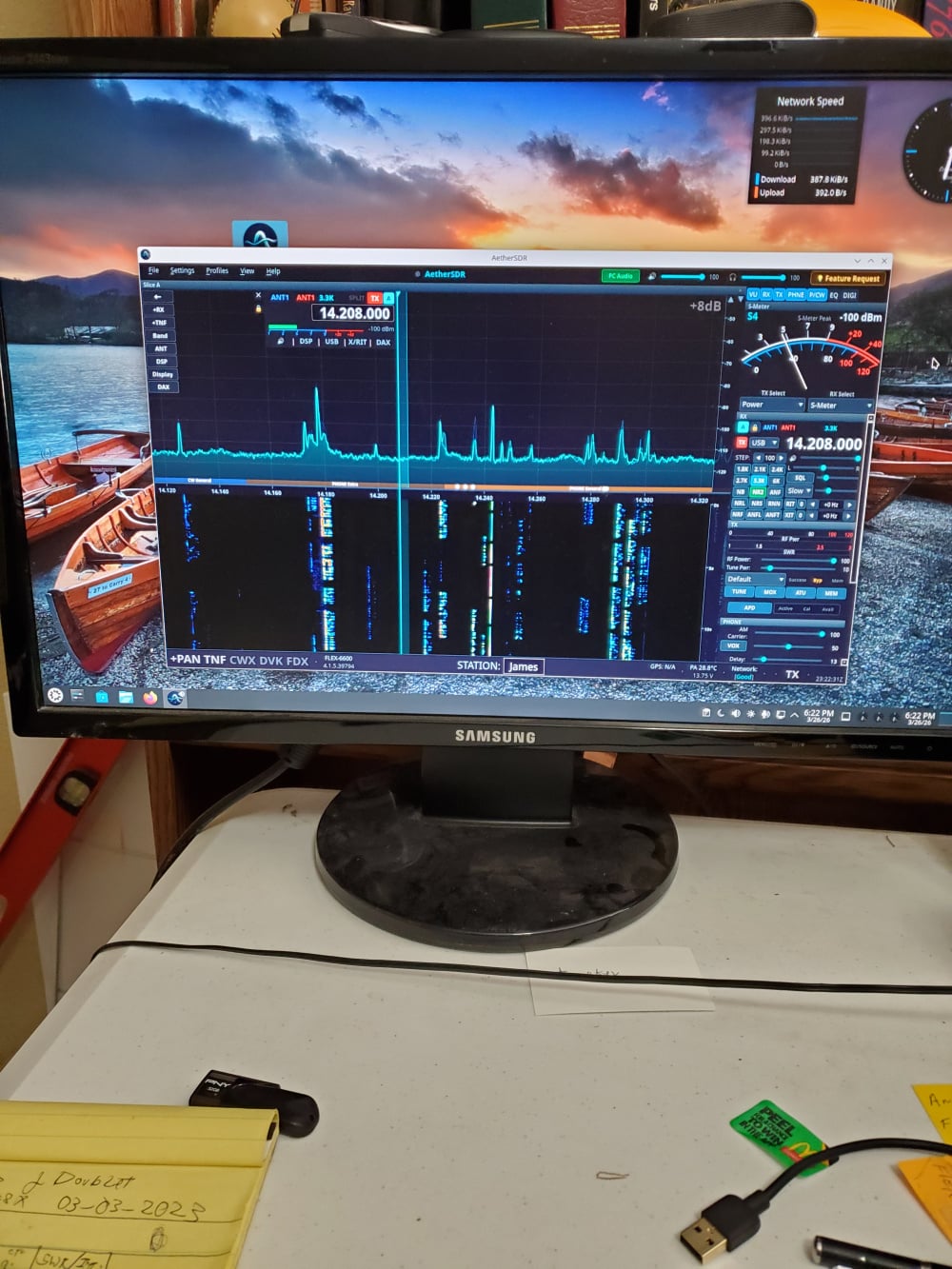
Here's an interesting puzzle. Kubuntu Linux and running the latest version of AetherSDR. If I run it full screen, I get the Poor network and 150+ms latency. If I click on the button in the upper right corner to reduce the size of the form, the network information goes green and shows Good to Excellent. Latency is down to single and low,double digits.
James
WD5GWY
 0
0







Leave a Comment
Categories
- All Categories
- 401 Community Topics
- 2.2K New Ideas
- 691 The Flea Market
- 8.6K Software
- 197 SmartSDR+
- 6.6K SmartSDR for Windows
- 200 SmartSDR for Maestro and M models
- 462 SmartSDR for Mac
- 280 SmartSDR for iOS
- 268 SmartSDR CAT
- 220 DAX
- 395 SmartSDR API
- 9.6K Radios and Accessories
- 113 Aurora
- 352 FLEX-8000 Signature Series
- 7.2K FLEX-6000 Signature Series
- 999 Maestro
- 58 FlexControl
- 872 FLEX Series (Legacy) Radios
- 978 Genius Products
- 484 Power Genius XL Amplifier
- 358 Tuner Genius XL
- 136 Antenna Genius
- 323 Shack Infrastructure
- 228 Networking
- 485 Remote Operation (SmartLink)
- 147 Contesting
- 847 Peripherals & Station Integration
- 148 Amateur Radio Interests
- 1.1K Third-Party Software