SmartSDR v4.2.20 | SmartSDR v4.2.20 Release Notes
SmartSDR v3.10.15 | SmartSDR v3.10.15 Release Notes
The latest 4O3A Genius Product Software:
The latest 4O3A Genius Product Software and Firmware
If you are needing assistance with FlexRadio products, please refer to the product documentation or check the Help Center for known solutions. Need technical support from FlexRadio? It's as simple as creating a HelpDesk ticket.
SolidSDR: Web-based FlexRadio client (open source, cross-platform)
Comments
-
Thanks for your development efforts. I have been enjoying the Solid-SDR web interface. I have the DAX audio working with WSJT-X, but cannot find any information on CAT control settings. Has CAT been implemented yet, and if so, where do I find it?
Thanks for trying it out! The short answer is no, nothing is implemented for CAT control yet. I’ll work on getting the wiki updated today since I'm sure other people have wondered as well. With WSJT-X (or anything that uses Hamlib) on the same network as the radio, you can use the built-in FlexRadio support, which is what I’m doing currently. But over the internet, you’re kind of stuck manually setting up the slice and relying on VOX for keying.
The long answer is that I’ve been putting it off because there’s not an obvious good solution. The official CAT program provides two interfaces for applications to use, a virtual COM port or a TCP server. Since the goal of SolidSDR is for you to be able to use the radio with nothing but a web browser, neither one of those approaches are directly viable. We won't be installing any virtual devices, and there's no way we can expose a TCP server through a web browser.
That means we'll have to expose something through the server that applications can connect to over the internet, and for us that most likely means a websocket that can potentially require a username/password. I need to do some research into whether Hamlib currently supports anything that uses a websocket that we can potentially adapt, but in reality it's probably going to be not only a net new type of control exposed via websocket on the server, it'll also require submitting a patch to Hamlib to support it. I'm not opposed to that, I've just been focused on features that are more low-hanging fruit.
If anyone has any ideas or suggestions, I would love to hear them. Would you mind creating an issue on the project page for this?
https://github.com/daveisadork/solid-sdr/issues/new
Anyone that wants to report a bug or request a feature is encouraged to do so.
73, Dave KF0SMY
1 -
 Mike-VA3MW Administrator, FlexRadio Employee, Community Manager, Super Elmer, Moderator adminOptions
Dave
Nice work. I built something similar for my own fun project. Under the covers, the web server runs on GO and I learned a lot about how painful this is to do! :) And, we have a LOT of radio commands. My goal was a simple Web based front end for SSB only as a quick and dirty connection.
I figured that if someone wanted to do a full Digital interface, then you would do what RHR does and build it into the application, all running on a web page. Even with AI, it is a LOT of work.
For others, it is one thing to build it for yourself. It is an entire other thing to release it in the wild for others to use because the expectation is that 'it works' all the time and that you'll provide end user support of some sort.
It reminds me of the years I was a repeater operator. Everyone wanted the repeater to do something cool or special but no one wanted to actually do the work on the repeater. Dave, maybe you'll get some volunteers to help you with it to the next level! That seems to have worked for others.
73 es gl!
1 -
Under the covers, the web server runs on GO and I learned a lot about how painful this is to do!
That's what I'm using as well, mainly because of the mature WebRTC stack, but also because I have professional experience with Go from a couple past gigs so I was already comfortable with it.
And, we have a LOT of radio commands.
You're not joking… I initially started by working from the GitHub API docs and K3TZR's xLib6000 and xSDR6000 projects. I actually had a working prototype (FFT, waterfall, Opus audio, etc) before realizing that the official FlexLib is a source distribution and not a compiled binary. Once I figured that out (and got past being overwhelmed by the surface area), that's when I decided to essentially do a full port of FlexLib to TypeScript.
I figured that if someone wanted to do a full Digital interface, then you would do what RHR does and build it into the application, all running on a web page.
Right, that's essentially our design… the server is mostly just acting at a TCP/UDP to WebRTC bridge, all the work happens in the browser. However, our internal flexlib library is packaged separately from the rest of the app because I'm planning to eventually publish that on NPM for others to use once it's reasonably feature complete. It includes transports that allow it to work in a browser (via a bridge like our
solid-sdr-serveror you could roll your own using just websockets or whatever) or directly over TCP/UDP when running on Node/Deno/Bun.Even with AI, it is a LOT of work.
Yes, it is. It's funny how many people assume SolidSDR is another primarily-AI-driven project. In reality, the majority of it was (and continues to be) written by hand. I do use coding agents heavily for FlexLib porting tasks (because they're tedious and boilerplate heavy), but outside that I'm still doing most of the work the old-fashioned way. I'm reluctant to rely heavily on AI to implement things I can't test for myself on real hardware (which is why we don't yet have support for FlexControl, PGXL, TGXL, etc), plus it's been very educational for me discovering all the capabilities of my radio since I have to understand each feature before I can implement it. And it's fun.
Dave, maybe you'll get some volunteers to help you with it to the next level! That seems to have worked for others.
One can hope, right? 😀 Thank you for the kind words.
0 -
hi Dave. Thanks for the great browser based implementation. My main use case is to be able to access my flex from an android tablet using chrome. Was successful today on the receive side. I couldn't figure out what input source to set for my ssb mic. Chrome has mic permissions. Tried PC but no joy . Any idea? Something that would be useful for this use case would be a way to fine tune the frequency without a mouse . Thanks again and I'll be following the development closely
0 -
PC is correct. Make sure you have the correct device selected in the Audio Settings dialog. Touch the gear icon in the lower right corner and choose Audio Settings:
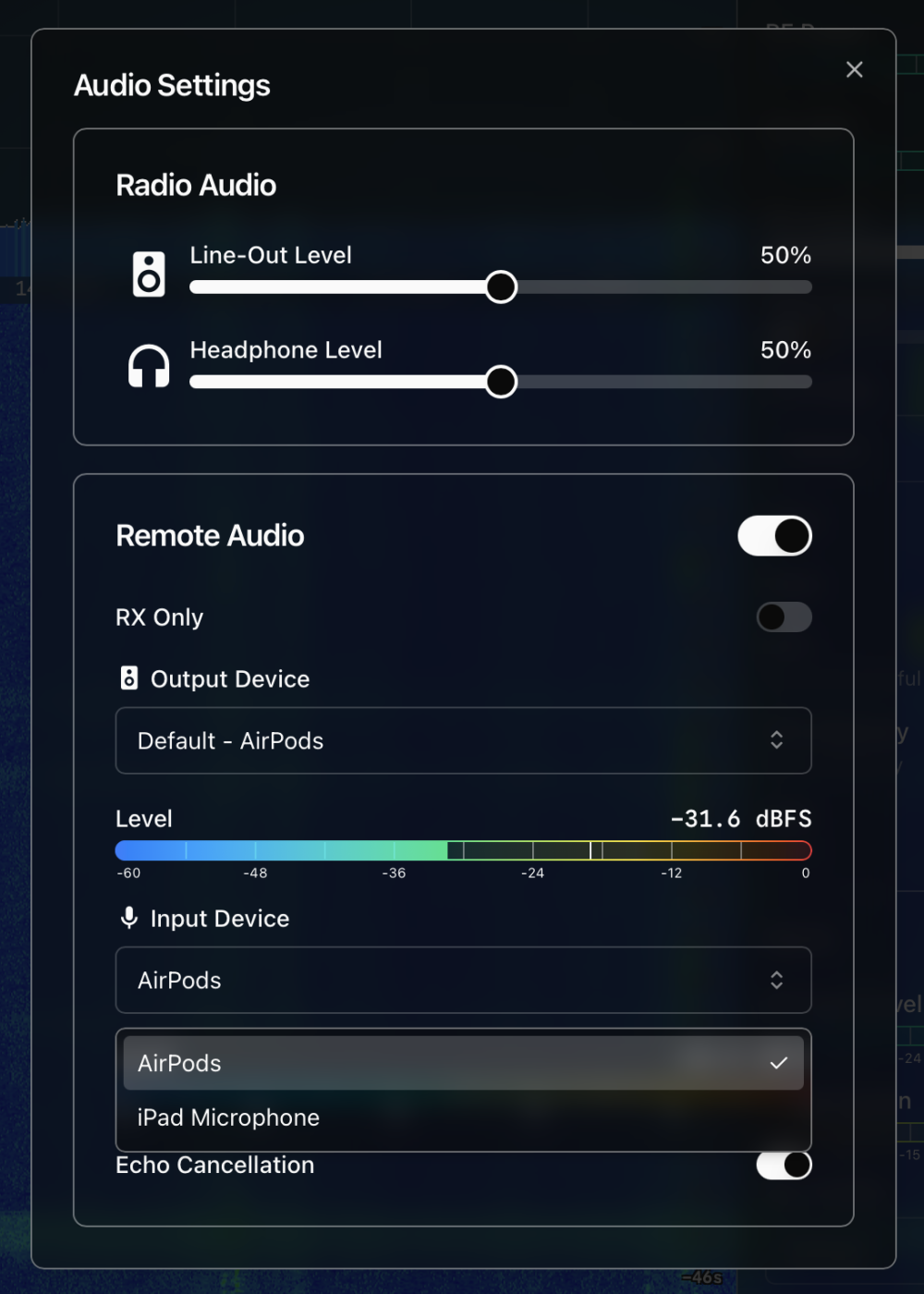
There is more information about troubleshooting TX audio in the wiki:
0 -
Something that would be useful for this use case would be a way to fine tune the frequency without a mouse .
I’m not sure what you mean. You should have the same control with a mouse or touch device. There was a bug that might have affected dragging a slice around in Chrome on touch devices, but it was fixed recently (v0.2.1 about 3 days ago). Is that what you were trying to do or something else?
0 -
Hi Dave. Well, my problem seems to be that the app thinks chrome doesn't have audio permissions. When going to audio settings, it says audio permissions denied. Chrome has mic permissions but i don't see a setting other than that.
0 -
Well, my problem seems to be that the app thinks chrome doesn't have audio permissions. When going to audio settings, it says audio permissions denied. Chrome has mic permissions but i don't see a setting other than that.
Apologies if you’ve already checked this. The only Android devices I have access to at the moment are old, so things might be a bit different. There are 2 different audio permissions… The OS level, where the OS allows Chrome to access the mic, and another where Chrome allows specific pages to access the mic. It sounds like the second one is what we’re missing.
It prompts you the first time you load the page but it’s easy to accidentally dismiss it, and Chrome will remember that forever. On my device there’s a little settings icon in the address bar, and tapping that shows Permissions with Microphone allowed. If it doesn’t say that, tap to change it. If that’s what you’re seeing too, then try a refresh or opening in a new tab and see if it picks it up.
If it still isn’t working can you share a screenshot of where you’re checking the Chrome mic permission?
0 -
On the fine tuning comment, I find it difficult to make small adjustments of say, a tuning step with the touch screen. I was thinking of something like the tuning wheel that Marcus has in the ios app or an up/down arrow that would move 1 step at a time.
0 -
On the fine tuning comment, I find it difficult to make small adjustments of say, a tuning step with the touch screen. I was thinking of something like the tuning wheel that Marcus has in the ios app or an up/down arrow that would move 1 step at a time.
Ah, yeah I get that. It's not too bad on a tablet, but on a phone it can be very fiddly, especially if your panadapter is zoomed way out. I usually just zoom in a bit until I can manage it 😀
Marcus' design is a good solution. I also thought about having buttons to nudge the slice like you suggested, or having up/down buttons for each digit on the slice frequency like what SDR++ does. We could also do something like doing a long press to enable "fine tuning mode" which takes a lot more movement to move the slice. I'll give it some thought over the weekend.
0 -
AAny of those suggestions would be great. And you nailed it on the android chrome permissions. The mic was disabled for the site. Probably because it thinks itit doesn't have a valid cert. Thanks again. I'm having lots of fun with it. BTW, running the server on a pi 4. Runs great. No stuttering and the pa looks fine.
0 -
BTW, running the server on a pi 4. Runs great. No stuttering and the pa looks fine.
That’s great news! I did some testing on a Pi 3 and it was just barely able to do it, so I was hoping the Pi 4 would be a bit more capable. Pi 5 should have no problem at all. If you do end up having any performance issues, I wrote a wiki article with some suggestions specifically for the Pi.
0 -
I was able to get the CAT control working by selecting FlexRadio SmartSDR Slice A as the Rig and putting the IP address of the Flex Radio as the Network Server. CAT freq control now works and PTT. I also have DAX Rx working and decoding. I still need to figure out the correct assignments for DAX TX with Brave Browser and Ubuntu. I hear the tone on TX in the speaker, but it is not reaching the radio to TX.
0 -
So I tried SolidSDR for the first time from my Windows Chrome Desktop browser. Is the mouse-wheel scroll wheel not implemented for tuning?
0 -
So I tried SolidSDR for the first time from my Windows Chrome Desktop browser. Is the mouse-wheel scroll wheel not implemented for tuning?
It isn’t. I always found that aspect of SmartSDR frustrating, especially trying to scroll in the radio sidebar. I can add it behind a preference setting.
0 -
I still need to figure out the correct assignments for DAX TX with Brave Browser and Ubuntu. I hear the tone on TX in the speaker, but it is not reaching the radio to TX.
OK, this was an adventure, but I think I found something that works. Modern Linux distros have virtual audio cable capabilities built in, so it's nice you don't need extra software like on Mac and Windows, but the downside is it's very difficult and confusing to configure. I tested this on Ubuntu, but it should work for any distro using pipewire.
Copy and paste these commands in the terminal:
#create the config directory
mkdir -p ~/.config/pipewire/pipewire.conf.d
#create the config file
touch ~/.config/pipewire/pipewire.conf.d/95-dax.conf
#edit the config file
open ~/.config/pipewire/pipewire.conf.d/95-dax.conf
You should have a text editor open with an empty file. If not, open the file with whatever text editor you like and paste this in:
context.modules = [
    # =================================================================
    # DAX TX: Virtual Transmit Bridge (Chromium + Firefox Compatible)
    # =================================================================
    # WSJT-X sends playback audio to the Sink ("DAX TX").
    # Chromium/Firefox record input modulation from the Source ("DAX TX Mic").
    { name = libpipewire-module-loopback
      args = {
          audio.position = [ FL FR ]
          capture.props = {
              media.class = "Audio/Sink"
              node.name = "dax_tx"
              node.description = "DAX TX"
          }
          playback.props = {
              media.class = "Audio/Source"
              node.name = "dax_tx_source"
              node.description = "DAX TX Mic" # True hardware-style input
          }
      }
    }

    # =================================================================
    # DAX RX 1: Virtual Receiver Channel 1
    # =================================================================
    # Browser SDR outputs VFO audio here. WSJT-X captures via Monitor.
    { name = libpipewire-module-loopback
      args = {
          audio.position = [ FL FR ]
          capture.props = {
              media.class = "Audio/Sink"
              node.name = "dax_rx1"
              node.description = "DAX RX 1"
          }
          playback.props = {
              media.class = "Stream/Output/Audio"
              node.name = "dax_rx1_playback"
              target.object = "none"
          }
      }
    }

    # =================================================================
    # DAX RX 2
    # =================================================================
    { name = libpipewire-module-loopback
      args = {
          audio.position = [ FL FR ]
          capture.props = {
              media.class = "Audio/Sink"
              node.name = "dax_rx2"
              node.description = "DAX RX 2"
          }
          playback.props = {
              media.class = "Stream/Output/Audio"
              node.name = "dax_rx2_playback"
              target.object = "none"
          }
      }
    }

    # =================================================================
    # DAX RX 3
    # =================================================================
    { name = libpipewire-module-loopback
      args = {
          audio.position = [ FL FR ]
          capture.props = {
              media.class = "Audio/Sink"
              node.name = "dax_rx3"
              node.description = "DAX RX 3"
          }
          playback.props = {
              media.class = "Stream/Output/Audio"
              node.name = "dax_rx3_playback"
              target.object = "none"
          }
      }
    }

    # =================================================================
    # DAX RX 4
    # =================================================================
    { name = libpipewire-module-loopback
      args = {
          audio.position = [ FL FR ]
          capture.props = {
              media.class = "Audio/Sink"
              node.name = "dax_rx4"
              node.description = "DAX RX 4"
          }
          playback.props = {
              media.class = "Stream/Output/Audio"
              node.name = "dax_rx4_playback"
              target.object = "none"
          }
      }
    }
]
Save the file and close the text editor. Then back at the terminal, run this command:
systemctl --user restart pipewire pipewire-pulse wireplumber
You might need to restart your browser and WSJT-X, but in both you should have new audio devices available.
In WSJT-X:
- Input: dax_rx1.monitor
- Output: dax_tx
Then in your browser in the DAX Settings dialog:
- DAX TX Input Device: DAX TX Mic
- DAX RX 1 Output Device: DAX RX 1
If it still isn't working, the system may have automatically muted some of the devices. This happened to me and I don't know why. I had to use pavucontrol to fix it, which is not installed by default. You can install it with:
sudo apt install pavucontrol
You can just run pavucontrol at the command line, or it shows up in the apps menu as "Volume Control"
Overall… kind of a frustrating process, but I did manage to get it working in the end. Good luck!
0 -
For anyone on Linux seeing this in the future, I've since come up with a better pipewire config. The new one suppresses DAX audio being directed to the speakers by default, and shouldn't require using something like pavucontrol. We have a simple setup script now so you shouldn't have to edit any config files. There's a wiki page for it that includes instructions for setting up a few different apps:
Here's the full text of the new config:
context.modules = [
    # =================================================================
    # DAX TX: Virtual Transmit Bridge (Chromium + Firefox Compatible)
    # =================================================================
    # WSJT-X sends playback audio to the Sink ("DAX TX").
    # Chromium/Firefox record input modulation from the Source ("DAX TX").
    { name = libpipewire-module-loopback
      args = {
          audio.position = [ FL FR ]
          capture.props = {
              media.class = "Audio/Sink"
              node.name = "dax_tx"
              node.description = "DAX TX"
          }
          playback.props = {
              media.class = "Audio/Source"
              node.name = "dax_tx_source"
              node.description = "DAX TX"
          }
      }
    }

    # =================================================================
    # DAX RX 1: Virtual Receiver Channel 1
    # =================================================================
    # Browser SDR outputs VFO audio to the Sink ("DAX RX 1").
    # WSJT-X captures from the Source ("DAX RX 1").
    { name = libpipewire-module-loopback
      args = {
          audio.position = [ FL FR ]
          capture.props = {
              media.class = "Audio/Sink"
              node.name = "dax_rx1"
              node.description = "DAX RX 1"
          }
          playback.props = {
              media.class = "Audio/Source"
              node.name = "dax_rx1_source"
              node.description = "DAX RX 1"
          }
      }
    }

    # =================================================================
    # DAX RX 2
    # =================================================================
    { name = libpipewire-module-loopback
      args = {
          audio.position = [ FL FR ]
          capture.props = {
              media.class = "Audio/Sink"
              node.name = "dax_rx2"
              node.description = "DAX RX 2"
          }
          playback.props = {
              media.class = "Audio/Source"
              node.name = "dax_rx2_source"
              node.description = "DAX RX 2"
          }
      }
    }

    # =================================================================
    # DAX RX 3
    # =================================================================
    { name = libpipewire-module-loopback
      args = {
          audio.position = [ FL FR ]
          capture.props = {
              media.class = "Audio/Sink"
              node.name = "dax_rx3"
              node.description = "DAX RX 3"
          }
          playback.props = {
              media.class = "Audio/Source"
              node.name = "dax_rx3_source"
              node.description = "DAX RX 3"
          }
      }
    }

    # =================================================================
    # DAX RX 4
    # =================================================================
    { name = libpipewire-module-loopback
      args = {
          audio.position = [ FL FR ]
          capture.props = {
              media.class = "Audio/Sink"
              node.name = "dax_rx4"
              node.description = "DAX RX 4"
          }
          playback.props = {
              media.class = "Audio/Source"
              node.name = "dax_rx4_source"
              node.description = "DAX RX 4"
          }
      }
    }
]
0 -
-
Oh, that's my primary way of tuning. Hi hi. I would definaley appreciate you adding it. While you're at it (lol) how about adding a single-click option for tuning. I askeed Jeramy for that and he added it in Aether. Anyone who goes back and forth between the Flex and Thetis (Anan, Hemers) will appreciate it. Thanks again for all you are doing. I can't believe how well this works on a Pi 4. The performance is perfect. Might be different if I were using DAX. I'll try that in the next few days and let you know.
0 -
Release v0.2.5 fails on Raspeberry Pi. Hi Dave, just downloaded latest release and unzipped on my Pi 4. Getting the following error (look like I have the wrong code version):
pi@piflex:~/Projects/solid-sdr $ ./solid-sdr-server
-bash: ./solid-sdr-server: cannot execute binary file: Exec format errorThanks.
0 -
Release v0.2.5 fails on Raspeberry Pi. Hi Dave, just downloaded latest release and unzipped on my Pi 4. Getting the following error (look like I have the wrong code version):
pi@piflex:~/Projects/solid-sdr $ ./solid-sdr-server
-bash: ./solid-sdr-server: cannot execute binary file: Exec format errorWhich build are you using?
0 -
Oops. Thought I checked it twice but I was using the amd version. Sorry.
0 -
Thought I checked it twice but I was using the amd version.
That’s a relief 😅
how about adding a single-click option for tuning.
I’ll look into this and see if there’s a good way to implement it.
0


Leave a Comment
Categories
- All Categories
- 401 Community Topics
- 2.2K New Ideas
- 690 The Flea Market
- 8.6K Software
- 197 SmartSDR+
- 6.6K SmartSDR for Windows
- 200 SmartSDR for Maestro and M models
- 460 SmartSDR for Mac
- 279 SmartSDR for iOS
- 268 SmartSDR CAT
- 220 DAX
- 395 SmartSDR API
- 9.6K Radios and Accessories
- 112 Aurora
- 348 FLEX-8000 Signature Series
- 7.2K FLEX-6000 Signature Series
- 999 Maestro
- 58 FlexControl
- 872 FLEX Series (Legacy) Radios
- 975 Genius Products
- 482 Power Genius XL Amplifier
- 358 Tuner Genius XL
- 135 Antenna Genius
- 322 Shack Infrastructure
- 227 Networking
- 483 Remote Operation (SmartLink)
- 146 Contesting
- 847 Peripherals & Station Integration
- 147 Amateur Radio Interests
- 1.1K Third-Party Software