SmartSDR v4.2.20 | SmartSDR v4.2.20 Release Notes
SmartSDR v3.10.15 | SmartSDR v3.10.15 Release Notes
The latest 4O3A Genius Product Software:
The latest 4O3A Genius Product Software and Firmware
If you are needing assistance with FlexRadio products, please refer to the product documentation or check the Help Center for known solutions. Need technical support from FlexRadio? It's as simple as creating a HelpDesk ticket.
PC Audio not working in 4.2.18

Removed all previous versions of smart SDR, DAX, and VSPs. Installed 4.2.18 with no problem. However, I notice that PC Audio is not working. I restart smart SDR and PC Audio works for about 15 secs and then stops working. All other apps on the computer seem to be ok. Just wondering if anyone else has experienced and can help me to identify problem. Thanks
Answers
-
Hi Fred, it is working for me on my Win 10 laptop. Are you sure that you don't have the master volume (SmartSDR main window, top left) muted or turned down?
0 -
Len, it works for about 15 to 20 secs before stopping. Nothing muted that I can see
1 -
Hi Fred, you might want to submit a help desk ticket.
0 -
 Mike-VA3MW Administrator, FlexRadio Employee, Community Manager, Super Elmer, Moderator adminOptions
PC Audio is separate from DAX. Make sure you windows default sound devices are correct. If you still have an issue, please open a support ticket.
0 -
Just installed 4.2 on an older (slow) PC and ran it both locally and remotely.
Audio ran normally BUT:
Around every 2 min there was a 5 second span with no audio then all audio stopped only "fixed" by restarting SmartSDR. No transmit made during this time.
0 -
have you shut down the radio and removed DC power after upgrade as per the release notes?
Next step is you should have backed up profiles. Do a factory reset and test PC audio before loading profiles. If working, load your profiles and test again.0 -
What is the configuration of the PC? is it running other software? What does the network condition indicate (green bars)? This may be a PC overload.
0 -
My PC has two different audio devices, and always seems to choose the wrong one.
The first / preferred / needed is the on-the-motherboard (Realtek Audio), which actually goes through a mixer to my shack-speakers.
The second / undesired / always-chosen is my monitor, which has built-in speakers (disabled). When Win 11 chooses this device, I hear nothing, yet SmartSDR shows "PC Audio" is blue-selected. Suddenly, I remember, change the Win 11 audio-device, and SmartSDR works again.
So - you may find that Windows is subverting your PC Audio. Perhaps give that a look…
0 -
It looks like DAX is working. Do you have the correct DAX input/output selected in the program that uses DAX audio? The DAX audio streams changed names, so you need to reset them to the new values. For example, here is the audio setting for VARAHF:
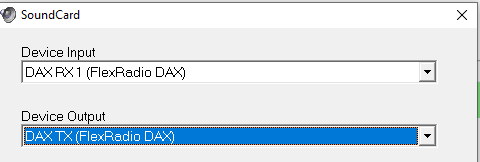
In Windows Settings, you should see these input devices:
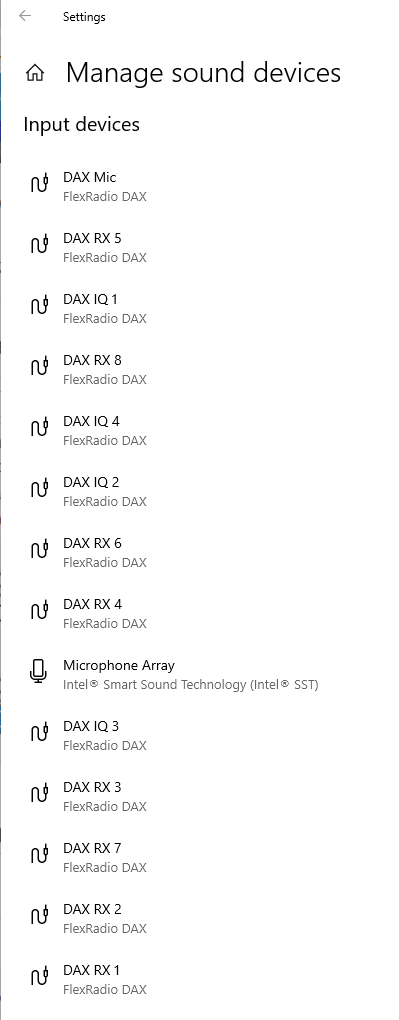
Notice that all the "Reserved" device names no longer appear. It is much easier now to find the device that you need.
0 -
Len,
Thank you. I am trying to set up the SliceMaster with the new 8600 and WSJT-X. SliceMaster puts out the message that "Audio Channel is not enabled in DAX control panel, DAX=1, Slice A."
WSJT works when I launch is separately rather than from the SliceMaster. I kind of assumed that if I do not see the Audio line moving in the RX streams of the SmartSDR DAX, then this is where the issue is. But interestingly, when WSJT is working and decoding, there is still no indications of the DAX audio in the SmartSDR DAC panel. How should it work? Should I see the audio lines moving there? If not, what is it for?
Thanks,
Alex
0 -
It looks like this is the SliceMaster issue that is not aware of the new DAX drivers.
Alex
0 -
Hi Alex, I don't think that SliceMaster works with 4.2.
0





Leave a Comment
Categories
- All Categories
- 401 Community Topics
- 2.2K New Ideas
- 689 The Flea Market
- 8.6K Software
- 196 SmartSDR+
- 6.6K SmartSDR for Windows
- 200 SmartSDR for Maestro and M models
- 460 SmartSDR for Mac
- 279 SmartSDR for iOS
- 268 SmartSDR CAT
- 220 DAX
- 395 SmartSDR API
- 9.6K Radios and Accessories
- 109 Aurora
- 348 FLEX-8000 Signature Series
- 7.2K FLEX-6000 Signature Series
- 999 Maestro
- 58 FlexControl
- 872 FLEX Series (Legacy) Radios
- 975 Genius Products
- 482 Power Genius XL Amplifier
- 358 Tuner Genius XL
- 135 Antenna Genius
- 321 Shack Infrastructure
- 226 Networking
- 483 Remote Operation (SmartLink)
- 145 Contesting
- 847 Peripherals & Station Integration
- 147 Amateur Radio Interests
- 1.1K Third-Party Software