SmartSDR v4.2.20 | SmartSDR v4.2.20 Release Notes
SmartSDR v3.10.15 | SmartSDR v3.10.15 Release Notes
The latest 4O3A Genius Product Software:
The latest 4O3A Genius Product Software and Firmware
If you are needing assistance with FlexRadio products, please refer to the product documentation or check the Help Center for known solutions. Need technical support from FlexRadio? It's as simple as creating a HelpDesk ticket.
SmartSDR on large screen 4K TV in "PC Mode " ?

A new 4K TV with PC Mode is arriving in a couple of weeks. My first new TV in 10 years . I have not tried SmartSDR on a large screen TV, just computer monitors . Any tips for SmartSDR on a big TV . I have both SmartSDR for Windows and SmartSDR for Mac OS. I will be upgrading to the 4.2 version when it is released .
Andy K3UK
Comments
-
HI Andy… it depends on how you're planning to hook to the TV. I don't have a Maestro or one of the units with an HDMI output, so I can't help you there.
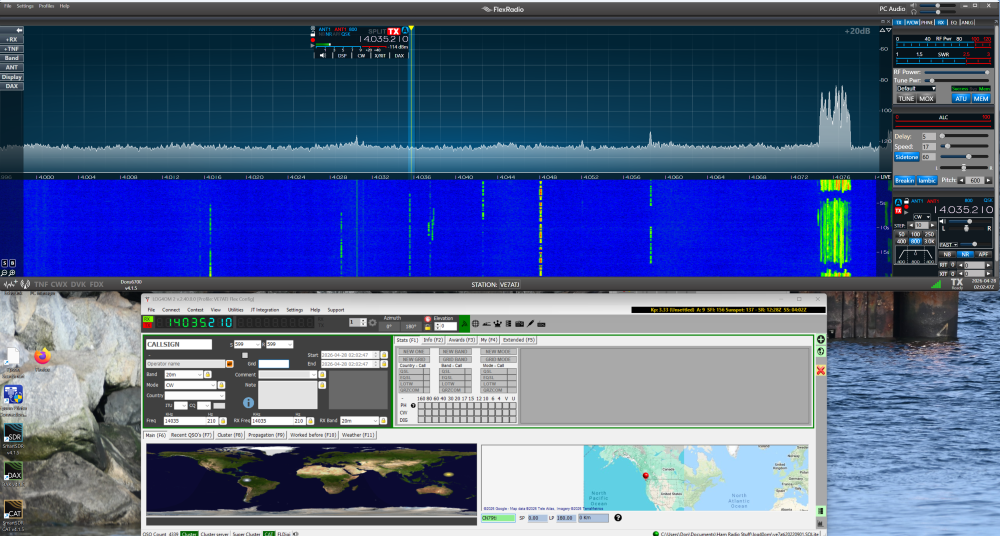
I can tell you that I run two (2) 4k monitors attached to my Windows 11 PC and I can run SmartSDR on either one of them very successfully. It's great having the expanded band span of a wide monitor (both are approx 27in models). I even suppose that with proper configuration of the displays, I could have SmartSDR running across both monitors combined! :-)
Anyway, I keep it to one for now with Log4OM running below it, while the other runs web-browser look ups, like QRZ.com, POTA, SOTA, etc.
 0
0 -
Hi Andy,
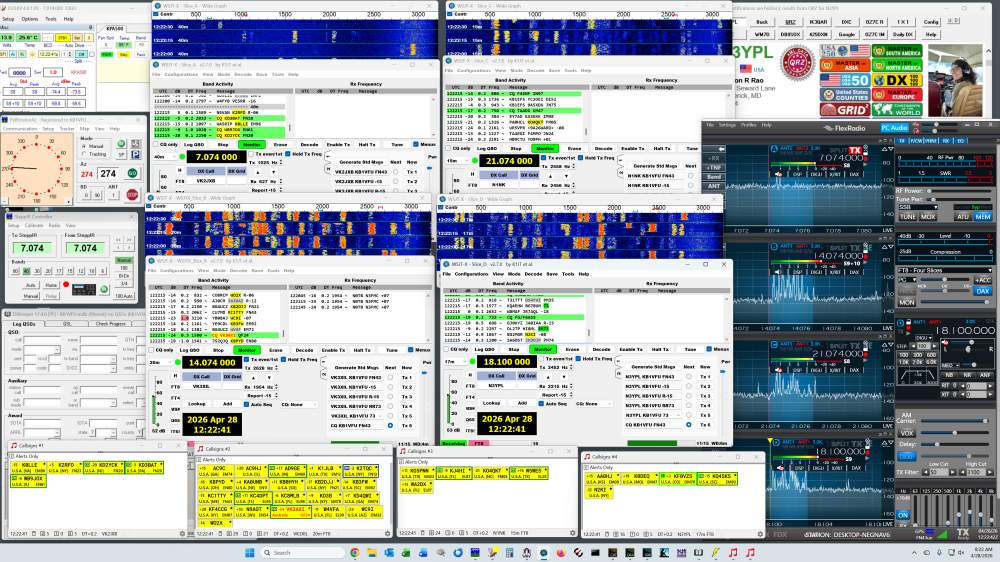
Your new TV will need to support 4:4:4 Chroma in order to display text cleanly, which it presumbly does in PC Mode. I have a 43" TCL 4K (43Q65) with Google TV (just $220) that works very well; shown below running four instances of WSJTX, four instances of JTAlert, DX Lab apps, SmartSDR with four panadpaters, DDUtil and PstRotatorAz. Several other apps are minimized.
My desktop lacks horizontal space for multiple displays, so a single 43" 4K TCL TV is a good solution and it is a fraction of the cost of a dedicated 4K computer monitor in the same size. My eyes are positioned about 24" from the display at mid-level without strain or grainy images. Newer 4K TVs are by default very bright, so you will likely want to reduce brighness substantially when using as a PC monitor. I have my TCL set to just 30% of max brightness.
Good luck and 73,
Larry KB1VFU
 0
0 -
Thanks Don and Larry .
The new TV is a TCL QM8K 65" , so it should be as capable as Larry's screenshot .
73 de Andy K3UK
0 -
You may find the 65in to be a bit large. I have a 55in, and when sitting at a desk depth distance from it I am about the maximum I would want to be for constant head movement up and down and left and right in order to see and track things. Unless you strategically center the most used windows clustered around the center of the screen, you might find that you look like one of those car dash toys that has the head on a spring as you constantly have to move your head. I have been using my 55 in for about 10 years and I would never go back to multiple monitors.
One other thing you might want to become proficient at if your using Windows is the Multiple Virtual Desktops that will allow you to have several seperate desktops displaying and running different programs and allow you to quickly toggle between them depending upon you need. I set mine up logically so that each desktop cover a different function. Ham Station, Personal Desktop, Work Desktop, Video Editing Desktop, Home Server Desktop.
0 -
For me the "sweet spot" is achieved by aligning the TV so my eyes are level at the center of the bottom edge of the top third of the screen and no lower than the dead center of the screen. This helps minimize eye and head movement and thusly reduce eye and neck strain. Also, I use a tilt-back office chair, which helps avoid neck strain when working hours at a time.
It will be difficult to achieve an ideal viewing positon with a 65" screen and may require increasing your chair height substanially and possibly adding a footrest to compensate, depending on your stature. The bottom of the screen should be positioned as close as possible to desktop level. You will probably find that stitting four feet from the screen will provide the best compromise.
Alternatively, if you have sufficient space behind your desktop, mounting the TV on a rolling and adjustable stand would allow you set the ideal height and move it farther away to comfortably watch regular entertainment content. Below is a Gemini 3 AI analysis (I know — be careful), which comports with similar recommendations on A/V websites. Note that you will want to increase Windows scaling (mine is set to 150%):
For a 65-inch 4K display used as a computer monitor, the ideal viewing distance for reading text comfortably while maintaining productivity is approximately4 to 6 feet (1.2 to 1.8 meters), or roughly 48–72 inches.While some television-focused, high-immersion recommendations suggest a closer 6.5 feet, text readability at that size requires a balance to avoid eye fatigue and excessive head movement.Optimal Distance Breakdown
Optimal for Reading & Work (4-6 ft):This range allows you to see the entire screen without excessive head movement while keeping text clear and crisp.For Immersive Use (6-8 ft):If you are using it primarily for movies or gaming, 6.5–8.9 feet is considered ideal for a 4K 65-inch screen to maximize immersion without being able to see individual pixels.
- Tips for 65-inch Monitor Usage
Scaling and Resolution:Because a 65-inch panel has a massive area, you should use4K resolutionat 100% scaling if sitting 5-6 feet away, or scale up to 125%–150% if you prefer to sit slightly closer to maintain readability of small text.Eye Level:Position the screen so your eyes are level with the top third of the display to avoid neck strain.Reduce Eye Strain:Use the 20-20-20 rule: Every 20 minutes, look at something 20 feet away for 20 seconds.
73,
Larry KB1VFU
0 -
Well the TV arrived and is mounted . My Mac Mini is small enough to be on my soundbar stand . SmartSDR was first booted up while the TV was in Filmmaker mode and then I switched the TV to PC mode . That was significantly less bright but I think I will use PC mode when using the radio . Larry was correct , I did not have it mounted at the best height for the type of viewing we do when operating a radio . I did notice some neck strain after a while . Still , I find it enjoyable . HF radio audio through a 13:1 soundbar is overkill but interesting
Andy K3UK .
0



Leave a Comment
Categories
- All Categories
- 401 Community Topics
- 2.2K New Ideas
- 689 The Flea Market
- 8.6K Software
- 196 SmartSDR+
- 6.6K SmartSDR for Windows
- 200 SmartSDR for Maestro and M models
- 460 SmartSDR for Mac
- 279 SmartSDR for iOS
- 268 SmartSDR CAT
- 220 DAX
- 395 SmartSDR API
- 9.6K Radios and Accessories
- 109 Aurora
- 348 FLEX-8000 Signature Series
- 7.2K FLEX-6000 Signature Series
- 999 Maestro
- 58 FlexControl
- 872 FLEX Series (Legacy) Radios
- 975 Genius Products
- 482 Power Genius XL Amplifier
- 358 Tuner Genius XL
- 135 Antenna Genius
- 321 Shack Infrastructure
- 226 Networking
- 483 Remote Operation (SmartLink)
- 145 Contesting
- 847 Peripherals & Station Integration
- 147 Amateur Radio Interests
- 1.1K Third-Party Software