SmartSDR v4.2.20 | SmartSDR v4.2.20 Release Notes
SmartSDR v3.10.15 | SmartSDR v3.10.15 Release Notes
The latest 4O3A Genius Product Software:
The latest 4O3A Genius Product Software and Firmware
If you are needing assistance with FlexRadio products, please refer to the product documentation or check the Help Center for known solutions. Need technical support from FlexRadio? It's as simple as creating a HelpDesk ticket.
SmartSDR v4.2 - New features

Stay Current
We strongly urge every FlexRadio operator to update to SmartSDR v4.2 as soon as it is available.
Beyond the exciting new features, this release includes significant under-the-hood maintenance and performance improvements that you won't see on the surface but will absolutely feel on the air. Staying current with software updates is critical.
Each release addresses bugs, closes security vulnerabilities, improves system stability, and ensures compatibility with the latest operating systems and hardware.
Falling behind on updates can lead to unexpected crashes, degraded performance, and missed improvements that the development team has worked hard to deliver. Think of it like maintaining your station equipment.
Regular upkeep keeps everything running at its best. Whether you're a casual operator or a seasoned contester, running the latest version of SmartSDR ensures you're getting the most out of your radio and the most reliable experience possible.
SmartSDR v4.2 — Coming April 28, 2026
SmartSDR v4.2 is packed with updates for every FlexRadio operator, delivering meaningful improvements across both SmartSDR Basic and SmartSDR Plus — more performance, broader hardware support, and enhanced control at every level.
What's New in SmartSDR Basic (available to all users)
- New DAX Version 2 Architecture
- New FlexVSP Driver
- ARM Support for SmartSDR, DAX, and FlexVSP
- APD External Sampler / PGXL Integration
- Windows 11 Support
- USA 60M Turf
- Numerous under-the-hood performance improvements
SmartSDR Plus Enhancements (for power operators)
- User Configurable RX Filters
- TX Filter Display During Transmit
- Band Edge Markers
Whether you're running a FLEX-6000 series radio from the shack or operating remotely via SmartLink, v4.2 brings real-world improvements that matter on the air.
Setting Up WSJT-X for DAX 2
SmartSDR DAX 4.2 introduces new performance changes to the DAX architecture. The following resources will help you get up and running:
Comments
-
Pretty cool… will this eliminate the need to turn off Core Isolation in Win 11 settings?
Also, will we be able to import 4.1.5 profiles directly into 4.2?
1 -
Overhauled DAX, is great news. Expanding APD to use external amplifiers , like the PGXL and 3rd party amplifiers using a adapter for feedback from the amplifier to the radio with a Flex Radio adapter, is great too. But, where are the missing adjustment sliders for the DSP functions and improvements to the DSP functions? Also, has the new 60 meters allocation been added? I am glad to see the updated DAX system and the support for 64 bit code. That should improve stability. But, when will we see some new features that might make having the Plus/Early Access license worth paying for? I have Early Access, and have been hoping that the new licensing system would actually provide new,exciting features in SmartSDR more often. Maybe, I misunderstood what the paid licensing was supposed to provide and make it a worthwhile investment.
James
WD5GWY
2 -
I agree with James. The missing adjustment sliders for the DSP are becoming embarrassing...
Torsten - DL9GTB1 -
where is it possible to dowload 4.2????
0 -
Tuesday the 28th of April on the FlexRadio Site
0 -
Glad to see finally the APD loop in the PGXL.
But I am not sure if I get this function. I have not paid for any future software releases beyond the 4.1.5. I know there was the basic SW license and also the Early release SW option. Frankly I bought the 8600 because it was being promoted with a demonstration of how the PGXL would be able to work with an 8600 with APD looped in vs. the 6600, which I owned at the time. Therefore, I was led to believe that would be functional without the need to buy into the udpdate for a fee structure.
So, will I need to pony up some bucks for me to take advantage of APD with the PGXL looped in?
Bill, AD5EW
1 -
Great news, especially DAX v2 no longer requiring Core Isolation! And using Share Memory (not interrupts).
In fact, this is SO great that I think I'll buy some b.e.e.r. and plan a complete wipe-and-re-install of Win11 to celebrate 😀 It's time I did that anyway.
0 -
The description on the YouTube channel page says that the APD ( Pure Signal) is for everyone using an 8000 or Aurora. No need to purchase a Plus license.
James
WD5GWY
0 -
How are the custom RX filters persisted? Profile? Which one(s)?
0 -
Yes, James great to see SmartSignal for an external amplifier, yet another promise fulfilled. Nice for those of us who have a PGXL, note the PGXL ADP A & B outputs are BNC that would connect to the respective RXA & RXB (BNC) on the 8xxx radio. In otherwords two BNC to BNC cables are required.
My question are: (assuming TX Band Settings must be configured)
When will the "box" that switches between RX antennas and ADP outputs be available? Let's call it ADP/RX control box. If it's in the works and still sometime down the road, then providing guidelines. suggested diagram will be helpful and prevent a lot of support tickets. I would want to build one ASAP and I"m sure many others would too. I would assume from previous videos, one of the TX outputs will be used, so a simple DPDT relay triggered by one of the TX outputs would be the game plan.
Would controlling the ADP/RX control box automatically (PGXL integration) in the software or will it be user configured, meaning with the software setup TX Band Settings and them we be told to use TX3 for example, to control the ADP/RX control box, or will the user have to configure what ever in the TX Band Settings?
The Release Notes do not detail how to setup the radio, we'll find out on April 28th. May I suggest if not already implemented, to keep with the station automation theme, if a PGXL is detected, that the software automatically configures the TX Band Settings to toggles say TX3 for all bands the PGXL is capable of, 160m thru 6m. This of course would have to be done manually for other vendor's external amplifiers.
1 -
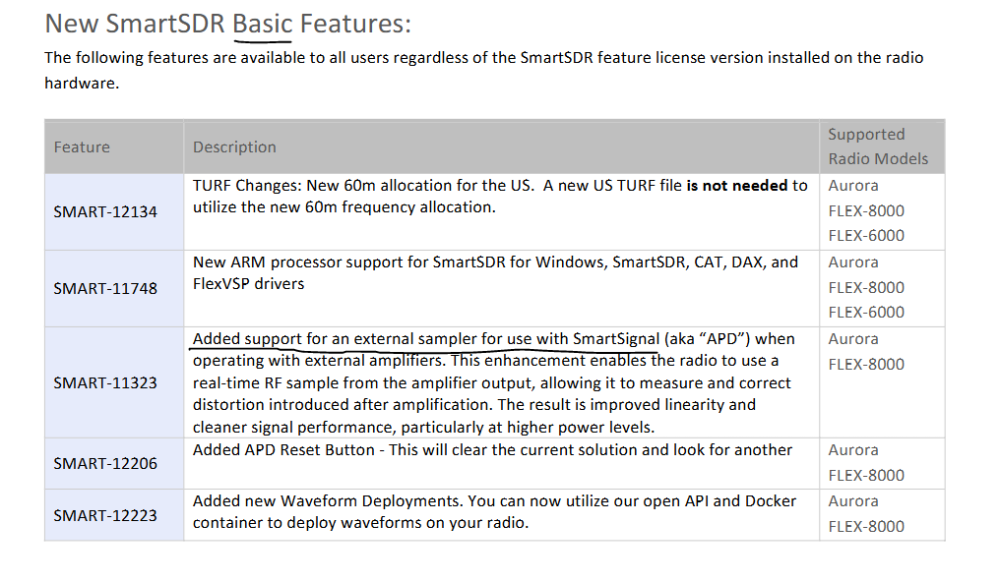
James, you and I have a different understanding about who gets APD. I took the comment to mean it would work on all 8000 and not on the 6000 series radios. However, you would still need to have version 4.2 features of the software, which is an upgrade from the base version 4, to enable it. Flex may want to clarify this.
0 -
It will work on 8000 and Aurora (not 6000) radios and is part of SmartSDR Basic (SmartSDR+ is not required).
 1
1 -
Rick, I didn't say that APD would work on the 6000 radios. And yes, you will have to update to version 4.2 Basic. ( which is a free update). Mainly because the necessary code doesn't exist in version 4.1.5 Basic or Plus/Early Access. If you want the additional new features ( Band plan, custom filter buttons etc.) you will need to have Plus or Early Access.
James
WD5GWY
0 -
Afternoon. How will the new 60M turf files affect the MARS program ?
0 -
errrrr.. pardon my complete stupidity but how is APD used on an 8600 if the RXA and RXB ports are utilized by dedicated RXantennas? Is there a switching box to be purchased by us whom no longer can build our own solutions due to viaion? Oh, and don't mind me, you do not have to pardon my stupidity :)
0 -
Hi Larry, I haven't seen 4.2 yet, but I would guess that you can use the XVTA and XVTB ports. Flex did say that they would be engineering a switch box to allow sharing a RX ant port with APD, but there has been no information about that released lately.
1 -
After watching the video and looking at the comments on the YouTube site, I am unclear on what to do with the Maestro. Tim recommends deleting all prior SmartSDR versions to remove all the old drivers, so how do we update the Maestro? Information on that will be helpful. Thanks! K1HC
0 -
Hi D.ick, DAX and CAT do not run on the Maestro, so there should be nothing special to do there. The referenced drivers are installed on your computer along with SmartSDR if you did that install. So it is only the PC that needs the old versions uninstalled, and then only if you installed them in the first place.
1 -
Question… If you upgrade to the free 4.2 version but later want the 4.1.5 premium features how do you upgrade?
0 -
Hi Mick, You get all premium features available at time of upgrade as well as all features released during the 1 year period following your purchase. So if you upgrade to SmartSDR+ today, you will get all SmartSDR+ features released to this point. In roughly 30 days from the release of 4.2, you get those features as well.
If you upgrade to 4.2 basic on Tuesday, then wait some amount of time before purchasing SmartSDR+, you will get all features that your radio is capable of, up to and including whatever is released at the time of upgrade. The caveat is that the new features (i.e. 4.2) are not available for 30ish days from release. If you upgrade after the 30 day period, you get all features at that time.
0 -
I posted this in the groups.io group so pardon the duplication if you've seen it already…
I just received an email as I am sure many here also did about the 4.2 release.
One of the pieces I am interested in is APD, linked in the email here https://helpdesk.flexradio.com/hc/en-us/articles/49290951647899-Configuring-SmartSignal-APD-for-FlexRadio-8000-and-the-Power-Genius-XL-Amplifier
Q1. What will will happen when APD is expecting a -60db sample and that input drops to -90db when the amplifier is in standby or off?
Q2. Does the APD switch automatically to the Internal sampler? It doesn't appear as though it will based on the illustrations in that Helpdesk article.
I do not have a PGXL. But the linear amplifier I do have has an SMA output in the rear "100W = 0dbm". According to my calculations that is a -50db sampler so I will connect that to my RXA input initially with 30db of additional attenuation just to see the impact on the RXA input. I will reduce the attenuation in 10db steps and if all goes well I expect to be good to go with 60db total attenuation as outlined in the release.
However, since there is no integration between SmartSDR and my brand of linear amplifier, SmartSDR will not know when the amplifier is in Standby or Operate. I have the same question here as well (see Q1 above). It will be fun figuring it out.
It would be nice to be able to enable/disable APD and set Inernal/External APD based on transmit profiles Eg. "AMP ON" (external PTT enabled and RXA APD enabled), "BAREFOOT" (external PTT disabled and INTERNAL APD enabled).0 -
do you have to UNINSTALL 4.1 usually i do a full reboot and upgrade with the power button waiting until it is WHITE and have usually been ok tnx
0 -
Hi Arnold, you do not need to uninstall SmartSDR, but it won't hurt to uninstall first.
You may need to uninstall DAX, but check the release notes to be sure.
0 -
Hi Len.
0 -
Hi Len… actually, the instructions for installing 4.2.18 says quite clearly to "…highly recommended to uninstall all previous versions starting with SmartSDR v4.1.5." Further on it also says to make sure that you also uninstall all versions of VSP, DAX and CAT.
0 -
Hi Don, yes, Tim just released an announcement recommending uninstalling all previous versions. It is not required, but is highly recommended.
I assume this is because 4.2 DAX is a total rewrite and is not compatible with earlier versions.
0 -
Mike-VA3MW Administrator, FlexRadio Employee, Community Manager, Super Elmer, Moderator adminOptions
Correct. The 2 DAX's are totally different programs and design.
0 -
tnx for all of your comments/suggestions
0 -
I imagine that tomorrow is going to be a busy day for Flex Radio.
James
WD5GWY
0












Leave a Comment
Categories
- All Categories
- 401 Community Topics
- 2.2K New Ideas
- 689 The Flea Market
- 8.6K Software
- 196 SmartSDR+
- 6.6K SmartSDR for Windows
- 200 SmartSDR for Maestro and M models
- 460 SmartSDR for Mac
- 279 SmartSDR for iOS
- 268 SmartSDR CAT
- 220 DAX
- 395 SmartSDR API
- 9.6K Radios and Accessories
- 109 Aurora
- 348 FLEX-8000 Signature Series
- 7.2K FLEX-6000 Signature Series
- 999 Maestro
- 58 FlexControl
- 872 FLEX Series (Legacy) Radios
- 975 Genius Products
- 482 Power Genius XL Amplifier
- 358 Tuner Genius XL
- 135 Antenna Genius
- 321 Shack Infrastructure
- 226 Networking
- 483 Remote Operation (SmartLink)
- 145 Contesting
- 847 Peripherals & Station Integration
- 147 Amateur Radio Interests
- 1.1K Third-Party Software