SmartSDR v4.2.20 | SmartSDR v4.2.20 Release Notes
SmartSDR v3.10.15 | SmartSDR v3.10.15 Release Notes
The latest 4O3A Genius Product Software:
The latest 4O3A Genius Product Software and Firmware
If you are needing assistance with FlexRadio products, please refer to the product documentation or check the Help Center for known solutions. Need technical support from FlexRadio? It's as simple as creating a HelpDesk ticket.
SmartSDR and current 60m channels on 6400

Per ARRL, these are the current 60m channels:
Channel 1: 5330.5 kHz
Channel 2: 5346.5 kHz
Channel 3: 5357.0 kHz
Channel 4: 5371.5 kHz
Channel 5: 5403.5 kHz
However, SmartSDR 4.1.5 and the Flex6400 will not TX on those frequencies.
I have to set them lower: 5330.4, 5346.4, 5356.9. 5371.4 before the TUNE and MOX buttons let me TX.
Additionally, I cannot program channel 5: 5403.5 (TUNE and MOX remain grayed-out)
This is the first time I configue my Flex 6400 for 60m and I wonmder what I am missing?
Comments
-
Hi Bruno, you may need to turn the TX Filter High Cut value down to 2800 Hz.
1 -
 Mike-VA3MW Administrator, FlexRadio Employee, Community Manager, Super Elmer, Moderator adminOptions
 -
Filter is set 100-2800. Tune & MOX turn blue when I set the frequencies 100Hz lower. And I can't program the 5.4xx channel (5?). The Tune & MOX buttons stay grayed out
Mike - I read the post but it didn't say why I do not see the 60m channel and frequency when I select 60m (like the manual says). Nor did it say why I can't program the 5.4xx channel.
I will calibrate and retest this evening.
This 6400 is remote on Palomar Mountain and it was bought new from Flex. This is the first time we configured it for 60m
0 -
Mike-VA3MW Administrator, FlexRadio Employee, Community Manager, Super Elmer, Moderator adminOptions
Can you post a screen shot of SmartSDR please for the channel that does not work. Did this work on a previous version?
0 -
Mike-VA3MW Administrator, FlexRadio Employee, Community Manager, Super Elmer, Moderator adminOptions
This might help. I took a FLEX-6600, installed 4.1.3 on it and reset the radio. The High Cut is critical in that it has to be less than 3000Hz as more than that puts you out of band.
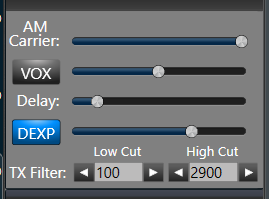
I then added the 'current' 5 channels for a typical US TURFing. This does not reflect the new 60M law that just was changed.
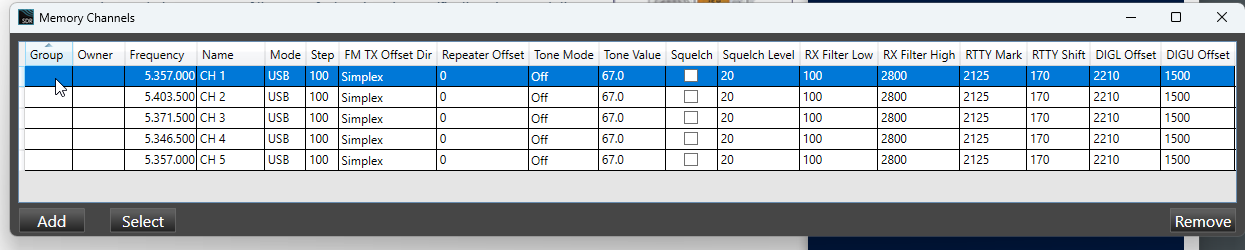
I then exported the memories to a ZIP file. You'll need to extract it and then import it Import/Export Profile utility (within SmartSDR).
I confirmed that the radio does TX on these 5 channels.
It should work.
1 -
Thanks …to I'll try it this evening and report back
0 -
UPDATE - I set the TX BW to 2900 and loaded the frequencies as you shared and all is now fine on 60m. All channels can now be used. I need to read-up on the profiles to see if I can save a 100-2900 TX BW profile for 60m while leaving it at 3000 Hz for the other bands.
Once the new 60m allocation is valid, I'll look for the TURFF file that will update the profile to let us use the new allocation.
Going back to the 60m frequencies, I need to read up on that as what you had me program (your spreadsheet) is not what is published by the ARRL. I believe it has to do with "center frequency" versus "suppressed carrier frequency".
I rarely used 60m and my last escapade over here was with my IC-7300 with a stealth wire antenna & tuner (I live in a condo here). My current limitation with my remotes was the antenna. The remote on Palomar Mountain I manage has an end fed which I can tune, but my remote in Florida has two inverted V antennas (40m and 80m), a GAP Titan TX vertical, and an 8-element LPDA (20m-10m).
In any event, thanks :-)
0 -
I think you are missing 5330.5. Not sure of the order, but it is the lowerst frequency channel.
I usually number the channels from low to high frequency but I may be wrong…
https://www.arrl.org/60m-channel-allocation
0 -
Hmm ... I entered the 5 channels that Mike shared in the spreadsheet he attached.
0 -
Channel 1 is the same as Channel 5
1 -
LOL … I hadn't noticed that.
Mike VA3MW —> You need to update the spreadsheet :-)
I changed CH1 to 5330.5 and it works fine, and all 5 channels are in and working.
Thank
1 -
Mike-VA3MW Administrator, FlexRadio Employee, Community Manager, Super Elmer, Moderator adminOptions
I will leave it for others to modify as required as it is a bit different for other countries.
2 -
Hi Mike
I have a 6700 and have imported the file you have provided as a test and it will not TX - the rig reports interlock is preventing transmission so I am doing somthing wrong HI.
Also does anyone have a latest UK Excel freq file?
Mimram0 -
Hi Mimram,
In order to be able to transmit on all the UK 60m frequencies you will need an updated TURF file for your radio. TURF files contains the allowed transmit frequencies and are locked to the serial number of your radio.
Contact Flex support (or your dealer) with your radio serial number and they should be able to create a custom TURF file for you. When I purchased my 8600 from the UK dealer they were able to quickly supply a TURF file that allows me to transmit on all the UK 60m allocations.
Jonathan
0






Leave a Comment
Categories
- All Categories
- 401 Community Topics
- 2.2K New Ideas
- 681 The Flea Market
- 8.6K Software
- 194 SmartSDR+
- 6.6K SmartSDR for Windows
- 197 SmartSDR for Maestro and M models
- 456 SmartSDR for Mac
- 278 SmartSDR for iOS
- 268 SmartSDR CAT
- 218 DAX
- 393 SmartSDR API
- 9.6K Radios and Accessories
- 98 Aurora
- 339 FLEX-8000 Signature Series
- 7.2K FLEX-6000 Signature Series
- 991 Maestro
- 58 FlexControl
- 872 FLEX Series (Legacy) Radios
- 965 Genius Products
- 480 Power Genius XL Amplifier
- 353 Tuner Genius XL
- 132 Antenna Genius
- 319 Shack Infrastructure
- 224 Networking
- 482 Remote Operation (SmartLink)
- 144 Contesting
- 845 Peripherals & Station Integration
- 147 Amateur Radio Interests
- 1.1K Third-Party Software