SmartSDR v4.1.5 | SmartSDR v4.1.5 Release Notes
SmartSDR v3.10.15 | SmartSDR v3.10.15 Release Notes
The latest 4O3A Genius Product Software:
The latest 4O3A Genius Product Software and Firmware
If you are needing assistance with FlexRadio products, please refer to the product documentation or check the Help Center for known solutions. Need technical support from FlexRadio? It's as simple as creating a HelpDesk ticket.
AetherSDR — Open-Source Linux Client for Flex Radios
Comments
-
I have noticed this but this is the same with SmartSDR. Something to look at, What is your "DISPLAY" settings at for the "Rate" and "FPS" having these set at factory or to high can cause a lot of un needed network slow downs, for me I slow these settings down quite a bit from the Factory Defaults and it helps with the Network bandwidth required to run the Radio. I have my "FPS" at 10, "Average" at 15 to 20, and Waterfall "Rate" at 8
This is way easier on the eyes and not near the Network traffic.
Remember all this data needs to go over usually a 100Mb Ethernet port on the 6000 radios and most older computers and Ethernet Switch's.
Also on AetherSDR when it gets built you can change the bandwidth to "Low Bandwidth", this is in the "Setup", "Choose Radio / SmartSDR Setup" tab I think this will help a bunch of us with the OLDER computer hardware once it is implemented. This I think will really benefit many of us that use OLD computer hardware with the LINUX OS.
73
Bret WX7Y
1 -
I ran a test Yesterday, I ran the AetherSDR Pi AppImage 0.7.2 on my Raspberry Pi 5 8Gig Ram. It ran surprisingly VERY WELL.
On the same Pi at the same time, I also run my Node-Red server and the FreeDV-FLEX AppImage while slice A was using FreeDVU on receive on my Linux Ubuntu Intel NUC6 AetherSDR.
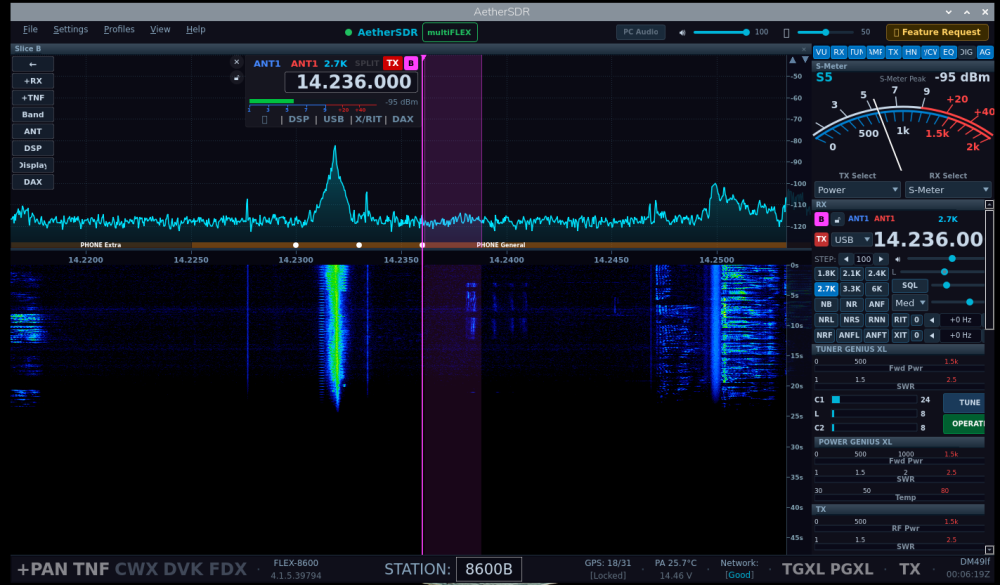
This I think was a vary hard stress test for the Pi5 CPU at 77, Memory at 17, Temp 177*f, In comparisons with Node-Red server and FreeDV-Flexradio, and the Node-red server running at CPU at 30, Memory at 16, Temp 120*f.
Here is a screen grab and it was consonantly a "good" Network display so the Pi graphics are being handled very well.
It is supposed to run on a Pi4 too but I have not tested that yet, maybe tomorrow.
I think a very promising portable unit.
73 Bret WX7Y
 1
1 -
It's amazing how much power is available in the Raspberry Pi systems. My Anan G2 Saturn Ultra has a Raspberry Pi CM4 module in it. And it just cruises along with no real problems.
Of course PiHPSDR for the Anan radios is pretty light weight compared to Thetis. Or, probably compared to AetherSDR as well.
James
WD5GWY
0 -
Is AetherSDR mature enough to work with the digital modes like FT8? After doing some Googling, I haven't come up with a working configuration. If I do a CAT Test that comes back green and I can change bands just fine. I have the radio set to "FlexRadio SmartSDR Slice A". I have audio input set to DAX Audio RX1 (FlexRadion Systems RX Audio). Putting WSJT-X into "Test PTT" puts the radio into XMIT, however it failes with a the "Test PTT" button coming back red after a second or two. I'm guessing there's something I'm not understanding about DAX, however I'm at a loss.
Any insight would be greatly appreciated.
73 and good DX,
de Roger, NK1I
0 -
What a great project!
I've already got it running on my Mac and Win11 with my 6400M. I tried to set it up manually via the IP address with Parallels and Ubuntu (Flex didn’t show up), but I couldn't establish a real connection to the Flex, even though it showed up then. There was no waterfall, etc.
Today, I’ll try installing it on a PI4+. I had some problems initially, but it's great to see all the improvements in such a short time.
I saw 'RADE', but I'm not sure if it's already 'activated'? It would be great to see FreeDV implemented without having to start the Flex Waveform add-on separately.
Anyway, well done. 'Slowly but surely'.
73, Stefan DF6VI
0 -
Hi,
My apologies in advance for asking such basic questions, but I am a noob at working with AetherSDR. It is on a PC running Ubuntu v24 in an AppImage.
The radio is a Flex 8600 with a TGXL and PGXL. I’m trying to get audio and rig control to WSJT-X v2.7.0-rc3 but I can’t seem to make it happen. Are there a few pointers to get me started? Here are some screen shots of what I’m seeing.
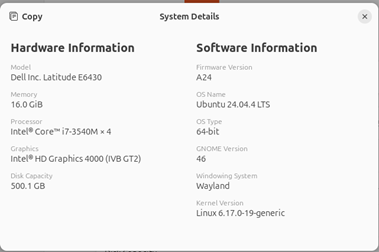
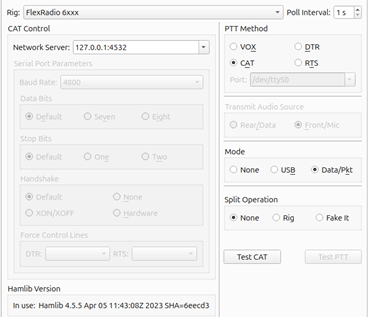
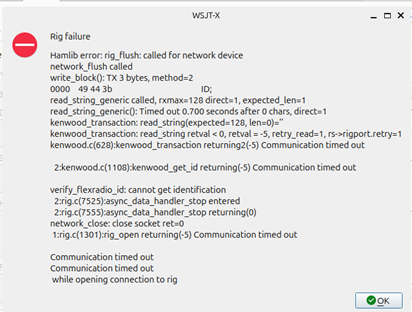
I know the port is open, because I can telnet to it and see connection confirmation in the AetherSDR UI.
Here are my audio choices in WSJT-X. None connect to DAX.
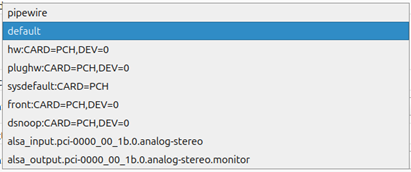
Any help is appreciated.
-73, Chuck W9WLX
0 -
OK, I figured it out. I had two mis-configs.
I needed to use Hamlib NET for the rig to get rig control.
The audio problem was due to not having an audio server installed. I installed PulseAudio with PipeWire and now have WSJT-X functioning.
Thanks for a well-done client in such a short time. Looking forward to enabling more features and continuing to experiment.
-73, W9WLX, Chuck
0 -
Do you need to uninstall a previous version every time you install a new one?
Thanks
0 -
I am running AetherSDR on my MacBook. Holy Cow, this thing Rocks! And new features and bug fixes come out rapidly. de WA1QZX
0 -
I tried to copy and paste into this box and it just put it in table format and deleted a lot of text. What gives? What do I need to do to just cut and paste text?
0 -
Hi Chuck, I'm having a heck of a time getting WSJT-X or anything else working with CAT control running Ubuntu and AetherSDR (now) 0.7.12 and has me pretty frustrated so far so glad at least someone has had luck getting something working with it.
What OS are you running? 73
Bret WX7Y
0 -
I'm running Ubuntu v24.04.4 LTS. I did a fresh load of Ubuntu and had some challenges with it. Seems the driver package and the kernel had some incompatibility. The OS would not see the wireless card. When searching for a new driver, it would tell me the recommended driver is proprietary and not free. That didn't seem reasonable since it was an older Dell Latititude. Turns out I had to update the kernel, uninstall the driver package, and reinstall it. Then the wireless card came to life.
Chuck W9WLX
0 -
I actually moved away from the Issues with WSJT-X for a few hours and with Claude AI's help I built a Linux AetherSDR AppImage installer, It is at the bottom of this attached message and is called "Install_AetherSDR.sh" and it works really well the last to updates of AetherSDR we have had shared with us. This is actually a lot quicker install than Downloading and running the Windows version and the Script file below does it all in one step from a terminal screen, In fact I DID NOT have to
I ran the AehterSDR script from message #147 but it was only partially
worked and taking his Idea I built a new Script that does, as of right
now totally installs the Linux x86_386 version AetherSDR AppImage and
gives you a Desktop ICON like the windows setup version does.
To run, just copy and save the script file ONCE to your Home directory and from then on from a Terminal just type "sudo ./Install_AetherSDR.sh" hit enter from your Home directory and it should check for a update, down load the update, Install the update, and install the Icon on your Desktop program manager. To run AetherSDR just click on the Blue AetherSDR Icon.this was made for Ubuntu 24.04 but should run on other.
Install_AetherSDR.sh
Bret WX7Y and Claude AI
1 -
Bret
Thanks for sharing. Jeremy KK7GWY with the sharing of his AetherSDR app has really brought back the interest in using the Flex Radio. Each day I can hardly wait to investigate and test what new features he has released. On both Linus and Windows. It is getting close to being my go to GUI for operating.
John K3MA/N2NY/VE3OI
0 -
Really excited to read this thread. It opens up some community possibilities to rethink the whole user experience and be more task-oriented.
When I operate FT8 I only look at the SSDR window to confirm there are receive signals in the passband and the transmit waveform looks right. When I contest I only look at the SSDR window to see if there are signals in the band and occasionally adjust receive filter bandwidth. WSJT or N1MM are the primary operating interfaces.
Couple features I've wanted forever: one is to "promote" a slice to A. Imagine you are listening to a pileup and tuning around the band with another slice. You hear something promising on slice C, but the logger has no visibility into anything but A and B.
Another feature I've wanted to see for years is a single client supporting two radios concurrently. Ideally it would be in the same app instance. FlexLib is built around a single radio assumption so it may not be doable without replacing the low level stuff. Two radios are better than one in my opinion because you have an online fallback if something fails in a contest.
Does anyone else think a browser based SSDR would be interesting? That potentially makes multi-radio support just into browser tabs. I haven't looked at the latest FlexLib but earlier versions had a bunch of WPF dependencies and wouldn't build under .NET.
1 -
all of a sudden my mouse wheel does not affect the tuning. Also double click the left mouse button does not affect the tuning either. v07.18.2 I even went back to v07.18 and the same thing. running Windows 11
0 -
As great as aether is, there is still a lot of wonkiness to be sorted out. I have on occasion solved problems by rebooting the computer0
-
dlgver,
I already tried that I even shut the computer off rather then just a reboot. No joy. However it works fine on my Ubuntu computer and my windows 10 machine. Go figure!!
0 -
Found my problem!! My slice was locked. I unlocked it and all is good now.
1 -
I need help. I have tried to file a bug report on github but it does seem to except it.
I am just going to put it here and hope @ten98 Jeremy reads it.
0



Leave a Comment
Categories
- All Categories
- 390 Community Topics
- 2.2K New Ideas
- 662 The Flea Market
- 8.4K Software
- 157 SmartSDR+
- 6.5K SmartSDR for Windows
- 186 SmartSDR for Maestro and M models
- 440 SmartSDR for Mac
- 275 SmartSDR for iOS
- 265 SmartSDR CAT
- 204 DAX
- 386 SmartSDR API
- 9.4K Radios and Accessories
- 55 Aurora
- 297 FLEX-8000 Signature Series
- 7.2K FLEX-6000 Signature Series
- 971 Maestro
- 58 FlexControl
- 867 FLEX Series (Legacy) Radios
- 946 Genius Products
- 473 Power Genius XL Amplifier
- 347 Tuner Genius XL
- 126 Antenna Genius
- 308 Shack Infrastructure
- 216 Networking
- 468 Remote Operation (SmartLink)
- 142 Contesting
- 814 Peripherals & Station Integration
- 144 Amateur Radio Interests
- 1.1K Third-Party Software