SmartSDR v4.1.5 | SmartSDR v4.1.5 Release Notes
SmartSDR v3.10.15 | SmartSDR v3.10.15 Release Notes
The latest 4O3A Genius Product Software:
The latest 4O3A Genius Product Software and Firmware
If you are needing assistance with FlexRadio products, please refer to the product documentation or check the Help Center for known solutions. Need technical support from FlexRadio? It's as simple as creating a HelpDesk ticket.
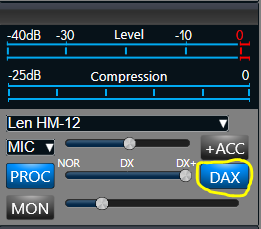
Yellow "TX" button in DAX


Comments
-
You need to turn on DAX for transmit:
 0
0 -
That got it, at least my FT8 is working. Still no VaraHF though. Thoughts?
And how do I save this config. Does the profile save everything?
0 -
That is part of your Mic Profile. I have the following mic profiles (just to give you an idea of what you can do):
Len CM500 - for my Yamaha CM500 headset
Len FHM-3 - for the stock hand-mic that came with my rig
LenDigital - for VarAC (DAX on)
Len HM-12 - for my Heil mic (PROC on)
Len HM-12 FM - for my Heil mic when I operate FM (PROC off)
Len Laptop - for my laptop mic when I am operating remotely
Go to Profile Manager and select the Microphone tab. There you will be able to create any Mic Profiles that you want. When you have a profile selected, any changes you make to the mic characteristics (DAX, PROC, MON, Mic Level, etc.) and TX equalizer will be automatically saved unless you turn off auto-save.
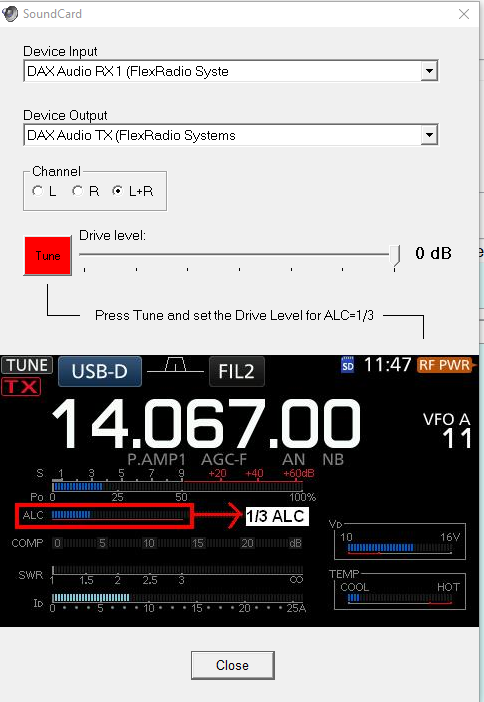
As far as VarAC goes, in the VARA HF settings, choose these DAX input and output devices:
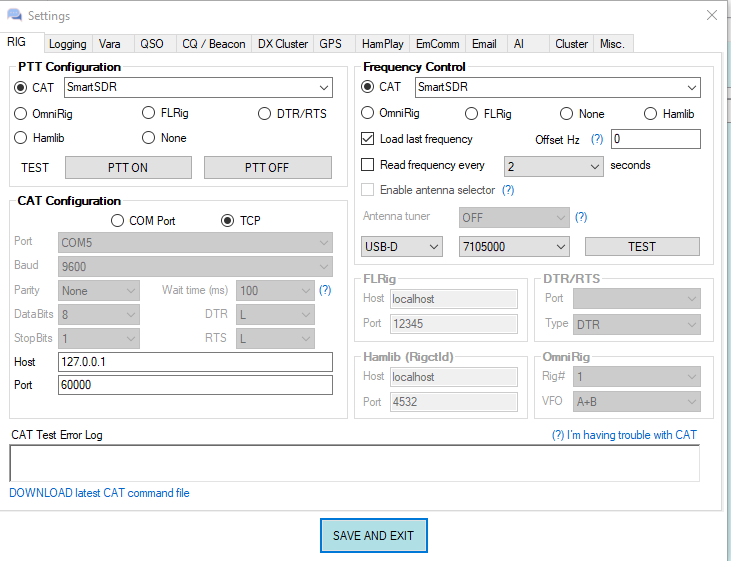
In VarAC Settings, Rig Control and VARA Configuration, select SmartSDR for PTT and Frequency Control. Select TCP for CAT Configuration and the values I show below for Host and Port.
There are probably other things that I am not thinking of, but that should get you started.
1 -
Good info on Mic's. Tnx.
0 -
Im using VARA HF. Not same screens regretfully..
0 -
VARA HF is just the HF modem. VarAC is the communication program that uses VARA HF.
Here is a link:
0 -
On my old radio (IC7300) I used Winlink and VARA hF, nothing more.
0 -
Ah, Winlink. I thought you were trying to use VARA HF by itself.
0



Leave a Comment
Categories
- All Categories
- 388 Community Topics
- 2.2K New Ideas
- 658 The Flea Market
- 8.4K Software
- 156 SmartSDR+
- 6.5K SmartSDR for Windows
- 186 SmartSDR for Maestro and M models
- 439 SmartSDR for Mac
- 275 SmartSDR for iOS
- 265 SmartSDR CAT
- 204 DAX
- 386 SmartSDR API
- 9.4K Radios and Accessories
- 52 Aurora
- 297 FLEX-8000 Signature Series
- 7.2K FLEX-6000 Signature Series
- 970 Maestro
- 58 FlexControl
- 866 FLEX Series (Legacy) Radios
- 944 Genius Products
- 471 Power Genius XL Amplifier
- 347 Tuner Genius XL
- 126 Antenna Genius
- 306 Shack Infrastructure
- 215 Networking
- 468 Remote Operation (SmartLink)
- 142 Contesting
- 811 Peripherals & Station Integration
- 144 Amateur Radio Interests
- 1.1K Third-Party Software