SmartSDR v4.1.5 | SmartSDR v4.1.5 Release Notes
SmartSDR v3.10.15 | SmartSDR v3.10.15 Release Notes
The latest 4O3A Genius Product Software:
The latest 4O3A Genius Product Software and Firmware
If you are needing assistance with FlexRadio products, please refer to the product documentation or check the Help Center for known solutions. Need technical support from FlexRadio? It's as simple as creating a HelpDesk ticket.
AetherSDR — Open-Source Linux Client for Flex Radios
Comments
-
Hello all,
I have to give a huge thanks to developers of AetherSDR, they are doing a great job with software. At first I was a bit skeptical about behaviour of software but now I have to say that it works well on Linux and Mac.
However, I have 2 complains:
- I can not hear my transmission on CW;
- it seems not possible to listen audio from the radio itself.
Apart these 2 problems software is running very well and so my huge congratulations to developers.
Best 73 es tks all.
CT1DRB/OK8RB
David Quental
0 -
@DaveC trying downloading the .AppImage file instead of building from source and see if works. The AppImage has opus bundled in.
in the meantime I’ll dig into why the source build is failing for you. You can also paste that same Dialog into https//Claude.ai and tell Claude you’re trying to build AetherSDR from https://github.com/trn9876/AetherSDR and see what suggestions it responds with.0 -
@ct1drb I’ll check into item 1 tomorrow when I’m back at my radio. For #2 are you referring to listening through the front speaker? Line out? PC audio?
0 -
Hey, noobie question as I haven't really dived in depth into the protocols that Flex radios use.
But would it be possible to add support for Flex 1500? I'll gladly do it myself, just gotta know whether it's even possible or if it's a lost cause of a dream.
It would make my 1500 a less of a dead weight collecting dust - ditched Windows everywhere a long time ago!
Tnx
73 Rob OK2AWO
With the 1500, 3000 and 5000, the radio is only 1/2 the solution with the PC being the other half. And, that 1/2 has no choice to run on Windows to make it work.
However, since the 1500 is a USB device, you could subscribe to Claude and start feeding it the details of how it works and the source code for PowerSDR and it might just build you a Linux solution that you could share with anyone.
You don't need technical skills, you just need to be very descriptive about what you want. Start with … I have this radio and I need to run it on Linux. What do I need to do. I'm 100% sure you could come up with some sort of solution.
Let us know how you make out.
73
1 -
Exactly right @Mike-VA3MW ! #LearnToClaude
0 -
Hello Jeremy,
I am talking, at the #2 to that jack socket for headphones from flexradio rigs, in back side of rigs.
Best 73 es tks all.
CT1DRB/OK8RB
David Quental
0 -
Wow, this thread is blowing up (in a good way)!
I got AetherSDR to compile without issue Linux Mint 22.1 and can run it. It is a whole lot easier than compiling a Linux kernel like I did 25 years ago.
I am trying to figure out how to connect remotely to the Flex 6400s in our Clubs station. I have the IP address and the Ethernet ports but can't figure out how to enter them into AetherSDR. I am a few revisions behind at this point and the problem may have been addressed. I may have to configure ufw to allow it to work but that is downstream of entering the network information.
Bill Beal, W5OXL0 -
I am having issues with 0.4.14 compiling on my Ubuntu PC and soon into the —build —build command it throws
"dnn/bbwenet_data.c
Updating build configuration files, please wait....
./autogen.sh: 16: autoreconf: not found
ninja: build stopped: subcommand failed. "So looks like I'm missing the autoreconf library or something, anyway just a heads up
The LINUX Appimage runs really good, the CW Decoder works really well so far anyway.
0 -
I can build AetherSDR from source code. B,for whatever reason I cannot get the AppImage to extract in Linux Mint 22.1. I have about Googled until I am cross eyed ( which is hard to do being blind in on eye). If I try to extract the image I keep getting errors. I was hoping to give the image a try to seebif it solves the problem I have with switching back and forth between the pc speakers and the line level audio output for powered speakers on the back of the radio. I can switch between them once. And the next time I switch, the audio stops, the application freezes and then crashes. The log file doesn't show a reason for the crash. ( or not one that is obvious) This is using the latest version. And has been the same since the ability to switch between the two outputs was added.
James
WD5GWY
0 -
You shouldn't need to extract the AppImage, it's like a .exe file for linux. You just need to flag it as executable. Open a terminal and type "chmod +x ./AetherSDR-(tab)" pressing tab will auto complete the file name. Once it's set to executable you can just double click and it should launch.
0 -
once its executable, from the terminal you can "./AetherSDRxxx" (File name) to start the AppImage if you like the Terminal node.
1 -
I guess I am having a senior moment or two. ( probably several) I followed your instructions and still the image file won't change to an executable file. It's probably a typo error on my part. I will keep working on it.
I did download the Windows zip file and got it going. And, unlike the installation on my Mint computer, I can switch between pc audio and the radio's audio output without any problems. But, I want to get it working correctly on my Linux Mint machine. So, I will keep plugging along until I find the problem.
Thanks for your help.
James
WD5GWY
0 -
In a terminal make sure you are in the same directory the file was Downloaded to and type in "chmod -x AetherSDR-v0.4.14-x86_64.AppImage" then do a ls -al and you should see if the mode for the file has the "x" in it. Now type "./AetherSDR-v0.4.14-x86_64.AppImage" for version 0.4.14"
hope this helps Tucker
0 -
The last line comes back with "Permission denied ". Could this be because it is in my Downloads folder?
James
WD5GWY
0 -
Figured it out. I had to right click on the file and select Permissions, then Allow file to be run as a executable file. ( Google search is getting better)
Thanks for your help.
James
WD5GWY
0 -
One more update. Installing the AppImage ( once I got past a couple of things) also fixed the problem I was having with AetherSDR crashing when switching between the pc speakers and the line level audio output for powered speakers on the back of the radio. Now,I can switch back and forth between the two and everything continues to work correctly.
I guess I was missing something when building the application from the source code. I did find a reference to Portaudio being missing in the log file. I downloaded and installed Audicaty which is supposed to install Portaudio as well.
I think that the only way I could have fixed the problem otherwise was to completely remove AetherSDR and it's dependencies and start over from scratch. Using the AppImage file is much easier since it includes all of the dependencies needed by the application.
Thanks for all the help!
James
WD5GWY
Version 4.1.5 Basic users might want to check out the Windows version of AetherSDR. It's worth installing just to get the Noise Reduction 2........it's that good!
1 -
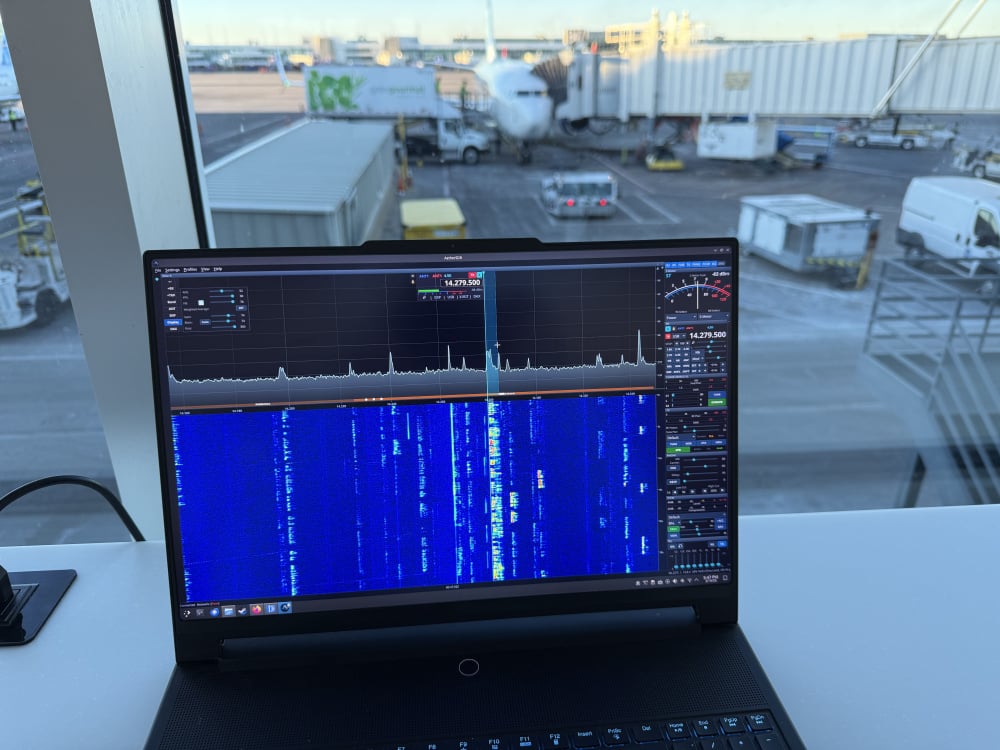
Clauding away at the airport, squashing bugs and resolving defects. SmartLink now working as expected.
2 -
Working great here. At some point I would like to suggest a bit of eye candy for the Spectrum display. If you have seen KE9NS's version of PowerSDR, you will see what I mean. That or in Thetis. Being able to fill the Spectrum with a gradient fill ( including opacity) with the custom colors would be nice. Black for the lowest level signal strength and red for the strongest signal strength. As I said, it's just eye candy, but I have found that it dresses up the spectrum display.
Have a safe trip home.
James
WD5GWY
1 -
Hello all,
just to tell that my complains are solved, so a huge thanks, however, I can not control volume of sound from radio, it has the same value.
My best 73 es tks all.
CT1DRB/OK8RB
David Quental
0 -
I am a total novice when it comes to Linux. I installed the latest version of Mint onto a computer. No other software is on the computer. I see in the readme file in Github that says to download
AetherSDR-*-x86_64.AppImage but I don't see that in the downloads. The instructions are confusing to a non-Linux person like me! Can someone please hold my hand and tell me the steps I need to follow to see if I can get AetherSDR running? I would like to give it a try. Thanks. K5XH Mark0 -
@ten98 I just wanted to thank you for the fantastic work you are doing here with AetherSDR. I have been testing the latest Mac .dmg build and it is working very nicely.
I am mainly a CW operator (would quite like to be able to hide the decoder!) and my 8600 is located in my garage, connected by gigabit network to my office/shack. Normally I use my Maestro or SmartSDR-Mac for CW but they both only allow Opus encoded RX audio. But using AetherSDR has really highlighted the improved audio available for CW when the uncompressed floating point audio is streamed.
I realise you haven't yet implemented Opus encodce/decode, but when you do please leave in the option to use the uncompressed RX audio! When you listen to CW tones and compare Opus vs uncompressed its like having cotton wool removed from your ears. The CW is so clean. I have a decent pair of active monitor speakers that I use and when connected to the Maestro, CW is not too bad but CW tones sound sligtly distorted with noise modulation due to the Opus codec. The uncompressed audio in comparison is lovely to listen to!
I really hope Flex in the future can be persuaded to allow the option of using uncompressed RX audio with Maestro and SmartSDR, for those of us that don't have bandwidth restrictions to the radio. @Mike-VA3MW please :-)
73 and many thanks,
Jonathan G4IVV1 -
The new version of AetherSDR is VERY VERY nice and works well here on both Windows and Linux, and yes a BIG HATs off to Ten98 and the Crew for there AMAZING hard work on this project.
There are a few gotcha's but that is to be expected, some huge things that have been missing from Flex SmartSDR like on screen CW decode, having the Antenna Genius, DAX and CAT on the main window even though it is a bit different and CAT may not be compatible with all 3rd party software, the Windows DAX and CAT still operate if you run it on Windows OS.
Thanks to Ten98 for helping me when my UBUNTU Linux wouldn't compile the last few versions and he responded within a minute or 2 with the answer I needed and I got it Compiled with no errors.
Thank you for sharing your creation guys, it's something to be proud of accomplishing that has been asked for for 13 years.
73
2 -
Hello all,
just to give my huge thanks for changes I requested, they are now at AetherSDR and I am very happy with it, well done!!
I have another request, but understand if it would not be possible:
I love contests and one software that I use is SkookumLogger, it is a nice piece of software and has a lot of good things, however, right now to setup with flexradio it needs to use another software, the xCAT one, to work properly. Some minutes ago I performed a test and xCAT software does not work with AetherSDR so far, it complains about a missing slice and so I have to move to SmartSDR for MAC.
Both SkookumLogger and xCAT use something called Flexradio CAT that is included in the CAT control of SmartSDR for Mac.
Could be possible to add such feature into AetherSDR to be able to be used by SkookumLogger and by other softwares that use same feature ?
Best 73, have a nice weekend and tks all.
CT1DRB/OK8RB
David Quental
0 -
@ct1drb can you open an issue request on the repo with this information so we can track it and dig in?
https://github.com/ten9876/AetherSDR/issues
Give it the label "enhancement".
Consider also starting a discussion in the discussion area about all of the 3rd party software that folks would like to see working with AetherSDR.
https://github.com/ten9876/AetherSDR/discussionsCheers,
Jeremy KK7GWY
0 -
Hello Jeremy and all,
done.
Best 73 es tks all.
CT1DRB/OK8RB
David Quental
1 -
Downloaded the latest version to my Linux Mint machine and to my Windows 11 machine. Both seem to work well. One thing I haven't seen is the ability to add another Panadapter. +RX just opens an additional Slice receiver in the same band. If accessing the radio from two different computers, in my case one Linux Mint machine and the other a Windows 11 machine, whichever machine starts up ssecond Shows the VFO control as VFO B instead of VFO A. Opposite the way SmartSDR handles it from two different computers running SmartSDR and accessing the same radio. ( unless being blind in one eye is causing me to miss something!)
James
WD5GWY
0 -
With SmartSDR running on two different machines ( computers) and accessing my 2 SCU Flex 6600, each client will display VFO A for it's session. If I add a second Slice receiver it will show VFO B. It's like two radios sharing a single transmitter.
The other issue is I don't see a way to add a second ( or more depending on which Flex Radio is being used) Panadapter. A second ( or more) Panadapter ( spectrum and waterfall display) allows one to receive on two or more bands, at the same time depending on which model of Flex radio one is using. ( models with two SCU's can also assign a different antenna to each Panadapter)
I hope I have explained what I am asking clearly.
James
WD5GWY
0 -
I double checked to make sure that I wasn't giving you incorrect information about how two SmartSDR clients act when connected to the same radio over a network. My description was correct. Both SmartSDR clients connected to the same radio over the network, when operating, show the default VFO display as VFO A.
James
WD5GWY
0







Leave a Comment
Categories
- All Categories
- 388 Community Topics
- 2.2K New Ideas
- 658 The Flea Market
- 8.4K Software
- 156 SmartSDR+
- 6.5K SmartSDR for Windows
- 186 SmartSDR for Maestro and M models
- 439 SmartSDR for Mac
- 275 SmartSDR for iOS
- 265 SmartSDR CAT
- 204 DAX
- 386 SmartSDR API
- 9.4K Radios and Accessories
- 52 Aurora
- 297 FLEX-8000 Signature Series
- 7.2K FLEX-6000 Signature Series
- 970 Maestro
- 58 FlexControl
- 866 FLEX Series (Legacy) Radios
- 944 Genius Products
- 471 Power Genius XL Amplifier
- 347 Tuner Genius XL
- 126 Antenna Genius
- 306 Shack Infrastructure
- 215 Networking
- 468 Remote Operation (SmartLink)
- 142 Contesting
- 811 Peripherals & Station Integration
- 144 Amateur Radio Interests
- 1.1K Third-Party Software