SmartSDR v4.1.5 | SmartSDR v4.1.5 Release Notes
SmartSDR v3.10.15 | SmartSDR v3.10.15 Release Notes
The latest 4O3A Genius Product Software:
The latest 4O3A Genius Product Software and Firmware
If you are needing assistance with FlexRadio products, please refer to the product documentation or check the Help Center for known solutions. Need technical support from FlexRadio? It's as simple as creating a HelpDesk ticket.
DAX Driver Error

Flex-6400M, Windows 11
I don't like doing this, but since I haven't received an answer or solution in six months, I'm trying again.
When I start DAX, I get the following error message.

I can't find the cause. The help desk couldn't answer it either...
Daniel
HB9DDS

Comments
-
usually that happens when the computer tries to grab one of the DAX drivers as a default record or playback device.
Try setting the TS480 as default record device and the high definition audio device as default playback device. or if you have a USB PC mic, plug that in and set to default record device.
Reboot then follow this procedure to reinstall DAX drivers.
https://helpdesk.flexradio.com/hc/en-us/articles/41413843097883-How-to-Manually-Reinstall-the-DAX-Drivers73 Dave wo2x
0 -
This is a fixable problem. If you open a support ticket they should be able to sort you out.
0 -
@ Dave, W02X
https://helpdesk.flexradio.com/hc/en-us/articles/41413843097883-How-to-Manually-Reinstall-the-DAX-Drivers
I've done this so many times. Also this afternoon (again). No success
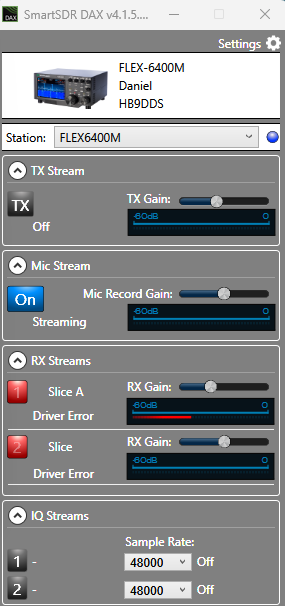
Oh yes, I opened a ticket on October 28, 2025. But they had no solution and gave up...
I reinstalled SmartSDR on a new Windows 11 partition. It works perfectly there.But what's causing the problem?
Daniel
HB9DDS
0 -
There might be an entry somewhere in the registry. Does anyone know more about this?
DanielHB9DDS
0 -
Daniel… this is not something to go guess about at. Open a ticket and let the guys who deal with our products on a daily basis help you out. They are the best in the world at it and it is free.
0 -
@ Mike
I already opened a ticket last year. No luck. The helpline "gave up".It's pointless for me to do it again. It's very frustrating.
Daniel
HB9DDS
0 -
Not sure why. This is a very solvable problem. Usually.
I had a weird problem with Icom's drivers when I could not use CAT on my IC-9700 and I had to actually rebuild windows from scratch. Given the many hours I tried to get to the root cause of the 9700 issue I have learned that sometimes you need to just reinstall Windows as it is confused. And, the solution is a Windows solution, not an vendor solution. It seems that this is what has happened in this case. Of course, calling Microsoft can be painful as well.
I found that rebuilding the entire computer was great for helping me de-crapify it! :) In the end, it was worth it.
I gather that this problem is just with 1 computer?
73
0 -
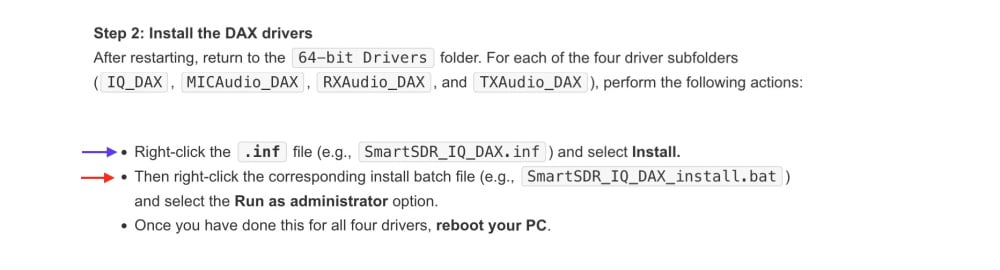
Okay, I've found the solution 😍
I forgot to do the blue arrow thing.
I only did the red arrow thing.S orry for the fuss...
My bad 😱
Daniel
HB9DDS
1 -
I was having difficulty installing 4.1.5 on an older Windows 10 laptop that I use in the field. All updates were current and I removed lots of older apps. During several installation attempts I got the blue screen of death, and other times it had DAX Driver errors. So after reading your post, I invoked the installer using "Run As Administrator" and it worked just fine.0




Leave a Comment
Categories
- All Categories
- 388 Community Topics
- 2.2K New Ideas
- 658 The Flea Market
- 8.4K Software
- 156 SmartSDR+
- 6.5K SmartSDR for Windows
- 186 SmartSDR for Maestro and M models
- 439 SmartSDR for Mac
- 275 SmartSDR for iOS
- 265 SmartSDR CAT
- 204 DAX
- 386 SmartSDR API
- 9.4K Radios and Accessories
- 53 Aurora
- 297 FLEX-8000 Signature Series
- 7.2K FLEX-6000 Signature Series
- 970 Maestro
- 58 FlexControl
- 866 FLEX Series (Legacy) Radios
- 944 Genius Products
- 471 Power Genius XL Amplifier
- 347 Tuner Genius XL
- 126 Antenna Genius
- 306 Shack Infrastructure
- 215 Networking
- 468 Remote Operation (SmartLink)
- 142 Contesting
- 811 Peripherals & Station Integration
- 144 Amateur Radio Interests
- 1.1K Third-Party Software