SmartSDR v4.2.20 | SmartSDR v4.2.20 Release Notes
SmartSDR v3.10.15 | SmartSDR v3.10.15 Release Notes
The latest 4O3A Genius Product Software:
The latest 4O3A Genius Product Software and Firmware
If you are needing assistance with FlexRadio products, please refer to the product documentation or check the Help Center for known solutions. Need technical support from FlexRadio? It's as simple as creating a HelpDesk ticket.
uninvited slice appears after TX

running a single slice in "DigiU"; after the radio transmits (tune or data) a second slice appears 500 Hertz up.
I do not need or want that second slice!
How/where do I get rid of that?
Peter
Answers
-
Hi Peter, to close an unwanted slice, click the little x in the corner of the slice flag.
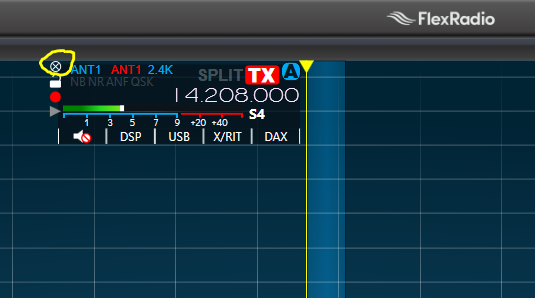
If this keeps happening, then I am guessing that either the app you are running is setting Split operation, or you are getting RF into your computer. I had RF into my computer via my USB cables and it knocked various applications out, including SmartSDR. It clobbered different apps at different times, so watch out for other strange behavior after making a transmission. In my case ferrites on all USB, Ethernet and power cables fixed it all.
0 -
Yes I know that, I want it to not appear at all.
0 -
What software are you using with Digiu?
0 -
MS-DMT (modem) & MSC (messaging software)
0 -
 Mike-VA3MW Administrator, FlexRadio Employee, Community Manager, Super Elmer, Moderator adminOptions
It sounds like you application is causing it. Is it sending a Split command (just as a rough guess).
0 -
only single mode Digiu, nothing else
0 -
Mike-VA3MW Administrator, FlexRadio Employee, Community Manager, Super Elmer, Moderator adminOptions
I would look at the CAT LOG for that Serial Port and see. You can do this by highlighting the serial port and then clicking on LOG. This will produce a LOG that can be captured. Now, try to recreate the problem and send the log to the developers of software you are using.
This does not sound like a radio issue.
0 -
This can also happen if you are using WSJT-X and the "SPLIT" function is set to "RIG" mode instead of "NONE" or "Fake-It."
Your other digital program may be doing the same.
0 -
tks
0




Leave a Comment
Categories
- All Categories
- 401 Community Topics
- 2.2K New Ideas
- 689 The Flea Market
- 8.6K Software
- 196 SmartSDR+
- 6.6K SmartSDR for Windows
- 200 SmartSDR for Maestro and M models
- 460 SmartSDR for Mac
- 279 SmartSDR for iOS
- 268 SmartSDR CAT
- 220 DAX
- 395 SmartSDR API
- 9.6K Radios and Accessories
- 109 Aurora
- 348 FLEX-8000 Signature Series
- 7.2K FLEX-6000 Signature Series
- 999 Maestro
- 58 FlexControl
- 872 FLEX Series (Legacy) Radios
- 975 Genius Products
- 482 Power Genius XL Amplifier
- 358 Tuner Genius XL
- 135 Antenna Genius
- 322 Shack Infrastructure
- 227 Networking
- 483 Remote Operation (SmartLink)
- 145 Contesting
- 847 Peripherals & Station Integration
- 147 Amateur Radio Interests
- 1.1K Third-Party Software