SmartSDR v4.1.5 | SmartSDR v4.1.5 Release Notes
SmartSDR v3.10.15 | SmartSDR v3.10.15 Release Notes
The latest 4O3A Genius Product Software:
The latest 4O3A Genius Product Software and Firmware
If you are needing assistance with FlexRadio products, please refer to the product documentation or check the Help Center for known solutions. Need technical support from FlexRadio? It's as simple as creating a HelpDesk ticket.
Periodic network issues

I am curious if anyone is experiencing the same issues I am. I have a 6600m connected to an eight port gigabit ethernet switch (Netgear 308) to which my PC is also connected. Both devices are showing 1G negotiation. My network quality should be perfect, yet it's far from it at least according to SSDR. Sometimes I see the quality go red and the TX action on the radio is very delayed from when WSJTX initiates it. I've seen 6000ms. I've seen SmartSDR lose connection to the radio. I've also experienced significant latency with PTT on the front panel Maestro using my Heil trigger. I do not see this latency when SmartSDR is not running. I'm pretty sure that the network latency is somehow the cause of all of this.
I am running SmartSDR 4.1.5. I have done multiple factory reset procedures.
Comments
-
I have also put chokes on the network cables and switched them all out.
I thought maybe I was running through smart link and that might be the cause of the latency. I disabled it and am still getting the issues locally.
0 -
[Typo correction] I have seen these kinds of issues in the past. I have a 6600M with various switches in the path.
In my case, it was a defective switch causing the problems. I have also had the same issues with a bad ethernet cable. I would try removing things one at a time to see what cures the problem. First try direct connect, with either self-assigned or statically assigned IP addresses to the PC and radio - just a single known good ethernet cable.
0 -
I have swapped out the cable and swapped out the switch. I see zero network errors before and after these changes, but I still see a 2+second delay on WSJTX transmitting and when SSDR keys up
OutboundDiscardedPackets : 0
OutboundPacketErrors : 0
RdmaStatistics : MSFT_NetAdapter_RdmaStatistics
ReceivedBroadcastBytes : 537884
ReceivedBroadcastPackets : 1250
ReceivedBytes : 134973041
ReceivedDiscardedPackets : 0
ReceivedMulticastBytes : 780745
ReceivedMulticastPackets : 1643
ReceivedPacketErrors : 0
ReceivedUnicastBytes : 131961308
ReceivedUnicastPackets : 420383
RscStatistics : MSFT_NetAdapter_RscStatistics
SentBroadcastBytes : 6667
SentBroadcastPackets : 126
SentBytes : 231229407
SentMulticastBytes : 22338
SentMulticastPackets : 123
SentUnicastBytes : 229897726
SentUnicastPackets : 314520
SupportedStatistics : 41635830 -
I've noticed that my SSR network quality is all green bars until I transmit and then it goes red.
0 -
I have done yet another factory reset and now everything seems normal. I suspect something gets corrupted or something within the radio and it behaves oddly until fully reset again. Why it keeps happening is the real mystery.
0 -
I've had trouble (some years back) where my 6500 would not work reliably with Maestro at 1 gb/s. Always a nonzero error rate. This was "cured" by downgrading to 100 mb/s. Something to try.
Try using a 100 mb/s switch to force lower bit rate. (Gb electronics gets you rfi vulnerability with minimal performance benefit IMO.)
73 Martin AA6E
1 -
Thanks Martin. I'll have to give that a try. Unfortunately I'm using unmanaged switches and I don't see configurable parameters in the front panel of the 6600M to for its side to negotiate 100m.
0 -
So I've invested in a managed switch and set the 6600M's port to 100/Full. I've also purchased CAT 8 shielded patch cabled for every device. While I'm not seeing the operational impacts (delayed or no PTT), I do see the network quality (according to SSDR) varying wildly. Further, I'm having difficulty understanding the criteria used to determine the quality of the network. It almost seems arbitrary. Latency is low, packet loss seems to be a single event at SSDR startup, and the max latency hasn't changed.
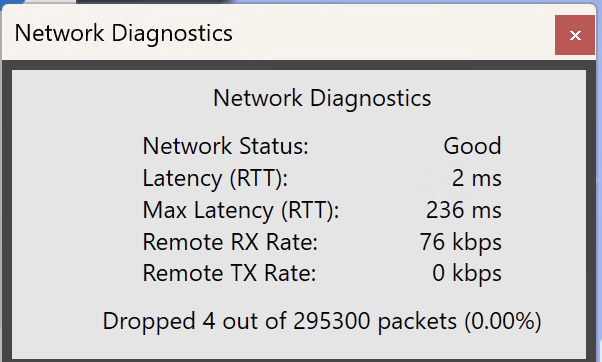
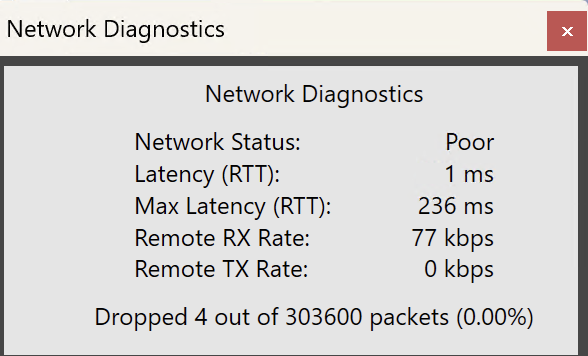
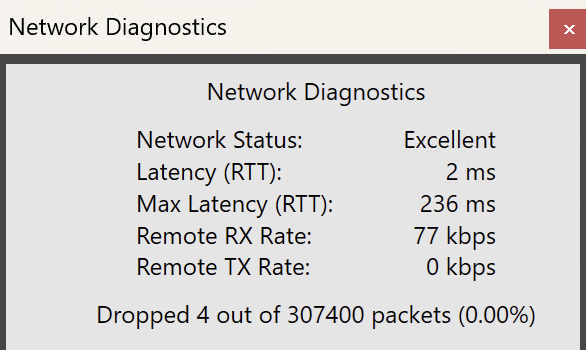
Does anyone know how this diagnostic works?
Thanks and 73,
Mike N0MDH
0 -
I had similar issues with our club station setup .
Here the cure was to add a second small switch , 8 port gig , before the netgear 1 gbit 16port unmanaged. Since id did that , no issues. i plan to replace both with a managed switch . So currently the 8 port is connected to the Wireless bridge ( ubiquiti ) on the incoming side as well as to the flex and the netgear on the local side. Apart form the Flex ( 6k4) the network was PERFECT in all usage and several analysis progs testing UDP performance .
Nothing that was otherwise recommended to change helped even a bit. I remember it did work long time until mid 25 , since one update in earlyx septmeber 3.9 something all went bananas even downgrading did not stop that habit.
Harry
0 -
That's interesting Harry. I got the managed TP-Link switch Mike VA3MW has. I turned all the ports down to 100MF. Still dropping the connection. Why would putting an 8 port gig switch in front of the Netgear switch do anything? Regardless, I'm willing to try anything. Can you tell me the specific brand and model of 8 port switch you got? Is it managed? Did you turn it down to 100 Mb/s? Thanks.
Paul
N0GN
0 -
Here's another peculiar thing. It's pretty reproducible that when I spin the Maestro VFO at a good speed the Maestro disconnects. WTH?? I've tried hardwired connections to the Maestro, different ISP's. High quality patch cables.
0 -
I've tried the following and I still have unexplainable network quality issues (according to SSDR)
- Swapped all cables out for CAT8 S/FTP patch cables.
- Tried three different switches: 2 unmanaged, 1 managed (on this switch I tried steps 3 & 4)
- set the port to the 6600M to 100Mb
- set my PC port to 100Mb
- tried both with the radio registered to Smartlink and with it unregistered
- Tried with the 6600M Maestro not connected to the radio
I see no packet loss to speak of other than from right when SSDR starts up. I also see max latency at unexplainable levels of thousands of milliseconds. I continue to see periodic Poor and Fair quality reports from SSDR. 😣
0 -
Hi Mike, have you tried what Ted suggested (plug computer directly into radio)?
My guess is that RF is getting into the network.
In my own RFI case, I discovered that RF was getting into the switch via the Ethernet cables (including those that are unrelated to radio use). I also found problems with RF getting into the computer via USB cables.
To solve both of these I used lots of mix 31 ferrites. In stubborn cases, I had to wrap several turns of a cable around a mix 31 toroid. Most of it was solved by simple snap-on ferrite beads.
0 -
I do have ferrites on most everything, but I'll check again. Thank you. I would also think that the shielded CAT8 cables would act to filter RFI as they were designed to do. The one thing that makes me think it's not RFI is that this happens in the absence of transmission from the radio. I can watch it go from Excellent, all green bars, to fair (yellow), or poor (red) without me transmitting.
73,Mike N0MDH
0 -
Hi Mike, if it happens while not transmitting, then it is likely a network issue. You need to plug your computer directly into the radio. No switches, no routers. If the issue persists, try a different cable. If that doesn't help, try a different computer. The objective is to discover which component (switch, router, computer NIC, radio NIC, cable) is the culprit.
0 -
Thank you very much, Len and Mike, for your tips. I've pretty much tried the things Mike has. I have some ferrites in place, but I'll add a bunch more. I have also had problems while not transmitting though. I have gone direct from computer to radio before and there are no problems. So Network and/or NIC is likely the problem. I had a heckuva problem this weekend during the Stew contest. Despite that I placed in the top quarter in HP category. I would like to place higher and then tell people how great FlexRadio is… The problem seemed most pronounced during the Patriots game yesterday. This evening on the local nets, it is much less of a problem. But still a problem.
I'm guessing it's a Network PLUS SmartLink issue and that the VPN solutions in the Community would solve it. But it really looks like both SoftEther and ZeroTier solutions would involve WAY more time fiddling with than I care to spend. Is there an easier way? I'm am especially interested because CGNAT ISP's may be my only other choice. Allo's willing to dig a trench to my site for fiber, but it really seems like that shouldn't be necessary. I have TWO ISP's at the site with 30 Mbps service each and there are Smartlink problems with both of them.
Thanks for your interest in this.
0 -
Hi Paul, SmartLink only brokers the remote connection. Once it authenticates the user and provides the connect info, you get a peer-to-peer connection and SmartLink is no longer involved.
You might want to try a low-bandwidth connection to see if that helps. Also turn the FPS and waterfall rate way down.
0 -
I'm going to watch this for a few hours today, but downgrading to 3.10.15.38923 seems to have resolved my intermittent network quality issues.
0 -
so much for that. not 20 minutes after upgrading to 4.1.5 and doing a factory reset, my SSDR lost connection with the radio.
0 -
Unfortunately, the lost connection is the symptom but we don't know which part of the transport layer caused the problem.
The next step is to do a Link.Local test.
Doing this is critical to isolate the issue. The problem still could be anywhere between the PC Software, PC NIC Card, Cables, Switch and the radio. BTW, we see a LOT of Gigabit switches 'flap' during autonegotiation phases.
If the radio needs to be sent in for repair, this is how they are going to test it and this is why this test is so critical.
Let us know how you make out….73
Diagnosing Network Issues with a Link-Local TestA Step-by-Step Guide for FlexRadio Users
Introduction
FlexRadio transceivers rely on stable network connections for optimal performance. If you’re experiencing disconnects, audio dropouts, or other network-related issues, performing a Link-Local Test helps determine whether the problem lies with your radio or your network.
This test directly connects your PC to the radio, bypassing any external network components.
This document outlines how to conduct the test and interpret the results.
Why Perform a Link-Local Test?
- Isolates the Problem – Helps determine if the issue is related to your network or the radio itself.
- Eliminates Variables – By removing routers, switches, and other network devices, we can focus on potential hardware or software issues.
- Simplifies Troubleshooting – If the radio works properly in this test, then the issue is within your network setup.
Step-by-Step Instructions
1. Gather Required Equipment
- Your FlexRadio transceiver
- A PC or laptop running the latest version of SmartSDR
- A single NEW LAN (Ethernet) cable
2. Power Down Your Equipment
- Turn off both your PC and your FlexRadio completely.
- Unplug any existing network connections to ensure no external devices are affecting the test.
3. Directly Connect the Radio to the PC
- Use an Ethernet cable to connect your PC directly to the LAN port on the FlexRadio.
- Do not connect the radio or PC to any router, switch, or other network devices.
4. Power Everything Back On
- First, turn on your radio and allow it to fully boot.
- Then, turn on your PC and let the operating system load completely.
5. Launch SmartSDR
- Open SmartSDR on your PC.
- In the radio chooser window, check if your radio appears as an available device.
Interpreting the Results
✅ If the radio appears and works correctly:
Try to recreate the same problem. If you are not able to, then this means your radio is functioning properly, and the issue likely stems from your network setup.
The next steps are:
- Check for faulty Ethernet cables, switches, or routers.
- Ensure your network is properly configured for SmartSDR.
- Look for any network congestion or interference.
❌ If the radio does NOT appear or crashes:
This could indicate a hardware or software issue with the radio or PC. In this case:
- Restart the test to confirm consistent failure.
- If the issue persists, contact FlexRadio Support and report your findings.
Conclusion
The Link-Local Test is a crucial step in troubleshooting network-related issues with your FlexRadio system. By eliminating network components, you can quickly determine whether the problem is internal to your radio or caused by your home network.
If you require further assistance, please reach out to FlexRadio Support with your test results.
🔗 Submit a Support Ticket: https://helpdesk.flexradio.com/hc/en-us/requests/new
0 -
N0MDH, so you downgraded and it worked, then upgraded and it didn't? I guess I'd be willing to downgrade if it definitely works. My impression, is that the disconnect problem started pretty recently and possibly related to an upgrade.
VA3MW, my previous problem was audio crackling which you helped me with. I did the Link-Local test and local connection was OK. I got the patch cables and network switch you suggested and the crackling resolved. But then recently I started intermittently losing the remote connection.
KD0RC, I'm relieved that it's impossible for it to be SmartLink. I was not looking forward to installing VPN software but would still try if there's a possibility it would help and there was a simple way. I always have Rate at 60, FPS at 15, and AVG at 90. Should I go lower on those? I just tried Low BW connection. Within 15 min or so, it lost the connection but then automatically reconnected within about 30 seconds. Not too bad, but in a contest, it's an eternity. Sometimes, it crashes so bad, the Maestro or SSDR needs to be rebooted. Sometimes I have to reboot the radio itself.
Right now I'm getting a popup message every few minutes that says, Client Connected From IP#… but it doesn't crash. I'm going down to the site today. I'm going to run a Maestro over WiFi with local connection. I think this has been OK in the recent past. If it's OK, then I think I'll need to consider trying a third ISP at the radio site. I've tried two at the home site so far.
BTW, I realize N0MDH's problem is local and mine is likely remote, but they could be related. I appreciate you all addressing this. When I get down there, I should be able to tell for sure.
Thanks!
de N0GN
0 -
Thanks for the suggestion, Mike. I can see the Radio in the SmartSDR launcher during the link.local test, but I cannot connect to it. despite them all being in the 169.254.0.0/16 network, I can neither ping the radio address nor the front-panel Maestro address (based on addresses shown in the Maestro network section.
0 -
Mike, do you have multiple network interfaces on your PC? Especially, do you have an active WiFi interfaces, that is maybe statically ( or otherwise) connected. If any other interfaces are on your PC, try disabling them so only the 169 address is available.
Apologies if you have already verified all this. It sounds like a subnet or network number problem, since you are seeing broadcasts.
0 -
Ted makes a good point too.
Can you list the IP addresses of all radios and clients just to make sure they are all on the same subnet. And, the subnet mask is critical as well.
0 -
I think maybe this radio needs a spa treatment. I was just doing some SSB Pota hunting on 20M and the front panel froze. SSDR was open (as was DAX/CAT) but WSJTX wasn't. I got a pop up on the PC that SmartSDR lost connection with the radio and the front panel has rebooted itself.
Interestingly, the radio cannot be found now. The front panel says please wait, and SSDR shows no available radios.0 -
Hi Paul, when I operate remotely over a poor connection (cell phone hotspot in the mountains), I set FPS to 5 and turn the waterfall rate all the way down to 1. Sometimes this is the difference between staying connected and getting dropped.
0 -
Most likely a local network issue……but, make sure you have all third party software that interfaces with the Flex Radio off.
I do a not of work developing interfaces with Flex, and when I make an error, it causes the Flex radio to do bad things, like loose connection and even to crash.Not saying that is your issue, but when trouble shooting, eliminate as many variable as possible.
Alan. WA9WUD
0 -
Thanks for the tip Len. I'll give it a try. Great thread.
0 -
After the last crash, the radio won't come up either in the front panel or in SSDR, even after a factory reset procedure. I think it was trying to tell me something. I have a case open for my PTT issues and the loss of audio after TX with ESC. I've suggested on that case that I send the radio in for a look.
0 -
I have a 6300 here running 4.1.5. It has zero issues on the same network.
Further, after leaving the 6600M alone for 30 minutes, I tried booting it again and it came back up. I downgraded it to 3.10.15 and it's been rock solid green bars. This is a confusing one.
To answer Ted, I have but a single gigE interface on the motherboard, no wifi.
To answer Mike, all addresses are assigned via DHCP and are in the same subnet. 192.168.1.0/24.0





Leave a Comment
Categories
- All Categories
- 390 Community Topics
- 2.2K New Ideas
- 664 The Flea Market
- 8.4K Software
- 157 SmartSDR+
- 6.5K SmartSDR for Windows
- 186 SmartSDR for Maestro and M models
- 441 SmartSDR for Mac
- 275 SmartSDR for iOS
- 265 SmartSDR CAT
- 206 DAX
- 386 SmartSDR API
- 9.5K Radios and Accessories
- 59 Aurora
- 297 FLEX-8000 Signature Series
- 7.2K FLEX-6000 Signature Series
- 974 Maestro
- 58 FlexControl
- 867 FLEX Series (Legacy) Radios
- 947 Genius Products
- 473 Power Genius XL Amplifier
- 347 Tuner Genius XL
- 127 Antenna Genius
- 308 Shack Infrastructure
- 216 Networking
- 470 Remote Operation (SmartLink)
- 142 Contesting
- 816 Peripherals & Station Integration
- 144 Amateur Radio Interests
- 1.1K Third-Party Software