SmartSDR v4.1.5 | SmartSDR v4.1.5 Release Notes
SmartSDR v3.10.15 | SmartSDR v3.10.15 Release Notes
The latest 4O3A Genius Product Software and Firmware
Need technical support from FlexRadio? It's as simple as Creating a HelpDesk ticket.
RADEv2 (FreeDV v2) on FLEX-6000/8000/Aurora with RPI
Comments
-
try doing the direct addressing for the radio. Since I have multiple on the network, that is all I have been using.
It is also possible that if you have a firewall running, it might not see the radio.
0 -
Hi Mike,
Both nodered and freedv work perfectly on their own. Each package reports a conflict if it is second to start. It's not firewall and it's not helped by direct addressing.
73 Martin
0 -
You may want to report that to Mooneer.
0 -
Anyone noticed a digital noise in the background when using the waveform support? I tried both with the Raspberry pi image and my custom PC deployment and got the same issue.
It doesn't seems to be present when using the full software.
0 -
Yes. I am seeing digital noise on both transmit and receive when using the Rpi image. When using the full software audio is clean.
0 -
I still can't get the AppImage to work on TX correctly. The Transmitted audio is distorted and not decodable and I've tested on a 2nd radio. I sent a sample to Mooneer.
However, it looks like Mooneer is adding a meter for SNR at some point. You have to subscribe to it from the radio meter list.
I pulled it into NodeRed and was testing a couple of meters to see how it looks.
This is the Meter Name you need to subscribe to:
WVF/0x65CB645C/FreeDV_SNR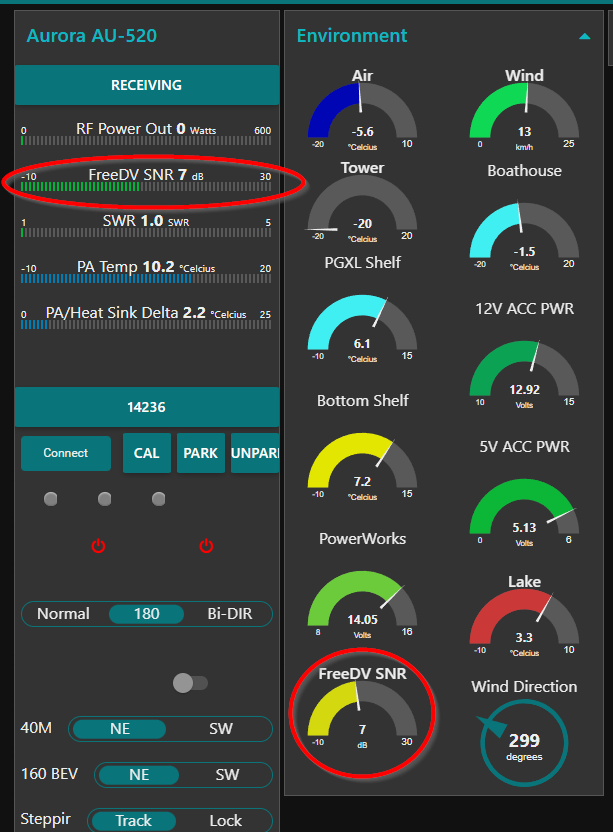
Mike va3mw
0 -
Mike
I am using vFreeDV-FlexRadio-2.1.0 and do not see the meter you speak of.
Is there a more current version of the AppImage?
Alan. WA9WUD
0 -
Mike
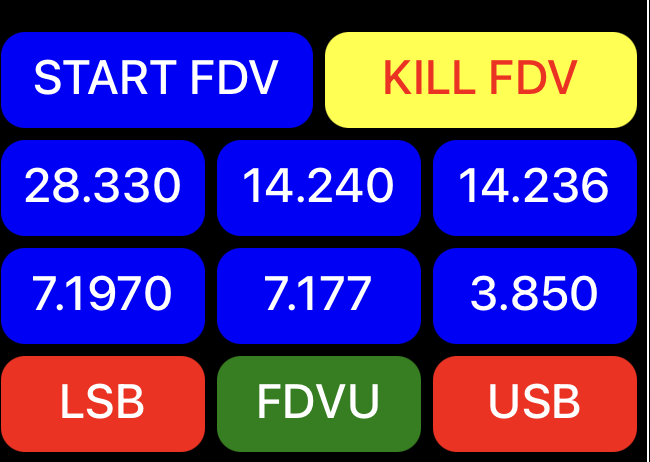
My FreeDV Flex Waveform Dashboard so far.
My audio is working well using a RPI-4 running 64bit lite OS with the RPI on the same LAN switch as my Flex 8600.
Alan. WA9WUD
 0
0 -
I have been investigating why my NODE-RED and FreeDV can't at this point co-exist on the same Pi and I have came to the conclusion that if I start FreeDV first it connects to the Radio and then when I start Node-Red the Radio Discovery packets fail this is because FreeDV is already using PORT 4992 and so there are collisions going on with the two programs, The single 4992 port problem has been an issue forever when trying to run two Flex Radios on the same Network with NODE-RED or other 3rd party programs that use Port 4992 and workarounds had to be used.
It would be nice to have a way to have more than one Discovery port available from the Flex Radios to be able to use for 3rd party software or a multi platform utility to have a HUB of some kind to Split port 4992 somehow but that is way above my capabilities.
I tried to run FreeDV on a old Raspberry Pi3 but NO DICE, as Mike said the RX Audio was very broken, I am running now on a bare install Pi4 B and it works very well.
Anyway there you go, I may be up in the night but that is what I found.
Has anyone came up with a script file to autorun the startup app on Power up? that would be nice.
73
Bret WX7Y
0 -
Hi Bret, got the same issue here with rpi. That's why i opted to compile the freedv-flex integration on a linux machine that was available.
I am wondering how Alan got it work on his environment. btw Alan, I had the pleasure to pick your signal last week on 20m.
73, Martin VA2PX
0 -
Bret and Martin
Not sure the "one thing" I did, but all good here for me.
First, I found the Flex Radio becomes very unstable, if you first run FreeDV, build the new FDVU and FDVL modes……then **** FreeDV. Flex keeps looking for the modes and is very upset it cannot find them…..ofter resulting in a Flex Radio crash.
So, I decided to always make sure FreeDV is running BEFORE the Flex Radio boots up. More on "screens' later to keep the process running.
Next, I run my Node-Red Flex Flow on a separate device (my Mac) and FreeDV on a dedicated RPI-4.
Next I do not use the FreeDV option to "find" the Flex Radio. This uses the Flex port 4992 port, as Bret explained. Rather, I use the IP address of the radio as an env variable in the FreeDV command. More on how to do this later.
To ensure the FreeDV process is not inputted I loaded the "screen" option on my RPI:
sudo apt-get updatesudo apt-get install screen
The
screenutility allows you to create multiple terminal sessions within a single window, and crucially, detach from a session without ending the running processes.
But……I found the "****" command did not work well, because screens has two PID names. So, I built the FreeDV start command to use screens and give the terminal a unique name. Now I can **** the name cleanly.
So, finally here are the commands, insert your Flex IP address
Startscreen bash -c 'export SSDR_RADIO_ADDRESS=192.168.70.151; ./FreeDV-FlexRadio-2.1.0-aarch64.AppImage'
****
pkill -9 -f FreeDV-FlexRadio-2.1.0-aarch64.AppImage
Alan. WA9WUD0 -
Note: replace ***** with the word you would use to K a PID.
Alan
0 -
I notice that all the US operators currently running freedv-flex 2.1.0 are displaying their correct locators whereas I am displaying my locator as AA00. Is this because the US operators have all got GPS modules inside their Flex? I am using an external 10MHz source to discipline my Flex 6600 which means it thinks it is at latitude 0 deg and longitude 0 deg.
Martin - G4ENZ
0 -
Ok I understand now. You don't run the freedv extension and node-red on the same host.
As for the meter Mike mentioned earlier, got it configured on nr, rebooted freedv. The hex number in it changed. It seems that number change over time.
73, Martin VA2PX
0 -
That's exactly it, Martin. I've got a similar setup than your and I also report the locator A00. the only thing I see for our situation would be to hardcode the locator in the flex. I don't think there is a way to do it.
1 -
The conflict between Node Red and FreeDV appimage not both being able to connect to the Flex when running on the same RPi is the result of bad coding practice in both of these applications. Only one can application can open the discovery port at a time. Whichever app grabs the discovery port first blocks the other. Both of these applications should close the discovery port after they have found the radio and connected to the Flex API. Holding the discovery port open when it’s not needed is bad practice.
0 -
I tried the appimage in a RPi 3B (wired Ethernet) and while it worked ok for me for both RX and TX, I found the CPU maxed out when decoding a received signal. Transmitting had the CPU at about 35%.
I ended up switching to using a Ubuntu 22 server I have set up on a VM. Going through the download/dependency/build process took hours to figure out as the documentation for that is a little rough around the edges, and the command to actually execute the latest 2.2.0 version turned out to be wrong and crashed upon start-up.
It’s all sorted and working now. I have noticed the same issue that others have reported where there is robo-tronic noise in receiving when the other station pauses speaking between words. Also, the receive audio coming out of the radio from the decoder is significantly lower than analog audio from the radio. This leaves one having to adjust the volume up and down when switching to/from the freedv mode.
Also, it looks like there is no configuration file available for users of the flex integration. That means we can’t set options for freedv reporter such as the locator or message, or even if we want reporting enabled or not.
Hopefully these issues are improved in future versions.
2 -
I certainly won't say anything bad about those who write the 3rd party software packages , and I fill privileged and grateful to those who write the software, and NOT charge for it.
For Software / Hardware I do pay for, I think a lot of the issue is that Flex Radios firmware lack of having the capability to sort through the limitations with port 4992 that should have been fixed long ago, makes it really hard to run two radio's on the same network not to mention the 3rd party software trying to work with such a hardware huge limitations. Be really nice to have several Discovery ports instead of just one maybe settable in SmartSDR.
1 -
Further to the meter changing HEX number, you can bypass this issue using regex in NR:

Here is what I use for regex: WVF/0x\S+/FreeDV_SNR
This can be done using a switch node.
73, Martin VA2PX
0 -
Another option, because there is only one FreeDV meter, I use "contains" "FreeDV"
Alan. WA9WUD
1 -
@Martin_G4ENZ when starting the AppImage command line suffix with: -l AA99bb -m 'This is my message' that will give you the proper non GPS info in the reporter. As mine is shown below:
 0
0 -
Feb UPDATE 2.2.1 freedv-flex for RPi is out and other OS versions.
Also for Beta is 2.3.0 decoding much improved for Rpi`s.
I am using Raspberry Pi 4 with 4gb Ram and it uses less than 800Mb RAM running this only which is fantastic.
No Spots on Ipads yet. Windows, Linux, MacOS, all available with callsign spots in the panadaptor.
I can not run the Waveform.
6500- 😁
One Panadaptor with FDVL or FDVU only while using RPi method.
DV can be used with other modes at the same time like always has.
Just can only have one DV instance of dv decode not multi stream yet.
It only supports one path for now. I have no idea if this is the same on the waveform.
Eventually i imagine freedv will be able to decode on all bands at the same time with flexradios all DV voice.
73 de AA0KM
PS dont forget to turn off all DAX when running FreeDV with Rpi`s.. :)
0 -
I just noticed that new versions 2.2.1 of FreeDV were posted yesterday at
https://github.com/drowe67/freedv-gui/releases
and the good news is that in addition to the RPi4 Flexradio Appimage discussed previously in this thread there is now a FreeDV-FlexRadio-2.2.1-x86_64.AppImage. I have so far not been able to get it to run and talk to my radio running in a WSL2 setup, but I have indeed gotten it to run in a Ubuntu 24.04.3 virtual machine, and it does indeed connect to and talk to the radio. The console output is full of keep-alive pings and responses as well as notifications when I e.g. change frequency of the radio. And the radio now allows me to set it into FDVU mode.
The bad news is even when a FDV signal is obviously present I am not getting any decoded output and when I attempt to transmit into a dummy load I am not getting any output. I may be missing something simple. (Yes I do have DAX off.)
If I use the standalone FDV 2.2.1 application I can decode signals properly after switching to DIGU mode.
Howard, K7JNX
0 -
I have just noticed there is now a X86 appimage. Just got the latest source version compiled this afternoon on my system. lol
Yes, you can run multiple modes. However, I've got report of issues when returning to ssb. TAll issued gets cleared with a radio reboot.
73, Martin VA2PX
0 -
@Howard K7JNX try for the VM turning off the firewall and on the PC.
I have the same setup using Windows 11 and a Ubuntu image running 2.2.1 appimage for x86_64 under Hyper-V with no issues now the intermachine firewall is off.
When I get time I will debug what ports I need to allow but for now it is working fine, spotting and also using FreeDV reporter correctly.0 -
Steve M0RFC - Thank you, your analysis was spot on. I switched my Virtualbox VM setup to use a bridged adapter instead of NAT mode in its network setting, and voila! It works beautifully.
0 -
I just posted a new discussion on how I successfully gotten
FreeDV-FlexRadio-2.2.1-x86_64.AppImage
running under WSL, which is a lot more convenient than running in a Virtualbox virtual machine.
0 -
Get updated builds of FreeDV and supports many Distros.
Desktop icons created for user to update no command line needed.
Click on desktop shortcuts and it asks a couple questions on how you want to update it.
Straight forward. I been using it off and on for several months now as many others has as well.
This script automates installation of FreeDV RADE in modern Linux distibutions.
It is currently tested in Mageia, MX Linux, LinuxMint, LMDE, Fedora, Ubuntu, Xubuntu, Kubuntu, Manjaro, OpenSUSE Tumbleweed, Garuda, EndevourOS, Gentoo, PiOS (on RPi5), PCLinuxOS and Debian.
1






Leave a Comment
Categories
- All Categories
- 386 Community Topics
- 2.2K New Ideas
- 655 The Flea Market
- 8.4K Software
- 155 SmartSDR+
- 6.5K SmartSDR for Windows
- 185 SmartSDR for Maestro and M models
- 438 SmartSDR for Mac
- 274 SmartSDR for iOS
- 264 SmartSDR CAT
- 202 DAX
- 385 SmartSDR API
- 9.4K Radios and Accessories
- 52 Aurora
- 293 FLEX-8000 Signature Series
- 7.2K FLEX-6000 Signature Series
- 968 Maestro
- 58 FlexControl
- 866 FLEX Series (Legacy) Radios
- 940 Genius Products
- 470 Power Genius XL Amplifier
- 344 Tuner Genius XL
- 126 Antenna Genius
- 306 Shack Infrastructure
- 215 Networking
- 466 Remote Operation (SmartLink)
- 142 Contesting
- 808 Peripherals & Station Integration
- 143 Amateur Radio Interests
- 1K Third-Party Software