SmartSDR v4.1.5 | SmartSDR v4.1.5 Release Notes
SmartSDR v3.10.15 | SmartSDR v3.10.15 Release Notes
The latest 4O3A Genius Product Software:
The latest 4O3A Genius Product Software and Firmware
If you are needing assistance with FlexRadio products, please refer to the product documentation or check the Help Center for known solutions. Need technical support from FlexRadio? It's as simple as creating a HelpDesk ticket.
RADEv2 (FreeDV v2) on FLEX-6000/8000/Aurora with RPI

This is a draft of a 'how to' to get the RADE image running the Applmage on a RPI and then have the new mode show up in SmartSDR.
I 'think' this all works, but I welcome input to the document.
This assumes you know how to have some basic knowledge of a RPI.
From:
Mike va3mw
✅ Running the FreeDV-FlexRadio AppImage on a Raspberry Pi


Version 2.1.0 or newer
This guide walks through:
- Downloading the FreeDV-FlexRadio AppImage to a Raspberry Pi
- Making it executable
- Running the AppImage
- Selecting a specific FlexRadio radio (optional)
- Important limitations
This process works on:
- Raspberry Pi 4
- Raspberry Pi 400
- Raspberry Pi Compute Module 4 (CM4)
The AppImage requires a 64-bit Raspberry Pi OS.
An AppImage is a way to distribute Linux applications as one single, portable file that runs on almost any Linux system without installation.
Think of it like a Windows .EXE or macOS .APP, but for Linux.
What an AppImage Is
An AppImage is:
- A self-contained application
- Bundled with all libraries it needs
- Delivered as one executable file
- That you can run with no installation
- And no root/sudo required
1. Download the FreeDV-FlexRadio AppImage onto the Raspberry Pi
Open a terminal on your Raspberry Pi and download the AppImage using wget:
wget https://github.com/drowe67/freedv-gui/releases/download/v2.1.0/FreeDV-FlexRadio-2.1.0-aarch64.AppImage
If the wget fails, the file name might have changed. You'll have to manually edit it to match the file on the FREEDV website.
Verify that the file was downloaded:
ls -l FreeDV-FlexRadio-2.1.0-aarch64.AppImage
You should see the file listed.
Make the AppImage Executable
AppImages must be marked as executable before running.
chmod +x FreeDV-FlexRadio-2.1.0-aarch64.AppImage
3. Run the AppImage
You can now run FreeDV-FlexRadio directly from the terminal:
./FreeDV-FlexRadio-2.1.0-aarch64.AppImage
✔ Tips:
- If you are connected via SSH, consider running in a screen or tmux session so the program doesn’t close if your SSH session disconnects.
Example:
screen ./FreeDV-FlexRadio-2.1.0-aarch64.AppImage

4. Selecting Which FlexRadio to Connect To (Optional)
If you have multiple radios on the network, you can tell FreeDV exactly which one to use by setting the environment variable SSDR_RADIO_ADDRESS before launching.
Example (radio at 10.0.1.11):
SSDR_RADIO_ADDRESS=10.0.1.11 ./FreeDV-FlexRadio-2.1.0-aarch64.AppImage
This forces the AppImage to connect to that specific radio instead of auto-discovering all FlexRadios on the LAN.
5. Using FreeDV in SmartSDR
Once the AppImage is running and connected to your radio, FreeDV modes will appear in SmartSDR just like any other mode:
- FDVU
- FDVL
You can select them from the mode dropdown on a slice. Set up your Mic levels as you would on SSB.
⚠️ Important Limitations
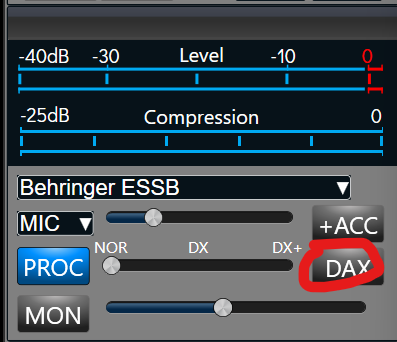
1. DAX must be turned OFF
If DAX is enabled, no audio will transmit in FreeDV mode.
2. Only one FreeDV slice can be active per radio
You cannot run multiple simultaneous FreeDV slices on the same FlexRadio unit.
Comments
-
I am multitasking at the moment, but was able to get it up and running and was receiving stations. When I have some more time, I will test transmitting, etc. Thanks for the heads up.
1 -
G’day Mike,
What Pi are you running?
Is a Zero enough?
Andrew VK5CV
0 -
I'm using a PI 4 . The 4 is not using many resources, but I would guess a Zero might not be enough. You can always give it a shot though.
0 -
A pi3 should do it, but try with a Zero and see if it works. monitor the cpu load with htop.
0 -
Hi Mike,
Cool stuff.
Well it took a while with a new Win 11 desktop repeatedly interrupting the SD card burner for the PiOS Trixie. Old Win 10 PC to the rescue!
Up and running on a Pi Zero 2 W. Flex 6500. About 35% CPU over 4 cores an 5% memory.Power out on transmit. SSDR Win on LAN. Will see what happens with iOS over WAN.
I will leave it running headless for now and wait for some signals to turn up. I assume it’s RADE 1 only.
Is there a script to make it run on power on or boot up?
I also assume the Pi needs to be on the radio LAN.Andrew VK5CV
0 -
PS Pi Zero won’t do 64 bit.
0 -
Is there any reason we couldn't have a corresponding appimage compiled to run under WSL running on the same Windows machine that runs SmartSDR?
Howard, K7JNX
0 -
Has anyone tried to compile a x86_64 linux image from the source code?
0 -
The app stops when I turn off the radio.
Andrew VK5CV
0 -
Maybe that is because the App looses connection to the radio.
0 -
It should go back to monitoring for an active radio rather than terminating.
0 -
Hm? It’s doing what I just said now.
Once or twice there has been no power on TX that needed a cold boot to fix.MultiFlex and multiple clients may be an issue. Keeping it simple for now.
Andrew VK5CV
0 -
FDVL (filter change) causes them to switch to upper side band on 40,80,160 just like the wave form issue of the past. Reared its ugly head again.
Also something changed the radio to be in remote on/off mode with ther orange light on and no way to change it to off. Something in the setup changed it to be permenent on orange/on.
Dont think the audio is a good as using the main FreeDV software.
Not sure the purpose of this anyway as you miss out on features of the FreeDv reporter.
Lots of ideas floating around i think about the raspberry pi.
I am 6500 flex so i wont be getting the built in coming Waveform to install and go.
But that ok still as i can use other ways of doing the same thing.
The Setup was perfect and very very accurate.
Thanks for your time Mike!
0 -
I have deployed successfully the freedv-flex waveform integration to a linux pc. In my case, I am using ubuntu 24.04.
I basically compiled the software from the source code. Here is the MOP I used to acheive it:
Package installsudo apt install python3-venv python3-pip build-essential cmake pkg-config libsndfile1-dev libhamlib-dev libspeexdsp-dev libcodec2-dev libjack-jackd2-dev libasound2-dev libpulse-dev libportaudio2 libportaudio19 portaudio19-dev libgtk-3-dev libwebkit2gtk-4.0-dev libnotify-dev libspeex-dev libsamplerate0-dev libfftw3-dev libcurl4-openssl-dev libusb-1.0-0-dev libxml2-dev libvte-2.91-dev libgstreamer1.0-dev libgstreamer-plugins-base1.0-dev libgstreamer-plugins-good1.0-dev libgstreamer-plugins-bad1.0-dev gstreamer1.0-plugins-base gstreamer1.0-plugins-good gstreamer1.0-plugins-bad gstreamer1.0-plugins-ugly gstreamer1.0-libav gstreamer1.0-tools gstreamer1.0-x gstreamer1.0-alsa gstreamer1.0-gl gstreamer1.0-gtk3 gstreamer1.0-qt5 gstreamer1.0-directsound gstreamer1.0-waveform gstreamer1.0-nice gstreamer1.0-pulseaudio gstreamer1.0-plugins-base gstreamer1.0-plugins-good gstreamer1.0-plugins-bad gstreamer1.0-plugins-ugly gstreamer1.0-libav
Python environment setup$ python3 -m venv rade-venv
$ source rade-venv/bin/activate
$ pip install --upgrade pip
$ pip install torch torchaudio --index-url https://download.pytorch.org/whl/cpu
$ pip install matplotlib numpy
4 pip install "numpy<2" --force-reinstal # fix numpy compatibility issue#Download Rade from repository
$ git clone https://github.com/drowe67/radae.git rade_src#Waveform compilation
waveform execution
$ mkdir build
$ cd build
$ cmake ..
$ cp -r ../rade_src/* ./rade_src/
$ make freedv-flex$PYTHONPATH=$(pwd)/rade_src src/integrations/flex/freedv-flex
As per one of the freeDV developpers, some steps might be unnecessary for it seems I got some unanticipated issues in my environment.
0 -
If you are just jumping in and reading this, for most of you, you will not need to compile anything.
Just load the AppImage file on your PI and run it. :)
Mike va3mw
0 -
Good point Mike.
Compilation is required here since there is no AppImage available other that raspberry pi one.
73, Martin VA2PX
0 -
Yea, that is work. Especially if you don't compile something every day. :) Good luck with it.
0 -
Hi Mike and others, I ran the AppImage on my Raspberry Pi and it would not auto find the radio so using this command "sudo SSDR_RADIO_ADDRESS=192.168.23.44 ./FreeDV-FlexRadio-2.1.0-aarch64.AppImage" and it finds my radio and I get the FDVU and FDVL but even with a S9 clean signal I don't have any Audio out, I have not tried to TX but no RX YET. I do see it sending my Coordinates and info to maybe the FreeDV Reporter.
Radio is a 8600
Any Idea what to look at or what I'm doing wrong?
0 -
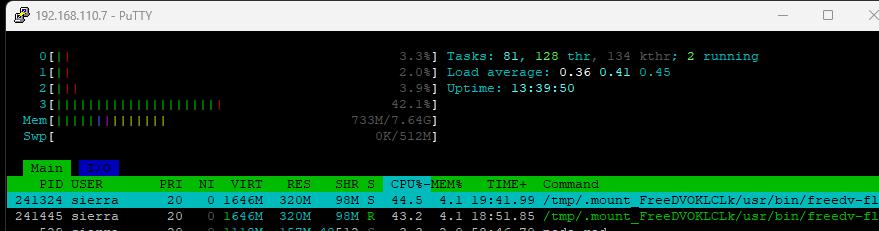
Today, I got a chance to test. On a RPI 3, I could get it to run, but while watching HTOP you could see the CPU was getting maxed out and the audio was choppy.
On a RPI4 it was pretty good. This is while receiving a signal.
 0
0 -
So far so good with my linux PC setup. Receive is fine. It seems to transmit fine but I havent done a QSO yet.
Bret, did you disabled DAX? As mentioned by Mike in his initial message, DAX must be turned off.
 0
0 -
Bret, WX7Y
I am running a 8400 radio on a RPI 4, no issue finding the radio and after days of listening, I decided it is time to transmit. I did a test transmission into a dummy load while recording it to make sure the audio was fine. There was no audio being transmitted so I have the opposite issue that you have.
If anyone have any idea it is surely welcome.
Mike, WO1RSM
0 -
My DAX is OFF
CPU total is running between 5 and 9%, Memory is 1G out of 16G, GPU 1%.
Below is what I get when I run the APP on the Terminal screen, repeated constantly So I'm not sure it is working correctly here or I'm missing something.
16:01:55 INFO /home/runner/work/freedv-gui/freedv-gui/src/integrations/flex/FlexTcpTask.cpp:481: Detected GPS update
16:01:55 INFO /home/runner/work/freedv-gui/freedv-gui/src/integrations/flex/FlexTcpTask.cpp:487: Got grid square DM49lf
16:01:55 INFO /home/runner/work/freedv-gui/freedv-gui/src/integrations/common/ReportingController.cpp:174: Grid square updated to DM49lf0 -
That looks good to me. Do you have a GPSDO on your flex? I don't get any position here in my terminal here.
0 -
Yes the Flex8600 has the GNSS GPS by default built in.
0 -
Of course, I am still a 6600 owner. lol
0 -
For those of you who have used the AppImage on a PI4, etc. How was your transmit audio reports?
I am getting people telling me I am scratchy even though I am about +25dB on the SNR scale.
0 -
I can see Mike has had this working with SmartSDR on iPad. I've not had any luck with SmartSDR (MacOS) running the AppImage on a RPi4.
I've even made a Docker Image to run this on my Unraid server to see if that made a difference - it didn't.
In both cases (AppImage or Docker container) the service is definitely running (I can see myself on the FreeDV reporter) and FDVU/L is available as a mode selection.
DAX is definately off.
Any ideas?
0 -
I've made 1 QSO with the PI4 AppImage. Did't yet such report.
1 -
I followed Mike's post and loaded the appimage onto a pi3b. flex-freedv reported a port conflict and couldn't connect to my 6600. It appears that I shouldn't run node-red and flex-freedv on the same pi as they fight for control of the 6600.
Other than this snag I have successfully made QSOs with good audio reports.
0 -
Got a similar issue here. The appimage couldn't find the radio. I has to shutdown node-red to make it work. This is what prompt me to compile a version on a PC.
0


Leave a Comment
Categories
- All Categories
- 388 Community Topics
- 2.2K New Ideas
- 658 The Flea Market
- 8.4K Software
- 156 SmartSDR+
- 6.5K SmartSDR for Windows
- 186 SmartSDR for Maestro and M models
- 439 SmartSDR for Mac
- 275 SmartSDR for iOS
- 265 SmartSDR CAT
- 204 DAX
- 386 SmartSDR API
- 9.4K Radios and Accessories
- 52 Aurora
- 297 FLEX-8000 Signature Series
- 7.2K FLEX-6000 Signature Series
- 970 Maestro
- 58 FlexControl
- 866 FLEX Series (Legacy) Radios
- 944 Genius Products
- 471 Power Genius XL Amplifier
- 347 Tuner Genius XL
- 126 Antenna Genius
- 306 Shack Infrastructure
- 215 Networking
- 468 Remote Operation (SmartLink)
- 142 Contesting
- 811 Peripherals & Station Integration
- 144 Amateur Radio Interests
- 1.1K Third-Party Software