Welcome to the FlexRadio Community! Please review the new Community Rules and other important new Community information on the Message Board.
The latest SmartSDR Software:
SmartSDR v4.2.20 | SmartSDR v4.2.20 Release Notes
SmartSDR v3.10.15 | SmartSDR v3.10.15 Release Notes
The latest 4O3A Genius Product Software:
The latest 4O3A Genius Product Software and Firmware
SmartSDR v4.2.20 | SmartSDR v4.2.20 Release Notes
SmartSDR v3.10.15 | SmartSDR v3.10.15 Release Notes
The latest 4O3A Genius Product Software:
The latest 4O3A Genius Product Software and Firmware
How to Receive Technical Support::
If you are needing assistance with FlexRadio products, please refer to the product documentation or check the Help Center for known solutions. Need technical support from FlexRadio? It's as simple as creating a HelpDesk ticket.
If you are needing assistance with FlexRadio products, please refer to the product documentation or check the Help Center for known solutions. Need technical support from FlexRadio? It's as simple as creating a HelpDesk ticket.
N3FJP Voice Keyer
Options

Cy Stanway
Member ✭✭
Anyone get the N3FJP voice keyer working with their 6400? I chose a new CAT (CAT 17) but it won't key the radio. Can't be that hard but I haven't been able to figure it out.
0
Comments
-
I have not been able to get the voice keyer to work either. However, it does key the radio but I get no transmit audio. To key my 6400M I select the same CAT serial com port that I have set up for keying CW. I suspect I am not selecting the correct DAX audio input to transmit the recorded voice although I have tried different ones. Please let the group know if you get the N3FJP Voice Keyer working correctly.0
-
I think you need the ptt option, not cat for keying the rig, or maybe select vox as an option..
0 -
I have the N3FJP voice keyer working now. I am using a CAT Serial Port #7 to key the Flex 6400M and I have selected the DAX Audio TX (FlexRadio Systems) to feed the recorded audio files to the Flex. I have attached two screen shots to better explain the settings.
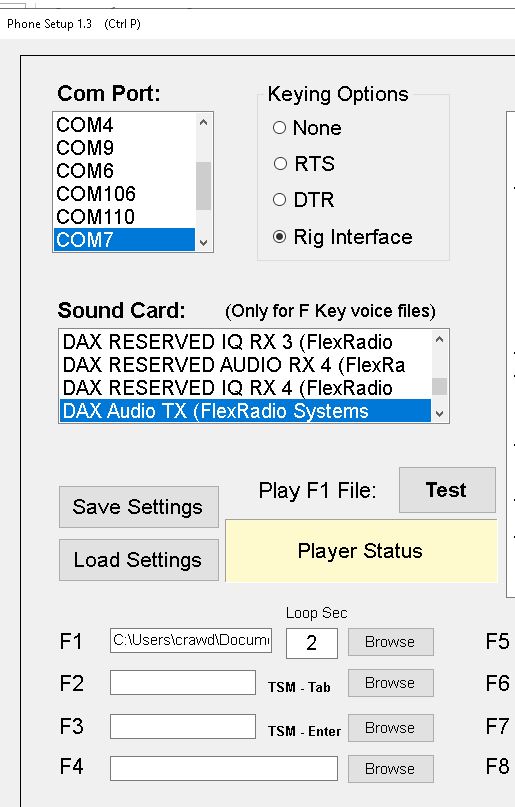
 3
3 -
Thanks!!!
0 -
This does not appear to work with using PC Audio. DAX needs to be enabled to transmit the recording, then disabled to transmit from the PC.
0


Categories
- All Categories
- 401 Community Topics
- 2.2K New Ideas
- 690 The Flea Market
- 8.6K Software
- 197 SmartSDR+
- 6.6K SmartSDR for Windows
- 200 SmartSDR for Maestro and M models
- 460 SmartSDR for Mac
- 279 SmartSDR for iOS
- 268 SmartSDR CAT
- 220 DAX
- 395 SmartSDR API
- 9.6K Radios and Accessories
- 112 Aurora
- 348 FLEX-8000 Signature Series
- 7.2K FLEX-6000 Signature Series
- 999 Maestro
- 58 FlexControl
- 872 FLEX Series (Legacy) Radios
- 975 Genius Products
- 482 Power Genius XL Amplifier
- 358 Tuner Genius XL
- 135 Antenna Genius
- 322 Shack Infrastructure
- 227 Networking
- 483 Remote Operation (SmartLink)
- 146 Contesting
- 847 Peripherals & Station Integration
- 147 Amateur Radio Interests
- 1.1K Third-Party Software