Welcome to the FlexRadio Community! Please review the new Community Rules and other important new Community information on the Message Board.
The latest SmartSDR Software:
SmartSDR v4.2.20 | SmartSDR v4.2.20 Release Notes
SmartSDR v3.10.15 | SmartSDR v3.10.15 Release Notes
The latest 4O3A Genius Product Software:
The latest 4O3A Genius Product Software and Firmware
SmartSDR v4.2.20 | SmartSDR v4.2.20 Release Notes
SmartSDR v3.10.15 | SmartSDR v3.10.15 Release Notes
The latest 4O3A Genius Product Software:
The latest 4O3A Genius Product Software and Firmware
How to Receive Technical Support::
If you are needing assistance with FlexRadio products, please refer to the product documentation or check the Help Center for known solutions. Need technical support from FlexRadio? It's as simple as creating a HelpDesk ticket.
If you are needing assistance with FlexRadio products, please refer to the product documentation or check the Help Center for known solutions. Need technical support from FlexRadio? It's as simple as creating a HelpDesk ticket.
Scanning on Flex 6000 using FRStack?

W2ECK
Member ✭✭
So understand you have to store frequency memories in the FRStack Scan Banks. But once you have done that, how do you initiate a Scan ??
73 Paul W2ECK
0
Answers
-
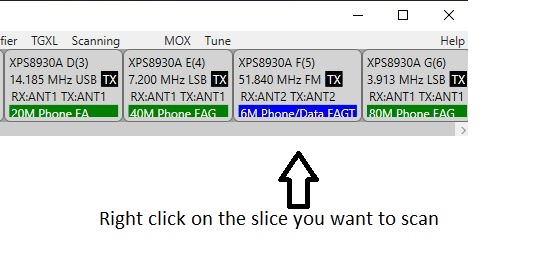
Right click on the slice flag at the top of frstack for the slice you want to scan and then select start scanning from the menu and then the scan bank number you want to scan.
 1
1 -
Larry
Thanks for the tip, got that working. A few followup questions if I may:
- once it starts scanning - how to do you stop it?
- so I see if will scan any individual freqs stored in the Scan Banks. Is there a way for FRStack to scan a range of freqs ?
- for instance 14.005 50 to 14.060 and then stop on any signals it finds?
73 and thanks again
Paul w2eck
0 -
While scanning this menu "scanning" will say "stop scanning" just click on it to stop scanning. I don't know of any way to scan a range of frequencies.
 0
0


Leave a Comment
Categories
- All Categories
- 398 Community Topics
- 2.2K New Ideas
- 678 The Flea Market
- 8.6K Software
- 191 SmartSDR+
- 6.6K SmartSDR for Windows
- 196 SmartSDR for Maestro and M models
- 456 SmartSDR for Mac
- 278 SmartSDR for iOS
- 268 SmartSDR CAT
- 218 DAX
- 392 SmartSDR API
- 9.6K Radios and Accessories
- 93 Aurora
- 335 FLEX-8000 Signature Series
- 7.2K FLEX-6000 Signature Series
- 988 Maestro
- 58 FlexControl
- 872 FLEX Series (Legacy) Radios
- 962 Genius Products
- 478 Power Genius XL Amplifier
- 352 Tuner Genius XL
- 132 Antenna Genius
- 317 Shack Infrastructure
- 222 Networking
- 480 Remote Operation (SmartLink)
- 143 Contesting
- 845 Peripherals & Station Integration
- 147 Amateur Radio Interests
- 1.1K Third-Party Software