SmartSDR v4.1.5 | SmartSDR v4.1.5 Release Notes
SmartSDR v3.10.15 | SmartSDR v3.10.15 Release Notes
The latest 4O3A Genius Product Software:
The latest 4O3A Genius Product Software and Firmware
If you are needing assistance with FlexRadio products, please refer to the product documentation or check the Help Center for known solutions. Need technical support from FlexRadio? It's as simple as creating a HelpDesk ticket.
Flex6400 WSJTX problem

Hi members,
Recently I've a WSJTX decoding problem. Actually from one day to the next I get almost no decoded stations on the screen, where I noticed that the color pattern in the Wide graph had also changed, I have now restored that. At first you think, okay it must be the antenna, but that is not the case, because I 've this phenomenon on both antennas, vertical and dipole.
The DAX, CAT and SDR settings have remained unchanged, and I have also checked against my well-documented settings.
I'm attaching some print screens that hopefully will help you track down what went wrong here.
Hopefully you can help me with this, I'm very curious where the cause is now.
kind regards,


Cees, PA3CVI
Comments
-
Have you checked you computer's clock?
Windows does self-correct but it does so on an irregular schedule leaving you computer with a large time offset. If the error gets big enough the system quits decoding until the next time the clock corrects itself.
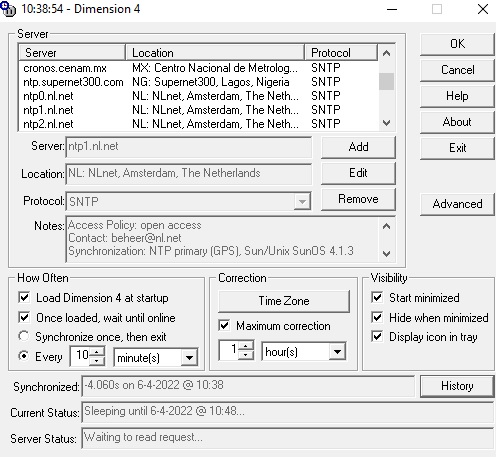
Running Dimension 4 or other clock-correcting software on your system will prevent this from happening.
0 -
Thanks for the screen shots. Very helpful.
On your WSJTx waterfall, you only show decoding up to 1800hz. And, I suspect you want to go up to 3000hz or so.
On your WSJTx waterfall, change the Bins/pixel setting to 2 to 4 (or 5) and see if that helps.
WSJTx will only decode the width of the waterfall.
73
0 -
Bob K8RC:
Too bad Bob, the installation and setup of dimension4 is not the solution. At first I thought this could be the cause, but it isn't. My PC clock now shows the correct Dutch time. I have selected the NTP server.
Sorry Mike, unfortunately this Bins/pixel setting to 2 to 4 (or 5) doesn't help, result negative.
All members:
The weird thing is that the Detection button flashes regularly but shows no detection on the screen.
Maybe then "a light will shine" with the WSJT users. Hopefully I'll get the mistake I'm making.

Regards and 73, Cees, PA3CVI
0 -
Solution
The problem was such that none of the members have given a solution yet.
I really looked all the information and tutorials, but I didn't find the solution.
Still, Bob's K8RC, hint kept running through my head.
My PC clock was set to the local time and I thought if I would set it to the UTC time.
Oops, yes the problem is solved !!
I haven't seen an option in WSJTX where you can set the time difference, both of which are so easy.
Still, I'm not completely satisfied with having to change my PC clock.
Maybe now someone knows who can give me a better solution.
Cees
0




Leave a Comment
Categories
- All Categories
- 388 Community Topics
- 2.2K New Ideas
- 658 The Flea Market
- 8.4K Software
- 156 SmartSDR+
- 6.5K SmartSDR for Windows
- 186 SmartSDR for Maestro and M models
- 439 SmartSDR for Mac
- 275 SmartSDR for iOS
- 265 SmartSDR CAT
- 204 DAX
- 386 SmartSDR API
- 9.4K Radios and Accessories
- 52 Aurora
- 297 FLEX-8000 Signature Series
- 7.2K FLEX-6000 Signature Series
- 970 Maestro
- 58 FlexControl
- 866 FLEX Series (Legacy) Radios
- 944 Genius Products
- 471 Power Genius XL Amplifier
- 347 Tuner Genius XL
- 126 Antenna Genius
- 306 Shack Infrastructure
- 215 Networking
- 468 Remote Operation (SmartLink)
- 142 Contesting
- 811 Peripherals & Station Integration
- 144 Amateur Radio Interests
- 1.1K Third-Party Software