Welcome to the FlexRadio Community! Please review the new Community Rules and other important new Community information on the Message Board.
The latest SmartSDR Software:
SmartSDR v4.2.20 | SmartSDR v4.2.20 Release Notes
SmartSDR v3.10.15 | SmartSDR v3.10.15 Release Notes
The latest 4O3A Genius Product Software:
The latest 4O3A Genius Product Software and Firmware
SmartSDR v4.2.20 | SmartSDR v4.2.20 Release Notes
SmartSDR v3.10.15 | SmartSDR v3.10.15 Release Notes
The latest 4O3A Genius Product Software:
The latest 4O3A Genius Product Software and Firmware
How to Receive Technical Support::
If you are needing assistance with FlexRadio products, please refer to the product documentation or check the Help Center for known solutions. Need technical support from FlexRadio? It's as simple as creating a HelpDesk ticket.
If you are needing assistance with FlexRadio products, please refer to the product documentation or check the Help Center for known solutions. Need technical support from FlexRadio? It's as simple as creating a HelpDesk ticket.
BCD to OM6BPF
Options
Roland HB9VQQ
Member ✭✭
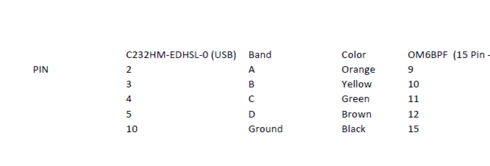
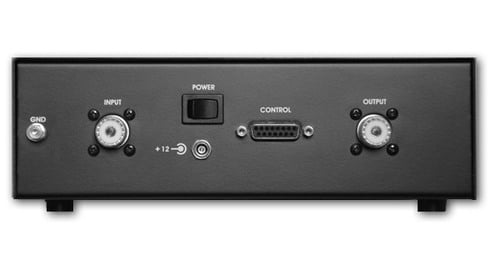
The Flex USB Guide is missing the instructions to connect the USB Port of the Flexradio (6600 in my case) to the 15-Pin control Port of the OM6BPF.
- Reqiured cable: USB FTDI Part Number C232HM-EDHSL-0
- 15 Pin Male D-Sub Connector (OM6BPF Backpanel)
Hope this helps in case you need it.
- Reqiured cable: USB FTDI Part Number C232HM-EDHSL-0
- 15 Pin Male D-Sub Connector (OM6BPF Backpanel)
Hope this helps in case you need it.
Tagged:
0
Comments
-
Hallo Roland
habe gar nicht mitbekommen,dass Du auch einen Flex hast.
Sei gegrüsst, 73 de Manfred, HB9FLU
0 -
Hallo Manfred, seit meinem 50 geburtstag einen 6600 :-) Du auch ? Gruss Roland0
-
Ну теперь все понятно0
-
Hi guys, which one is a ground one (#10)?? At FDTI website, I've found black one is actually ground...?
Thanks in advance.
73s, DK8ZZ0 -
That is how I use it.
Alan. WA9WUD
 0
0 -
So, here is an answer (actually the first post is a right one :-)
PIN 9 orange
PIN 10 yellow
PIN 11 green
PIN12 brown
PIN 15 black (ground)
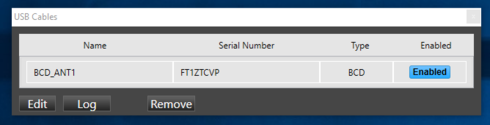
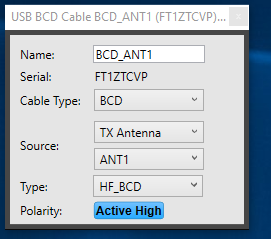
USB cable setup:
Change: BCD
Source: TX Antenna (ant 1 or ant 2, which one you need)
Type: HF_BCD
Polarity: active high
73s, Zik DK8ZZ0


Leave a Comment
Categories
- All Categories
- 401 Community Topics
- 2.2K New Ideas
- 689 The Flea Market
- 8.6K Software
- 196 SmartSDR+
- 6.6K SmartSDR for Windows
- 200 SmartSDR for Maestro and M models
- 460 SmartSDR for Mac
- 279 SmartSDR for iOS
- 268 SmartSDR CAT
- 220 DAX
- 395 SmartSDR API
- 9.6K Radios and Accessories
- 109 Aurora
- 348 FLEX-8000 Signature Series
- 7.2K FLEX-6000 Signature Series
- 999 Maestro
- 58 FlexControl
- 872 FLEX Series (Legacy) Radios
- 975 Genius Products
- 482 Power Genius XL Amplifier
- 358 Tuner Genius XL
- 135 Antenna Genius
- 322 Shack Infrastructure
- 227 Networking
- 483 Remote Operation (SmartLink)
- 145 Contesting
- 847 Peripherals & Station Integration
- 147 Amateur Radio Interests
- 1.1K Third-Party Software