Welcome to the FlexRadio Community! Please review the new Community Rules and other important new Community information on the Message Board.
The latest SmartSDR Software:
SmartSDR v4.2.20 | SmartSDR v4.2.20 Release Notes
SmartSDR v3.10.15 | SmartSDR v3.10.15 Release Notes
The latest 4O3A Genius Product Software:
The latest 4O3A Genius Product Software and Firmware
SmartSDR v4.2.20 | SmartSDR v4.2.20 Release Notes
SmartSDR v3.10.15 | SmartSDR v3.10.15 Release Notes
The latest 4O3A Genius Product Software:
The latest 4O3A Genius Product Software and Firmware
How to Receive Technical Support::
If you are needing assistance with FlexRadio products, please refer to the product documentation or check the Help Center for known solutions. Need technical support from FlexRadio? It's as simple as creating a HelpDesk ticket.
If you are needing assistance with FlexRadio products, please refer to the product documentation or check the Help Center for known solutions. Need technical support from FlexRadio? It's as simple as creating a HelpDesk ticket.
Having a Problem with slice master following the flex Frequency on CWskimmer

Ron Rosson
Member ✭✭
Thought I had it all together. Then something change between slice master and CW Skimmer it decodes find but does not follow Frequency on The Flex 6500. I'm trying to decide whether it a setting CW Skimmer or Slice master. If anyone has any ideas how I can resolve this issue. TIA
0
Answers
-
Hi Ron,
On the last tab of SliceMaster, do you have your radio selected?
 0
0 -
Here are my settings they are not the same it does show 6500 Btw I can't find how to add attachment so I can show my Slicemaster layout.1
-
 0
0 -
Here are my settings on Slicemaster
0 -
0
-
I see at the bottom that it found your Flex.
In CW Skimmer under View Settings... Radio tab, select SoftRock and the CW pitch that you have chosen in SmartSDR for your 6500. Select a Sampling Rate of 48 kHz.
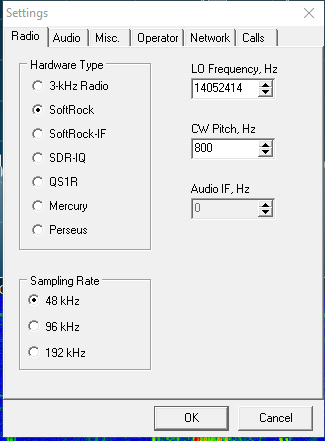
Make sure DAX is on and has a matching sample rate:

It has been a long long time since I set this all up, but I don't remember doing anything else to get it to follow my frequency excursions.
Hopefully this is enough info to get you going.
0 -
Len,
These are the setting i have and they seem to be working for me now. Thanks for the guidance to get me on the right path..
 0
0 -
Glad you got it working Ron!
0



Leave a Comment
Categories
- All Categories
- 398 Community Topics
- 2.2K New Ideas
- 678 The Flea Market
- 8.6K Software
- 191 SmartSDR+
- 6.6K SmartSDR for Windows
- 196 SmartSDR for Maestro and M models
- 456 SmartSDR for Mac
- 278 SmartSDR for iOS
- 267 SmartSDR CAT
- 218 DAX
- 392 SmartSDR API
- 9.6K Radios and Accessories
- 91 Aurora
- 335 FLEX-8000 Signature Series
- 7.2K FLEX-6000 Signature Series
- 988 Maestro
- 58 FlexControl
- 872 FLEX Series (Legacy) Radios
- 962 Genius Products
- 478 Power Genius XL Amplifier
- 352 Tuner Genius XL
- 132 Antenna Genius
- 317 Shack Infrastructure
- 222 Networking
- 480 Remote Operation (SmartLink)
- 143 Contesting
- 845 Peripherals & Station Integration
- 147 Amateur Radio Interests
- 1.1K Third-Party Software