SmartSDR v4.2.20 | SmartSDR v4.2.20 Release Notes
SmartSDR v3.10.15 | SmartSDR v3.10.15 Release Notes
The latest 4O3A Genius Product Software:
The latest 4O3A Genius Product Software and Firmware
If you are needing assistance with FlexRadio products, please refer to the product documentation or check the Help Center for known solutions. Need technical support from FlexRadio? It's as simple as creating a HelpDesk ticket.
Bandwidth in TX Ft8 without changing parameters

This is the second time this happens to me and without changing any programming parameter of the Dax, WsjTx, PC in use and Maestro.
But this time I documented everything .....
Note the difference in TX bandwidth 7 days away, both images are made by the QRL with the same location.

piture of 13-01-21

picture of 20-01-21
I emphasize that the same thing does not happen in a fixed station or via wifi connection directly on the home LAN but only from the remote location (QRL 30 Km from QTH).
What happens between one day and the following week ???
Obviously with such a wide Tx bandwidth decoding the low intensity signal is decidedly more difficult.
Can anyone help me, thanks in advance.
IZ1XEE Piero Ferrua
Comments
-
This looks like the periodic DPC problem with sound card DAX on your computer. It happens to many using Windows SmartSDR, including me. This has been written about on the Flex Community Forum before. I have many additional apps running on my Windows 10, HP i5-2400 computer with SmartSDR. Seems to be a resource issue. The solution, for me, when it happens once a week, is to shut down DAX and then restart DAX. It then clears it up for another week or so. Sort of "cleans out the buffers". I leave the computer on all the time, 7 x 24. If I shut it down nightly, it would probably not happen. I will eventually upgrade my computer to an i7. 73 de NE1B
0 -
thanks Bill for the answer, what I know of conpiuter for I assume it is not the right way ...
1) it is unthinkable to leave a laptop always on (7X24)
2)

3) when the pc is on I use only HDR, Log, WsJT, FR-Stack, Grid Traker. Obviously DAX and CAT
the machine is currently running at 74% memory and 15% CPU. He doesn't seem worried
I've already tried not only shutting down and restarting the DAX but also shutting down and restarting the PC .... no change resulted..
other suggestions ???
0 -
 Mike-VA3MW Administrator, FlexRadio Employee, Community Manager, Super Elmer, Moderator adminOptions
@Piero Ferrua That is a problem that sometimes happens with DAX. Sometimes you need to stop DAX and restart it to resolve the issue. In the odd case, you may have to reboot the radio.
We are aware of the issue.
Mike
0 -
Thanks Mike VA3MW,
for the answer unfortunately turn off and restart the DAX or even the whole PC does not work.
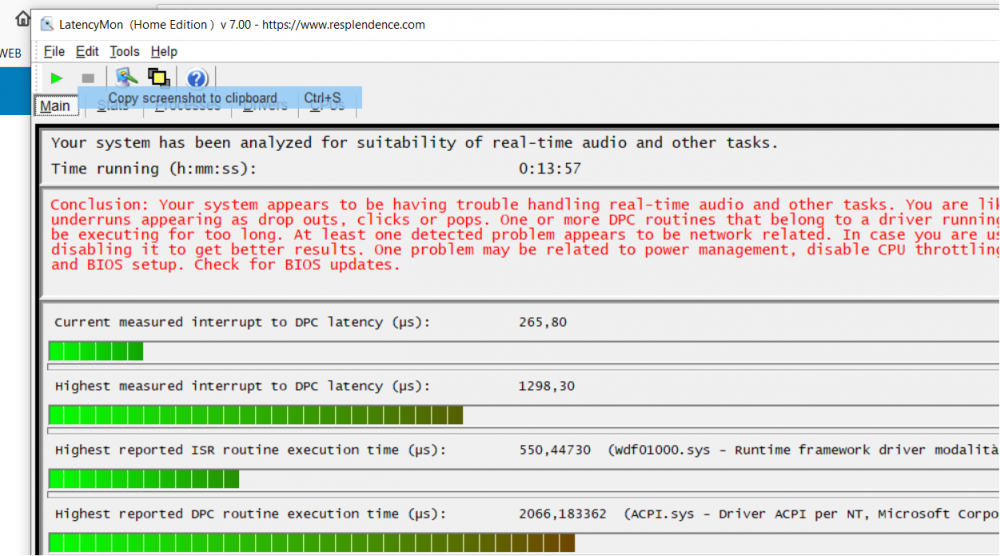
FlexRadio technicians are evaluating the problem apparently due to gods of DPC .
This is the report of the program that DPC diagostics suggested to me (Latency mon):
 0
0 -

I ran this utility while running FT8 on two bands. Lots of dropouts and grainy TX audio but the latency stats were fine.
0 -
Note that DAX 2.4.10 is much cleaner but you give up all the newer features. It's not a hardware issue in my case. Flex needs to fix this mess.
0


Leave a Comment
Categories
- All Categories
- 401 Community Topics
- 2.2K New Ideas
- 689 The Flea Market
- 8.6K Software
- 196 SmartSDR+
- 6.6K SmartSDR for Windows
- 200 SmartSDR for Maestro and M models
- 460 SmartSDR for Mac
- 279 SmartSDR for iOS
- 268 SmartSDR CAT
- 220 DAX
- 395 SmartSDR API
- 9.6K Radios and Accessories
- 109 Aurora
- 348 FLEX-8000 Signature Series
- 7.2K FLEX-6000 Signature Series
- 999 Maestro
- 58 FlexControl
- 872 FLEX Series (Legacy) Radios
- 975 Genius Products
- 482 Power Genius XL Amplifier
- 358 Tuner Genius XL
- 135 Antenna Genius
- 321 Shack Infrastructure
- 226 Networking
- 483 Remote Operation (SmartLink)
- 145 Contesting
- 847 Peripherals & Station Integration
- 147 Amateur Radio Interests
- 1.1K Third-Party Software