Welcome to the FlexRadio Community! Please review the new Community Rules and other important new Community information on the Message Board.
The latest SmartSDR Software:
SmartSDR v4.2.20 | SmartSDR v4.2.20 Release Notes
SmartSDR v3.10.15 | SmartSDR v3.10.15 Release Notes
The latest 4O3A Genius Product Software:
The latest 4O3A Genius Product Software and Firmware
SmartSDR v4.2.20 | SmartSDR v4.2.20 Release Notes
SmartSDR v3.10.15 | SmartSDR v3.10.15 Release Notes
The latest 4O3A Genius Product Software:
The latest 4O3A Genius Product Software and Firmware
How to Receive Technical Support::
If you are needing assistance with FlexRadio products, please refer to the product documentation or check the Help Center for known solutions. Need technical support from FlexRadio? It's as simple as creating a HelpDesk ticket.
If you are needing assistance with FlexRadio products, please refer to the product documentation or check the Help Center for known solutions. Need technical support from FlexRadio? It's as simple as creating a HelpDesk ticket.
No TX-audio Maestro Remote

Hallo FlexFriends!
73 de SA7AKE Jonas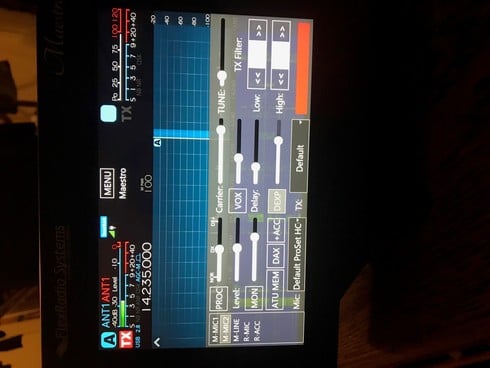
Im using Maestro remote with computer headset,
worked ufb for 15min then both RX audio and TXaudio stopped working in the middel of qso.
Disconected the meastro and RX audio came back but not TXaudio using VOX. Rebooted again and same thing worked for 5min then the same TXproblem.
Evertything else seems to be in order, working.
connected to LAN and PS
Loged in with PC-radio using the same headset works UFB.
See pic, what is the red square in lower right corner??
(in pic VOX is not enabled)
73 de SA7AKE Jonas
0
Answers
-
Does the mic's plug use separate plugs for RX and TX (MIC 2)?0
-
Hallo Steven! Yes separate plugs, mix 2. Strange that it Has worked two times after reboot. What is the red square?0
-
Try this.... Disconnect the headphones and power the Maestro down with a long-press, hold until all lights go out Boot it up and only then plug in the headphones. Btw. You should have a separate mic profile for use on your Maestro so that Settings you change when using your computer don’t change settings used on your Maestro. Double check your bias and 20+ gain buttons to see if they need changed for your particular mic. Mastering the Mic Profiles is part of getting maximum performance out of the FlexRadio.0


Leave a Comment
Categories
- All Categories
- 395 Community Topics
- 2.2K New Ideas
- 674 The Flea Market
- 8.5K Software
- 187 SmartSDR+
- 6.5K SmartSDR for Windows
- 192 SmartSDR for Maestro and M models
- 454 SmartSDR for Mac
- 276 SmartSDR for iOS
- 267 SmartSDR CAT
- 216 DAX
- 389 SmartSDR API
- 9.5K Radios and Accessories
- 87 Aurora
- 325 FLEX-8000 Signature Series
- 7.2K FLEX-6000 Signature Series
- 983 Maestro
- 58 FlexControl
- 869 FLEX Series (Legacy) Radios
- 959 Genius Products
- 477 Power Genius XL Amplifier
- 351 Tuner Genius XL
- 131 Antenna Genius
- 313 Shack Infrastructure
- 218 Networking
- 476 Remote Operation (SmartLink)
- 143 Contesting
- 836 Peripherals & Station Integration
- 146 Amateur Radio Interests
- 1.1K Third-Party Software