SmartSDR v4.2.20 | SmartSDR v4.2.20 Release Notes
SmartSDR v3.10.15 | SmartSDR v3.10.15 Release Notes
The latest 4O3A Genius Product Software:
The latest 4O3A Genius Product Software and Firmware
If you are needing assistance with FlexRadio products, please refer to the product documentation or check the Help Center for known solutions. Need technical support from FlexRadio? It's as simple as creating a HelpDesk ticket.
6600M Fan Speed Questions
Answers
-
I don't beleive the slow call is because they are holding information back. It is most likely because Steve has not been able to do so yet.
In the past Flex has had no problems telling people the information they are looking for is clasified. And in this case they have not said that.0 -
I don't mind waiting a bit longer as I’m sure the guys at FRS are busy also I believe they may be on travel this week.
The question that is most important to me is will they simply just raise the RPM limit in SSDR so we can use this much better performing and higher quality fan.
NOCTUA FAN-Industrial grade commercial fan.
https://noctua.at/en/nf-a14-industrialppc-2000/specification
1 -
Hope they pay you for the adds you run on them lol0
-
I'll mail you the checks
 0
0 -
I left a voice mail with Steve Hicks Friday (8/16/2019) and have not heard back yet.
I know they have been very busy lately.
I hope to speak with Steve on the phone or email soon...
Today is (9/04/2019) Still no response from Flex?
I left my Call,Name, Email & Phone #
I asked:
1. What is the Specific temp that will cause a 6600M to shut down?
2. What is the final transistor/s used in a 6600M, I could not find that info anywhere?
3. And most important Would it be possible to raise the RPM limit in a future version of SSDR to accommodate the above fan?
I think Joe may win the bet
0 -
I appreciate modding as much as anyone but IMO, adding an amp mitigates any stress on the radio and depending on the amp size, both amp and radio will idle along at higher power levels. As an example, with a 1KW amp, 200W is 10W from the radio and 20% duty cycle on the amp.0
-
This is NOT a what I would call a "mod" it is simply installing a better fan in place of the original one.
Adding an HF amp is kind of stating the obvious, Clearly if you add a big power amp you can lower the drive but that is not the objective here, the objective is to be able to run the radio at its full stated 100W output with out overheating the PA and if you read this thread you will see that by just simply replacing the stock fan yields a big improvement in cooling performance.
The only problem is in the SmartSDR code the software is programmed to shut the radio down if the fan RPM’s go over 1500. So all that needs to be done to make this fan work great in these radios is for Flex to just raise the RPM limit in the software to 2100 RPM’s.
0 -
John, any time you replace an original part with another model part is a MOD.
There is nothing wrong with what you are doing and it is a good thing I think. But to do it because it is beleived it is because of a designe flaw would not be correct.
Many run their radios at 100% duty cycle for days without over heating, So heat does not seem to be an issue. I have not read were radios keep shutting down because of over heating. But an fan improvement would still be a good thing, but not because of cooling problems now.0 -
I'd sure like my 6600M to run cooler while doing FT8 contesting. As others have commented: my DC power connector is so hot it feels like it's about to come apart. Have there been any updates on cooling improvements or upgraded fans since this discussion in Sept. 2019?0
-
Hi Dic k, a hot connector is a symptom of dirty, corroded or loosely fitting contacts, not rig cooling. I would turn the rig off and let the connector cool to room temperature. Then use de-oxit or other contact cleaner and exercise the connector by plugging and unplugging it multiple times.
Using FRStack4 or other third-party software that measures the internal voltage of your Flex, check to see how much voltage drop there is going from receive to transmit. Mine drops somewhere around 500 mV. I have a Power Pole connector at the radio and ring terminals at the power supply to eliminate a second connector.
1 -
When it comes to fans, I may humbly offer:
Sure, a sub-$2 fan in manufacturing is understandable, when it meets the specified requirements.
But along the way, the manufacturer probably identified a half-dozen alternatives that were marginally better in some way (longevity, airflow, noise, etc). And perhaps these were priced for the aftermarket enthusiast (ie single-lot, retail-packaging, consumer-channels), so they didn't make it into the factory production.
But, for aftermarket enthusiasts (automotive OR radio), spending $20 on a fan that performs better, lasts longer, is quieter, etc … that is OK. I personally do this all the time 🤣
I wonder, then, if Flex may have suggestions for fans that exceed the original performance, but may only be financially appealing to the aftermarket enthusiast?
0 -
 Mike-VA3MW Administrator, FlexRadio Employee, Community Manager, Super Elmer, Moderator adminOptions
Not really. We stopped on that fan we use and we won't revisit the fan that we specify until the current fan becomes unavailable. With so many projects going on, it is all about time management.
0


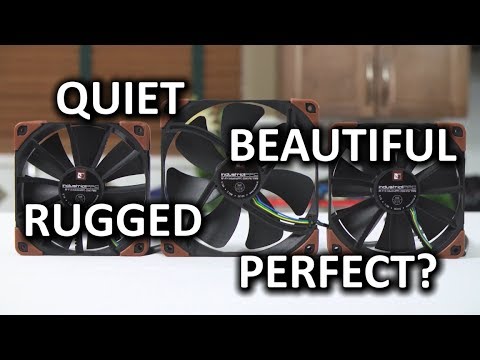 https://www.youtube.com/watch?v=ME4vUO2T-48



Leave a Comment
Categories
- All Categories
- 401 Community Topics
- 2.2K New Ideas
- 691 The Flea Market
- 8.6K Software
- 197 SmartSDR+
- 6.6K SmartSDR for Windows
- 200 SmartSDR for Maestro and M models
- 461 SmartSDR for Mac
- 279 SmartSDR for iOS
- 268 SmartSDR CAT
- 220 DAX
- 395 SmartSDR API
- 9.6K Radios and Accessories
- 113 Aurora
- 349 FLEX-8000 Signature Series
- 7.2K FLEX-6000 Signature Series
- 999 Maestro
- 58 FlexControl
- 872 FLEX Series (Legacy) Radios
- 976 Genius Products
- 483 Power Genius XL Amplifier
- 358 Tuner Genius XL
- 135 Antenna Genius
- 323 Shack Infrastructure
- 228 Networking
- 483 Remote Operation (SmartLink)
- 146 Contesting
- 847 Peripherals & Station Integration
- 147 Amateur Radio Interests
- 1.1K Third-Party Software