Welcome to the FlexRadio Community! Please review the new Community Rules and other important new Community information on the Message Board.
The latest SmartSDR Software:
SmartSDR v4.2.20 | SmartSDR v4.2.20 Release Notes
SmartSDR v3.10.15 | SmartSDR v3.10.15 Release Notes
The latest 4O3A Genius Product Software:
The latest 4O3A Genius Product Software and Firmware
SmartSDR v4.2.20 | SmartSDR v4.2.20 Release Notes
SmartSDR v3.10.15 | SmartSDR v3.10.15 Release Notes
The latest 4O3A Genius Product Software:
The latest 4O3A Genius Product Software and Firmware
How to Receive Technical Support::
If you are needing assistance with FlexRadio products, please refer to the product documentation or check the Help Center for known solutions. Need technical support from FlexRadio? It's as simple as creating a HelpDesk ticket.
If you are needing assistance with FlexRadio products, please refer to the product documentation or check the Help Center for known solutions. Need technical support from FlexRadio? It's as simple as creating a HelpDesk ticket.
DAX error, otherwise working
Options

John AE5X
Member
F6300, Windows 10 Home (64 bit)
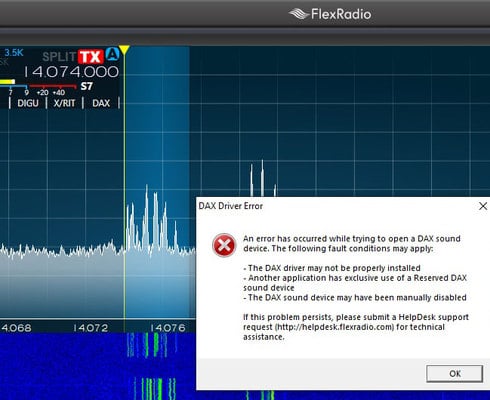
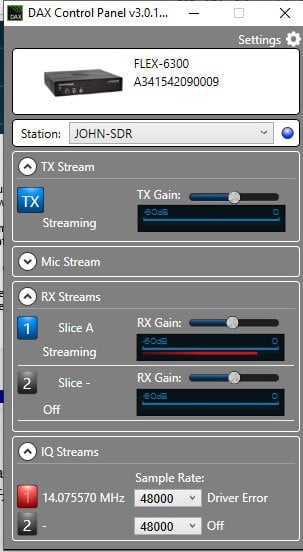
After the Windows 1903 update I'm getting a DAX error when starting SSDR. Once I acknowledge the error, WSJT-X works ok. Can anyone tell me how to fix the I/Q Stream error?
Tnx/73
After the Windows 1903 update I'm getting a DAX error when starting SSDR. Once I acknowledge the error, WSJT-X works ok. Can anyone tell me how to fix the I/Q Stream error?
Tnx/73
0
Answers
-
Check the DAX driver names. They probably got messed up after the Windows update. Follow instructions in link below.
https://community.flexradio.com/flexradio/topics/problems-with-dax-followin-g-update-to-2-5-1-and-wi...
0 -
How do I rename them?
0 -

0 -
I just updated one of my Windows 10 machines to 1903. Had same issue with DAX IQ drivers. It was a simple task of renaming the mislabeled DAX IQ devices in the Sound Control Panel as shown above.
For example I saw this in the Sound Control Panel after Windows 1903 update ....
DAX Reserved Audio RX 1
FlexRadio Systems DAX IQ
Ready
It should be renamed to ...
DAX Reserved IQ RX 1
FlexRadio Systems DAX IQ
Ready
In other words all (DAX Reserved IQ RX #) and (DAX IQ RX #) labels in the Sound Control Panel need to be paired with (FlexRadio Systems DAX IQ). Whereas (DAX Reserved Audio RX #) and (DAX Audio RX #) needs to paired with (FlexRadio Systems DAX Audio).
Just look for the mismatches and rename accordingly.
1

Leave a Comment
Categories
- All Categories
- 401 Community Topics
- 2.2K New Ideas
- 689 The Flea Market
- 8.6K Software
- 196 SmartSDR+
- 6.6K SmartSDR for Windows
- 200 SmartSDR for Maestro and M models
- 460 SmartSDR for Mac
- 279 SmartSDR for iOS
- 268 SmartSDR CAT
- 220 DAX
- 395 SmartSDR API
- 9.6K Radios and Accessories
- 109 Aurora
- 348 FLEX-8000 Signature Series
- 7.2K FLEX-6000 Signature Series
- 999 Maestro
- 58 FlexControl
- 872 FLEX Series (Legacy) Radios
- 975 Genius Products
- 482 Power Genius XL Amplifier
- 358 Tuner Genius XL
- 135 Antenna Genius
- 322 Shack Infrastructure
- 227 Networking
- 483 Remote Operation (SmartLink)
- 145 Contesting
- 847 Peripherals & Station Integration
- 147 Amateur Radio Interests
- 1.1K Third-Party Software