Welcome to the FlexRadio Community! Please review the new Community Rules and other important new Community information on the Message Board.
Need the latest SmartSDR or 4O3A Genius Product Software?
SmartSDR v4.1.5 | SmartSDR v4.1.5 Release Notes
SmartSDR v3.10.15 | SmartSDR v3.10.15 Release Notes
The latest 4O3A Genius Product Software and Firmware
SmartSDR v4.1.5 | SmartSDR v4.1.5 Release Notes
SmartSDR v3.10.15 | SmartSDR v3.10.15 Release Notes
The latest 4O3A Genius Product Software and Firmware
If you are having a problem, please refer to the product documentation or check the Help Center for known solutions.
Need technical support from FlexRadio? It's as simple as Creating a HelpDesk ticket.
Need technical support from FlexRadio? It's as simple as Creating a HelpDesk ticket.
Flex 6400+Maestro configuring for WSJT-X...further questions

Joseph Hill
Member
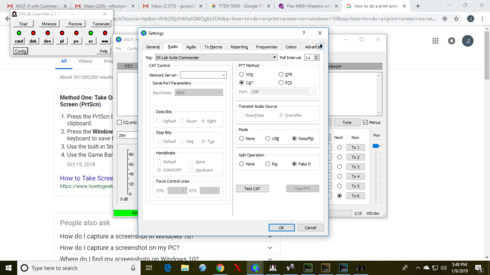
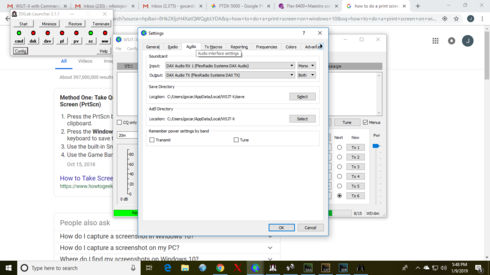
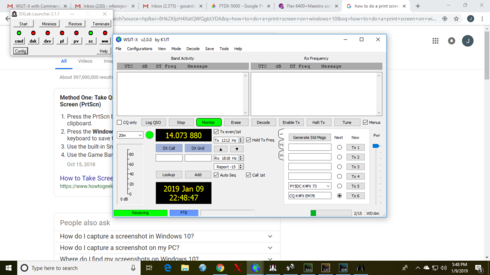
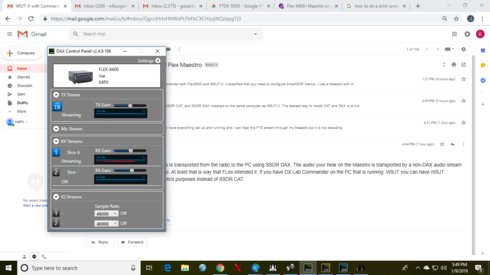
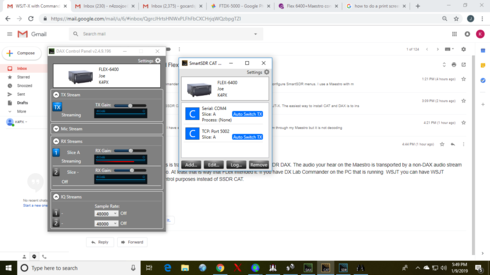
So I thought I had DX Labs, WSJT-X, SmartSDR, DAX, and CAT all configured correctly...but something not working right. The "DB scale" on the lower left hand of the WSJT-X screen is showing no signal. Please see screen shots attached. Any ideas?
0
Answers
-
You do have CAT ports and Audio selections correct.
So at this point; two more things to check;
A. On Maestro or SmartSDR, make sure that for Audio menu, DAX is selected, and highlighted.
If DAX is not selected, you will see this same issue.
B. What Windows version and build# are you running? Recent Win 10 updates are causing the
same issue; DAX channel shows streaming level, but no audio getting through.
The symptoms are that when you click the windows 10 speaker icon in the bottom right
notification bar, and select SOUNDS, the two TABs on that dialog box will show PLAYBACK
devices and RECORD devices. The corresponding DAX devices on each TAB will have names
and sub-names that no longer match, i.e., Flex Radio DAX RX3 might also say DAX IQ RX3.
You can search here for other threads that show the corruption, and what to do.
But that usually ends up requiring a trouble ticket and a teamviewer remote session
with support.
Cheers,
Neal
0 -
Hi Joseph. Apologies for the berevity, but I'm on my phone and about to go to bed. First things first. Get WSJT-X controlling SmartSDR. Leave DX Keeper out of the equation for now. In the WSJT-X settings, set the radio to Flex-6xxx. Hopefully that'll get WSJT-X connected to the radio. Try the Test Cat and Test PTT buttons to confirm. There may be other things to tweak, but you need to get WSJT-X controlling the radio, then DX Keeper to work with WSJT-X, not the other way around. I hope that helps you out and gets you on your way. 73!0
-
Likewise, I’m on my cell phone If you watch the video on using Slicemaster it will do almost all the configuration for you in about 3 mouse clicks. Using slicemaster makes it so much less complicated. Mike.1



Leave a Comment
Categories
- All Categories
- 386 Community Topics
- 2.2K New Ideas
- 652 The Flea Market
- 8.4K Software
- 155 SmartSDR+
- 6.5K SmartSDR for Windows
- 189 SmartSDR for Maestro and M models
- 437 SmartSDR for Mac
- 274 SmartSDR for iOS
- 264 SmartSDR CAT
- 202 DAX
- 384 SmartSDR API
- 9.4K Radios and Accessories
- 50 Aurora
- 290 FLEX-8000 Signature Series
- 7.2K FLEX-6000 Signature Series
- 966 Maestro
- 58 FlexControl
- 866 FLEX Series (Legacy) Radios
- 938 Genius Products
- 468 Power Genius XL Amplifier
- 344 Tuner Genius XL
- 126 Antenna Genius
- 306 Shack Infrastructure
- 215 Networking
- 466 Remote Operation (SmartLink)
- 144 Contesting
- 806 Peripherals & Station Integration
- 143 Amateur Radio Interests
- 1K Third-Party Software