Welcome to the FlexRadio Community! Please review the new Community Rules and other important new Community information on the Message Board.
The latest SmartSDR Software:
SmartSDR v4.2.20 | SmartSDR v4.2.20 Release Notes
SmartSDR v3.10.15 | SmartSDR v3.10.15 Release Notes
The latest 4O3A Genius Product Software:
The latest 4O3A Genius Product Software and Firmware
SmartSDR v4.2.20 | SmartSDR v4.2.20 Release Notes
SmartSDR v3.10.15 | SmartSDR v3.10.15 Release Notes
The latest 4O3A Genius Product Software:
The latest 4O3A Genius Product Software and Firmware
How to Receive Technical Support::
If you are needing assistance with FlexRadio products, please refer to the product documentation or check the Help Center for known solutions. Need technical support from FlexRadio? It's as simple as creating a HelpDesk ticket.
If you are needing assistance with FlexRadio products, please refer to the product documentation or check the Help Center for known solutions. Need technical support from FlexRadio? It's as simple as creating a HelpDesk ticket.
Strange carriers when operating cw
Options

Adde Tjernberg
Member ✭✭
When operating cw I get two additional carriers. Exactly +4khz and -4khz from my tx frq. I have not seen this behaviour before... anyone knows what it is? Here is a short video of the behaviour: 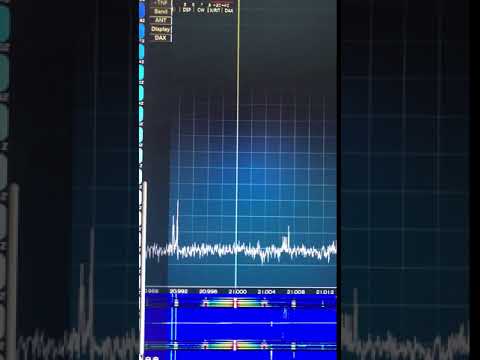 http://www.youtube.com/watch?v=Y6U0fKZLm2U 73 de Adde, SM0SHG
http://www.youtube.com/watch?v=Y6U0fKZLm2U 73 de Adde, SM0SHG 0
Answers
-
I have not tried 15m but I don't see that when I transmit on 40 at almost full power. But I do see something like that when I have a mis-match to my antenna.
I assume you are using the monitor feature in radio setup "Show TX in Waterfall:" If so I would not worry too much about it as it might just be seeing more than what gets out on the air.
Best thing to do would be to have a close ham with a pan look at your signal.1 -
Mark is spot on with this Adde. Artifacts you see in the TX monitor may not necessity reflex what is going on in the real world. along with perhaps having a friend take alisten, Another thing that you could do is repeat the test into a dummy load, and see if the behavior changes.1
-
I would suggest you "pull down" on the scale on the right hand side of the panadaptor until peak signal is visible. Then look at how many DB down the "spurs" are from peak carrier.
Every signal starts getting wide when you're looking 60+ db down from peak carrier.1



Leave a Comment
Categories
- All Categories
- 401 Community Topics
- 2.2K New Ideas
- 689 The Flea Market
- 8.6K Software
- 196 SmartSDR+
- 6.6K SmartSDR for Windows
- 200 SmartSDR for Maestro and M models
- 460 SmartSDR for Mac
- 279 SmartSDR for iOS
- 268 SmartSDR CAT
- 220 DAX
- 395 SmartSDR API
- 9.6K Radios and Accessories
- 109 Aurora
- 348 FLEX-8000 Signature Series
- 7.2K FLEX-6000 Signature Series
- 999 Maestro
- 58 FlexControl
- 872 FLEX Series (Legacy) Radios
- 975 Genius Products
- 482 Power Genius XL Amplifier
- 358 Tuner Genius XL
- 135 Antenna Genius
- 322 Shack Infrastructure
- 227 Networking
- 483 Remote Operation (SmartLink)
- 145 Contesting
- 847 Peripherals & Station Integration
- 147 Amateur Radio Interests
- 1.1K Third-Party Software