Welcome to the new FlexRadio Community! Please review the new Community Rules and other important new Community information on the Message Board.
Need the latest SmartSDR, Power Genius, Tuner Genius and Antenna Genius Software?
SmartSDR v3.7.4 and the SmartSDR v3.7.4 Release Notes | SmartSDR v2.12.1 and the SmartSDR v2.12.1 Release Notes
SmartSDR v1.12.1 and the SmartSDR v1.12.1 Release Notes
Power Genius XL Utility v3.8.8 and the Power Genius XL Release Notes v3.8.8
Tuner Genius XL Utility v1.2.11 and the Tuner Genius XL Release Notes v1.2.11
Antenna Genius Utility v4.1.8
SmartSDR v3.7.4 and the SmartSDR v3.7.4 Release Notes | SmartSDR v2.12.1 and the SmartSDR v2.12.1 Release Notes
SmartSDR v1.12.1 and the SmartSDR v1.12.1 Release Notes
Power Genius XL Utility v3.8.8 and the Power Genius XL Release Notes v3.8.8
Tuner Genius XL Utility v1.2.11 and the Tuner Genius XL Release Notes v1.2.11
Antenna Genius Utility v4.1.8
If you are having a problem, please refer to the product documentation or check the Help Center for known solutions.
Need technical support from FlexRadio? It's as simple as Creating a HelpDesk ticket.
Need technical support from FlexRadio? It's as simple as Creating a HelpDesk ticket.
Profile command failure (?)
Options

Ron Parsons
Member ✭✭
I have several Global Profiles saved on my Flex-6300. I had this problem with SSDR v1.4.16 as well as v1.5.0. I'm not sure whether this as a bug report or an enhancement request.
My main problem is with a profile named Satellite. See attached file Satellite.
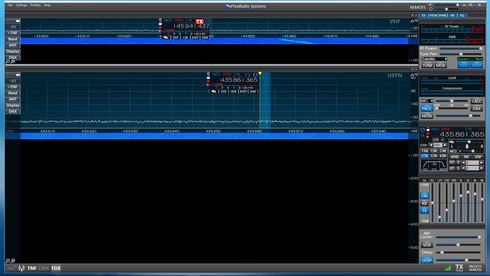
The important parameters to be saved are:
1. Number, size and placement of the panadapters
2. Name of slice (A or
3. Which panadapter is TX
When I load this profile, often I will get different results. Several of these are below.
Is this a bug? If not, please consider this as an enhancement request.
Ron W5RKN
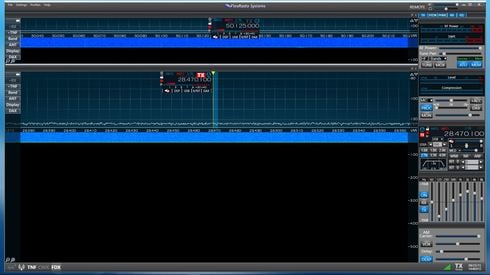
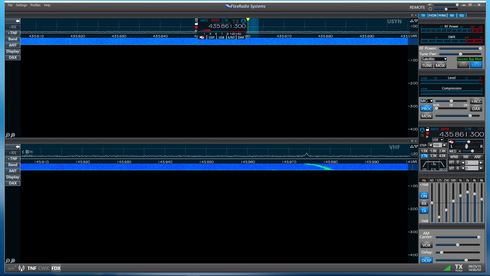
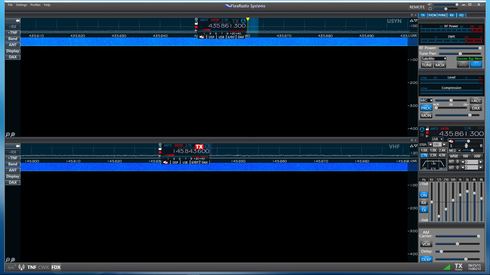
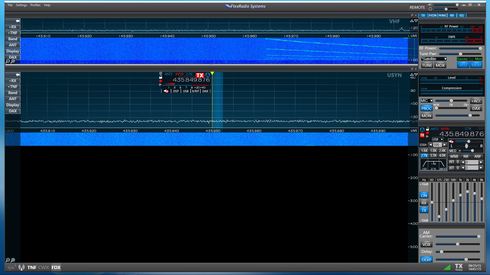
My main problem is with a profile named Satellite. See attached file Satellite.
The important parameters to be saved are:
1. Number, size and placement of the panadapters
2. Name of slice (A or
3. Which panadapter is TX
When I load this profile, often I will get different results. Several of these are below.
Is this a bug? If not, please consider this as an enhancement request.
Ron W5RKN
0
Comments
-
First, global profiles do not store panadapter "geometry" information, so this is the reason for panadapter display issue. Adding the capability is in the enhancement database.
Second, it looks like there may be some conflict between band persistence and the global profile. A global profile is supposed to override persistence, but something my not be set/working correctly. Deleting the persistence data by doing a profile export without the preferences, do a factory reset on the radio and then importing your global/TX profile data should provide some insight in determining if this is the issue.0

Leave a Comment
Categories
- All Categories
- 246 Community Topics
- 2.1K New Ideas
- 488 The Flea Market
- 7.3K Software
- 5.9K SmartSDR for Windows
- 134 SmartSDR for Maestro and M models
- 328 SmartSDR for Mac
- 241 SmartSDR for iOS
- 224 SmartSDR CAT
- 161 DAX
- 343 SmartSDR API
- 8.5K Radios and Accessories
- 6.9K FLEX-6000 Signature Series
- 768 Maestro
- 42 FlexControl
- 836 FLEX Series (Legacy) Radios
- 726 Genius Products
- 391 Power Genius XL Amplifier
- 251 Tuner Genius XL
- 84 Antenna Genius
- 223 Shack Infrastructure
- 150 Networking
- 370 Remote Operation (SmartLink)
- 118 Contesting
- 582 Peripherals & Station Integration
- 116 Amateur Radio Interests
- 810 Third-Party Software